
Disclosure: This post contains affiliate links. If you purchase through these links, I earn a small commission at no extra cost to you. I only recommend tools I’ve researched thoroughly.
The best AI testing tool depends on the problem your QA team is trying to solve. Testim and mabl are strong choices for AI-assisted end-to-end automation, Applitools and Percy specialize in visual testing, while platforms such as BrowserStack, Katalon, ACCELQ and Tricentis target broader testing workflows. This guide compares 10 AI testing tools by capability, use case and limitation.
Best AI Testing Tools in 2026 — Quick Picks
Use this table to jump to the right shortlist. Details for each tool follow later in the guide.
| Need | Suggested tool(s) | Why |
|---|---|---|
| AI-assisted E2E automation | Testim / mabl | Test generation, maintenance and workflow automation |
| Visual regression | Applitools / Percy | Visual comparison and regression detection |
| Cross-browser + AI workflows | BrowserStack | Broad browser/device ecosystem |
| Enterprise automation | Tricentis / Katalon / ACCELQ | Larger enterprise testing workflows |
| Natural-language testing | testRigor | English-like test authoring |
| AI-driven autonomous testing | Functionize | Agentic/autonomous workflow support |
Last reviewed: August 2026
AI is changing how software is built. Now it is changing how software is tested.
In 2026, AI testing is no longer limited to generating a few test cases from a prompt. Modern AI-powered testing platforms can generate tests from natural language, understand application behavior, recover broken tests, analyze failures, perform visual validation, generate test data, and—increasingly—act as autonomous testing agents. The shift isn’t incremental. What started as a convenience feature inside code editors has become an entirely new category of infrastructure that sits alongside CI/CD pipelines, observability platforms, and deployment tooling.
- AI testing tools in 2026 cover test generation, self-healing, agentic testing, visual AI, and failure analysis — not just UI automation.
- The best AI testing tool depends entirely on your team’s biggest bottleneck — start with the problem, then find the tool.
- Self-healing automation can hide real defects if healing events aren’t logged and reviewed by a human.
- AI should not replace QA judgment — it should amplify it. Volume without precision creates false confidence.
- The QA engineer of 2026 moves from test execution to quality strategy, using AI as an execution and analysis engine.
But there is an important distinction:
AI should not replace QA engineering. It should amplify it.
This is the same principle explored in the QA leadership framework for 2026 — AI executes, QA judges.
A tool that generates 500 automated tests is not necessarily better than a tool that helps a QA engineer identify the 50 tests that actually matter. Volume without precision creates noise. Noise creates false confidence. False confidence ships bugs.
This guide looks at the AI testing tools worth knowing in 2026, what they actually do, where they fit in a modern QA strategy, and how QA engineers can choose the right one. It also examines the limitations that vendors don’t always highlight—because understanding what a tool cannot do is often more useful than memorizing its feature list.
Table of Contents
- What Is AI Testing?
- How AI Testing Has Changed in 2026
- The Different Types of AI Testing Tools
- Best AI Testing Tools in 2026
- AI Testing Tools Comparison
- AI Testing Tools by Testing Need
- AI vs Traditional Test Automation
- How QA Engineers Should Use AI Testing Tools
- A Practical AI Testing Workflow
- What AI Testing Tools Still Cannot Do
- How to Evaluate an AI Testing Tool
- The Future of AI Testing
- Final Thoughts
What Is AI Testing?
AI testing refers to the use of artificial intelligence, machine learning, generative AI, computer vision, and AI agents to improve different parts of the software testing lifecycle. It is not a single technology. It is an umbrella term that covers everything from code-completion tools that help write assertions to fully autonomous agents that can explore an application, discover bugs, and file detailed reports without human intervention.
Traditional automation generally follows predefined instructions:
Open application
→ Login
→ Click Products
→ Select Product
→ Add to Cart
→ Verify Cart
The automation executes what the engineer explicitly programmed. Every step, every locator, every assertion must be defined in advance. If anything changes—a button ID, a page layout, the order of elements—the test breaks, and a human must fix it.
AI-powered testing adds another layer of intelligence.
For example:
QA Engineer:
"Verify that a user can successfully purchase a product."

AI:
→ Understands the intent
→ Identifies relevant UI elements
→ Creates test steps
→ Executes the flow
→ Validates results
→ Analyzes failures
→ Potentially adapts when the UI changes
The goal isn’t simply to automate clicking. Clicking was never the hard part. Writing the click instruction wasn’t the hard part either. The hard part has always been knowing what to test, keeping tests stable as the application evolves, and interpreting results at scale when hundreds of tests run on every merge.
The goal is to reduce the amount of repetitive work required to create, maintain, analyze, and optimize tests so that QA engineers can spend their time on the decisions that actually require human judgment.
Research into AI-assisted test automation has identified automated test generation and self-healing as two of the most common applications of AI in test automation. But those are only two points on a spectrum that is expanding rapidly.
How AI Testing Has Changed in 2026
The AI testing landscape has moved through several stages, each building on the last. Understanding these phases is useful because most teams are not at the same phase, and knowing where you are helps you decide where to invest next.
Phase 1 — AI-assisted coding
AI helps QA engineers write:
- Selenium code
- Playwright tests
- Cypress tests
- API tests
- Assertions
- Test data
- Utility functions
Examples include AI coding assistants such as GitHub Copilot and other coding agents.
The engineer still owns the test architecture. AI is essentially an advanced autocomplete—it speeds up the writing, but the QA engineer still decides what gets written, how it’s structured, where it runs, and what it asserts. This phase is well understood and widely adopted. Almost every QA team writing code in 2026 uses some form of AI coding assistance, even if they don’t think of it as “AI testing.”
Phase 2 — AI-generated test cases
The QA engineer provides a requirement:
“Test password reset functionality.”
AI generates scenarios such as:
- Valid email
- Invalid email
- Non-existing account
- Expired reset link
- Multiple reset requests
- Password policy validation
- Reused password
- Expired token
- Rate limiting
This is already significantly more useful than simply generating automation code. The bottleneck in most QA teams isn’t typing speed—it’s coverage thinking. When an engineer writes tests manually, they tend to focus on the happy path and the two or three most obvious failure modes. AI can rapidly brainstorm dozens of edge cases, including scenarios the engineer might not have considered until a production incident forced them to.
The key insight here is that AI isn’t just writing faster—it’s thinking wider. It can draw on patterns from millions of applications to suggest scenarios that are statistically common failure points, even if they seem unlikely for any individual feature.
Phase 3 — AI-powered test maintenance
Traditional automation has one major problem: applications change.
A developer changes:
<button id="submit-login">to:
<button id="login-submit">A traditional locator may fail. And that single failure can cascade—a broken login step means every downstream test that depends on authentication also fails. On a Monday morning, a team might face 200 failed tests, all traced back to one renamed element. This is the maintenance tax that has killed countless automation initiatives.
AI-powered tools can use additional information about the application—DOM structure, visual appearance, surrounding text, accessibility labels, historical patterns—to identify the intended element and recover the test without human intervention.
This is generally referred to as self-healing or adaptive test automation. It doesn’t eliminate maintenance entirely, but it transforms a category of failures that used to require immediate human attention into events that the system resolves on its own and logs for later review.
Phase 4 — Agentic testing
This is one of the most important developments in 2026. It represents a fundamental shift in how testing work gets distributed between humans and machines.
Instead of simply asking AI: “Generate a test.”
you can increasingly give an AI testing agent a goal:
“Test the checkout process and identify anything that could prevent a customer from completing a purchase.”
The agent can potentially:
- Navigate the application
- Discover workflows
- Create test scenarios
- Execute tests
- Investigate failures
- Generate evidence
- Report defects
The human QA engineer moves from being the person who manually creates every test step toward being the person who defines quality objectives, evaluates evidence, and governs the testing system. This is a significant professional evolution. It does not diminish the QA role—if anything, it elevates it. The engineer stops being a test scripter and starts being a quality strategist who happens to have AI agents as part of their toolkit.
The parallel to software development is instructive. AI coding agents haven’t eliminated the need for senior engineers. They’ve made senior engineering judgment more valuable, because someone still needs to define the architecture, review the output, and decide what’s actually correct. The same dynamic is playing out in testing.
The Different Types of AI Testing Tools
Not every tool calling itself “AI testing” solves the same problem.
This is one of the biggest mistakes teams make when evaluating the market. A team struggling with test maintenance evaluates a tool designed for test generation and wonders why it doesn’t help. A team that needs visual regression testing adopts an agentic platform and finds it solves the wrong problem entirely. Clarity about categories is essential before any evaluation begins.
AI testing tools generally fall into these categories:
| Category | What AI Helps With |
|---|---|
| AI Test Generation | Creating test cases and automation |
| AI Test Automation | Creating and executing UI/API/mobile tests |
| Self-Healing Automation | Recovering tests after application changes |
| Agentic Testing | Autonomous exploration and testing |
| Visual AI | Detecting visual and UI regressions |
| AI Test Management | Generating, prioritizing and maintaining test cases |
| AI Failure Analysis | Understanding why tests failed |
| AI Test Data | Generating realistic test datasets |
| AI Coding Assistants | Writing and improving automation code |
The best solution for a team depends on its actual bottleneck. A team that can create tests easily but spends 60% of its sprint fixing broken locators has a maintenance problem, not a generation problem. A team that ships pixel-perfect UIs to millions of users has a visual regression problem. A team drowning in CI failures has a failure-analysis problem. Start with the pain, then find the tool—not the other way around.
How We Compared the AI Testing Tools
This comparison considers:
- test-generation capability
- test maintenance and self-healing
- visual testing
- API/mobile/browser support
- CI/CD integration
- debugging and failure analysis
- team skill requirements
- enterprise fit
- limitations
- trade-offs
This comparison is based on current product documentation, publicly available capabilities, and a QA-engineering evaluation of where each platform fits.
Best AI Testing Tools in 2026
Here are the tools QA engineers should know in 2026. Each tool is evaluated based on its core AI capabilities, its position in the market, and the specific problems it solves best.
1. Testim
Best for: AI-powered end-to-end automation and test maintenance
Testim is one of the established AI-powered test automation platforms for web, mobile, and Salesforce applications. It has been in the AI testing space long enough to have refined its approach through multiple product iterations, and its platform reflects lessons learned from thousands of enterprise deployments.
Its AI capabilities focus heavily on:
- Test creation
- Smart locators
- Self-healing
- Test maintenance
- Natural-language test creation
- TestOps
- AI-generated code
Testim’s current platform includes Agentic Test Automation, allowing users to describe tests using natural language and have AI agents create tests. Its Smart Locators use AI/ML to improve test stability when application elements change. Unlike traditional locators that rely on a single attribute—an ID, a CSS selector, an XPath—Smart Locators consider multiple attributes simultaneously and weigh them based on stability. When one attribute changes, the locator can still identify the correct element using the remaining attributes.
Why QA engineers should care
Traditional automation often becomes expensive because maintaining tests takes more time than creating them. Teams frequently report that they spend 40-60% of their automation effort on maintenance rather than creating new coverage. Over time, this maintenance burden compounds—the more tests you have, the more maintenance they generate, until the team reaches a point where they’re running just to stay in place.
Testim’s AI approach attempts to reduce that maintenance burden significantly.
Traditional:
UI changes → Test fails → QA investigates → Locator updated → Test rerun

AI-assisted:
UI changes → AI identifies changed element → Test adapts → QA reviews result
The difference in the second model is that the QA engineer’s involvement shifts from reactive debugging to proactive review. Instead of spending thirty minutes figuring out what broke and how to fix it, the engineer spends two minutes confirming that the AI made the right adaptation. That’s a fundamentally different allocation of time and attention.
Testim also supports custom JavaScript, API steps, reusable groups, CI integrations, and third-party grids. This flexibility matters because real-world testing rarely involves only clicking buttons on a web page. Most meaningful test scenarios involve API calls, database checks, conditional logic, and integration with external systems.
Best use case
- AI-assisted E2E automation
- Self-healing tests
- Low-code automation
- Enterprise test management
- Code flexibility
2. mabl
Best for: AI-native end-to-end and agentic testing
mabl is another major player in AI-powered testing. What distinguishes mabl in 2026 is its commitment to AI as a foundational design principle rather than a bolt-on feature. The platform was built with machine learning at its core, which means AI capabilities are woven into the architecture rather than layered on top of a traditional automation engine.
In 2026, mabl has moved beyond simply generating tests. Its platform focuses on the broader testing lifecycle: Create → Execute → Analyze → Heal → Improve.
mabl’s AI capabilities include:
- Natural-language test creation
- Browser testing
- Mobile testing
- API testing
- Adaptive auto-healing
- Failure analysis
- Visual assertions
- Agentic testing
mabl’s documentation states that its generative AI can create browser, mobile, and API tests from natural-language test intent. Its Auto Test Failure Analysis can also send test output to an LLM to produce a failure analysis and suggested reason. This is particularly valuable in CI/CD environments where dozens or hundreds of tests fail simultaneously and the QA team needs to quickly distinguish between real defects, infrastructure issues, and flaky tests.
Why mabl is interesting in 2026
The important shift is from “AI helps me write a test” to “AI helps operate the testing lifecycle.”
This distinction matters because writing a test is a one-time activity, but operating the testing lifecycle is a continuous, ongoing process that consumes far more total effort over the life of a project. AI that helps across all of those stages is fundamentally more valuable than AI that only helps with the initial creation.
Best use case
- Agentic testing
- End-to-end automation
- AI test generation
- Self-healing
- Failure analysis
- Continuous testing
3. Applitools Eyes
Best for: Visual AI testing
If there is one category where AI provides a particularly obvious advantage, it is visual testing. Human eyes are remarkably good at spotting visual anomalies—a misaligned button, a missing icon, a text overflow—but human eyes don’t scale. You cannot ask a person to compare 500 screenshots across 12 browser-device combinations after every deployment. AI can do exactly that, consistently and quickly.
Traditional functional automation might verify button exists, is enabled, and has correct text—but it might not notice broken alignment, incorrect spacing, overlapping elements, missing icons, layout shifts, visual regressions, or responsive design problems.
These are the kinds of defects that customers notice immediately but automated functional tests routinely miss. A checkout button that exists, is enabled, and contains the correct text can still be completely invisible to the user if a CSS change pushed it below the fold or rendered it the same color as the background.
Applitools uses Visual AI to analyze application interfaces and identify meaningful visual and functional regressions. The emphasis on “meaningful” is important—pixel-level comparison tools have existed for years, but they generate enormous numbers of false positives from anti-aliasing differences, font-rendering variations, and sub-pixel shifts. Visual AI attempts to distinguish between changes that matter to a human user and changes that are rendering artifacts.
2026 development
Applitools has also introduced an MCP server that connects visual testing capabilities to AI assistants such as Cursor and Claude Code. This allows developers to validate the visual output of their AI-generated code before it ever reaches the QA team.
Best use case
- Visual regression
- Cross-browser UI validation
- Responsive UI
- Design consistency
- AI-generated frontend code validation
- Visual testing at scale
4. BrowserStack AI / Low-Code Automation
Best for: AI-assisted automation combined with real-browser and real-device testing
BrowserStack has added AI capabilities to its broader testing platform, and its unique advantage is that those AI capabilities sit on top of one of the largest real-browser and real-device testing infrastructures in the industry. This combination matters because AI-generated tests are only valuable if they can run in the environments that reflect actual user conditions.
Its Low Code Automation platform supports AI test generation, natural-language test steps, AI-powered self-healing, dynamic AI interactions, cross-browser testing, mobile testing, and real-device execution.
BrowserStack has also introduced AI agents for test management, including test case generation, test data generation, test deduplication, test selection, failure analysis, and low-code test authoring.
The test deduplication capability is worth highlighting because it addresses a problem that grows worse as AI generates more tests. When multiple team members use AI to generate tests from similar requirements, overlapping and redundant scenarios proliferate.
Best use case
- Cross-browser testing
- Real device testing
- Mobile testing
- AI test generation
- Low-code automation
- AI test management
5. Functionize
Best for: Generative AI test creation and intelligent automation
Functionize uses AI to help create, execute, and analyze automated tests. Its approach emphasizes the power of generative AI to turn human intent into executable test automation with minimal manual effort.
One of its current capabilities is Create Agent, a generative AI agent that creates test cases from natural-language instructions. Unlike template-based test generation, which maps keywords to predefined patterns, the Create Agent interprets the meaning of the instruction and generates test steps that reflect the actual workflow.
Functionize also provides Architect functionality for manually refining and controlling generated tests. This is a critical capability because pure AI generation without human refinement rarely produces production-quality tests. The best workflow is AI-generated first draft followed by human review and adjustment.
Best use case
- Generative AI test creation
- Natural-language test authoring
- Automated UI testing
- AI-assisted maintenance
- Enterprise automation
6. Katalon
Best for: Broad AI-augmented testing across the QA lifecycle
Katalon is interesting because it approaches AI testing from a broader platform perspective rather than focusing on a single AI capability. Its ecosystem covers web testing, API testing, mobile testing, desktop testing, test management, reporting, and CI/CD.
One particularly interesting capability is Katalon TrueTest. TrueTest can observe real user interactions, build user journey maps, and generate test cases from those journeys. This flips the traditional test-design process on its head—instead of imagining how users might use the application, TrueTest uses actual production behavior data to determine what should be tested.
This approach addresses a common disconnect in QA: the gap between what the team thinks is important and what users actually do. Teams often invest heavily in testing features that are rarely used while under-testing the workflows that generate the most revenue.
Best use case
- Web + API + mobile testing
- AI-assisted automation
- User journey discovery
- Regression testing
- Broader QA platform capabilities
7. ACCELQ
Best for: Codeless AI-driven enterprise automation
ACCELQ focuses on AI-driven, codeless test automation. Its target audience is organizations that want enterprise-grade automation without requiring deep programming expertise from their QA teams—particularly relevant for large organizations where the QA team may include business analysts, manual testers transitioning to automation, and domain experts who understand the application deeply but don’t write code.
Its AI approach includes test discovery, test generation, test maintenance, test optimization, self-healing, and natural-language automation. The platform has also introduced its Autopilot generative AI capabilities, with test discovery being particularly valuable for organizations with large, legacy applications where comprehensive documentation may not exist.
Best use case
- Enterprise automation
- Codeless testing
- AI-powered maintenance
- Business-process testing
- Teams with limited coding expertise
8. Tricentis Tosca
Best for: Enterprise continuous testing and agentic automation
Tricentis has been adding generative and agentic AI capabilities to Tosca, evolving a platform that was already one of the most widely deployed enterprise testing solutions. The significance of Tosca adding agentic AI is that it brings these capabilities to organizations with complex, mission-critical applications—banking systems, insurance platforms, healthcare systems, and supply chain management tools where testing is not optional and the cost of defects is measured in millions.
In 2026, Tricentis introduced Agentic Test Automation for Tosca, allowing enterprise QA teams to generate executable end-to-end tests from natural-language prompts. Tosca’s agentic capabilities operate within enterprise constraints—data governance, audit trails, SAP and mainframe support—which lighter-weight AI testing tools may not support.
Best use case
- Large enterprise applications
- Complex business workflows
- SAP testing
- Enterprise CI/CD
- Large regression suites
- Strong governance requirements
9. testRigor
Best for: Natural-language/codeless test automation
testRigor changes the language of automation itself. Tests are written in something very close to plain English, and the platform handles the translation to actual browser interactions.
click "Login"
enter "user@example.com" into "Email"
enter "password" into "Password"
check that page contains "Welcome"
There are no CSS selectors, no XPaths, no element IDs in the test. The test describes what a user would do, not how the automation framework should find elements in the DOM.
The more application-specific implementation details your automation exposes, the more maintenance becomes necessary. Natural-language automation attempts to move the abstraction level closer to the actual business behavior. A test that says “click Login” doesn’t break when the button’s ID changes—it’s looking for something labeled “Login” that can be clicked, exactly how a human user would approach it.
Tests written in natural language can also be reviewed by product managers, business analysts, and other stakeholders who wouldn’t be able to read a Playwright script. That shared understanding can catch requirement misunderstandings before they become production defects.
Best use case
- Codeless testing
- Natural-language automation
- UI regression
- Teams with mixed technical skill levels
- Faster test authoring
10. BrowserStack Percy
Best for: AI-powered visual regression testing
Percy focuses specifically on visual testing. Visual testing is deceptively simple in concept—compare screenshots and spot differences—but enormously complex in practice. Rendering differences between browsers, dynamic content, animations, and viewport variations all create noise that can drown out genuine regressions.
In 2026, Percy positions its platform around AI-powered visual review and intelligent visual comparison. AI-powered comparison can distinguish between meaningful layout changes and rendering artifacts, reducing the review burden to only the changes that matter. Percy also supports snapshot stabilization—waiting for animations to complete and dynamic elements to settle before capturing screenshots.
Best use case
- UI regression
- Component changes
- Responsive layouts
- Visual consistency
- Cross-browser UI changes
AI Testing Tools Comparison
Here is a practical comparison for QA engineers. Keep in mind that the AI testing landscape evolves rapidly, and specific capabilities may change between the time this guide is published and the time you read it. Use this as a starting point for evaluation, not as a final decision matrix.
| Tool | AI Test Generation | Self-Healing | Agentic Testing | Visual AI | API | Mobile | Best For |
|---|---|---|---|---|---|---|---|
| Testim | ✅ | ✅ | ✅ | ◐ | ✅ | ✅ | E2E automation |
| mabl | ✅ | ✅ | ✅ | ✅ | ✅ | ✅ | Agentic testing |
| Applitools | ✅ | ◐ | ✅ | ⭐ | ◐ | ✅ | Visual testing |
| BrowserStack | ✅ | ✅ | ◐ | ✅ | ◐ | ⭐ | Cross-platform testing |
| Functionize | ⭐ | ✅ | ✅ | ◐ | ◐ | ◐ | AI test creation |
| Katalon | ✅ | ✅ | ◐ | ✅ | ⭐ | ⭐ | Full QA platform |
| ACCELQ | ⭐ | ✅ | ◐ | ✅ | ✅ | ✅ | Enterprise automation |
| Tosca | ⭐ | ✅ | ⭐ | ◐ | ⭐ | ✅ | Enterprise testing |
| testRigor | ⭐ | ✅ | ◐ | ◐ | ✅ | ✅ | Natural-language testing |
| Percy | ◐ | — | ◐ | ⭐ | — | ⭐ | Visual regression |
Legend: ⭐ = major strength | ✅ = strong capability | ◐ = available/secondary capability | — = not the primary purpose
Feature availability changes rapidly, so always validate the current plan and product documentation before selecting a platform.
AI Testing Tools by Testing Need
Instead of asking “What is the best AI testing tool?” ask: “What testing problem am I trying to solve?”
That question produces a much better answer. The “best” tool depends entirely on context—your team’s skills, your application’s architecture, your existing toolchain, your biggest pain points, and your budget.
If your biggest problem is test maintenance
You’re spending more time fixing broken tests than writing new ones. Your CI pipeline produces dozens of failures after every UI update.
If your biggest problem is visual regression
Your users care deeply about the visual experience. You’ve had incidents where functional tests passed but the UI was visibly broken.
If you want autonomous or agentic testing
You want AI to actively explore your application, discover issues, investigate failures, and operate with minimal human direction.
If you want natural-language testing
You want to write tests in plain English rather than code. Your team includes members with strong domain expertise but limited programming experience.
If you need enterprise testing
You operate in a regulated industry with audit trails, governance, role-based access, and support for technologies like SAP.
AI vs Traditional Test Automation
AI testing does not make traditional automation obsolete.
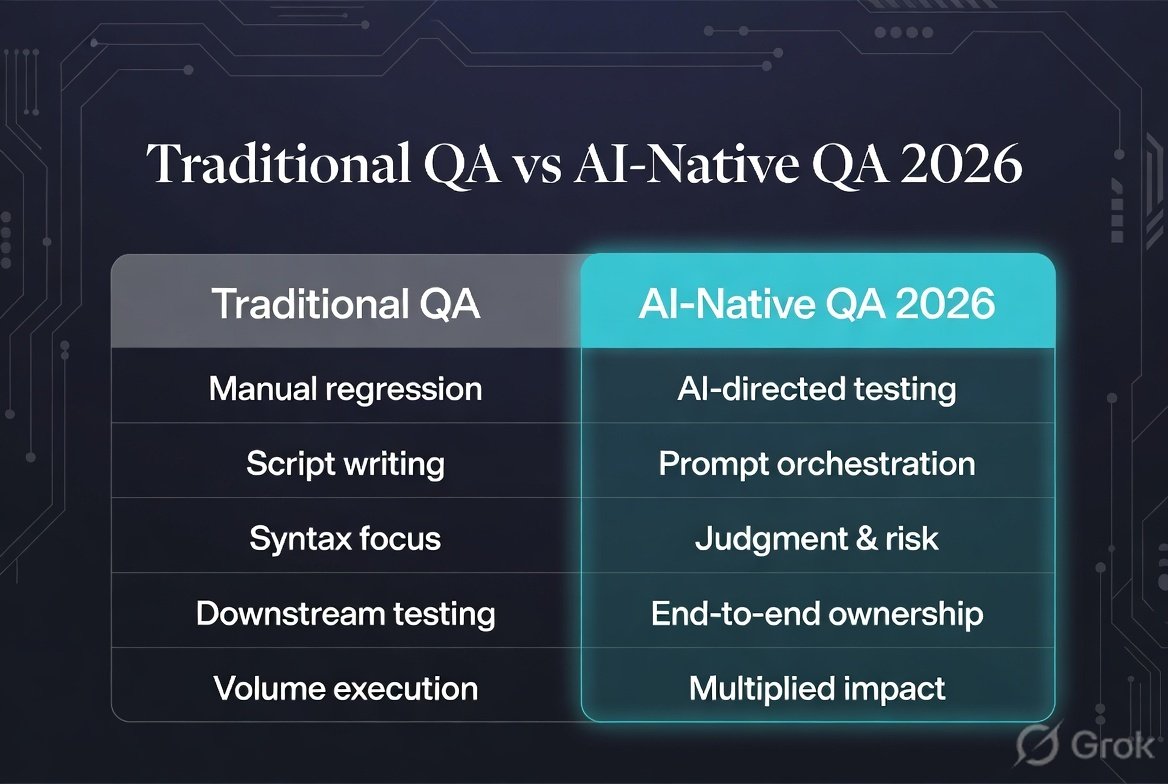
In fact, the strongest QA teams will probably use both. Traditional automation provides precision, predictability, and full control. AI provides speed, adaptability, and broader coverage. They complement each other rather than competing.
AI becomes an intelligence layer around your automation framework. It doesn’t replace Playwright or Selenium—it makes them smarter. The framework still provides the reliable, deterministic execution engine. AI provides the intelligence to generate tests faster, maintain them more efficiently, and analyze results more effectively.
The Best Architecture May Not Be One AI Tool
You don’t necessarily need to replace your entire QA stack with an AI testing platform. No single tool excels at everything, and the best testing architectures are composed of specialized tools that each solve a specific problem well.
                 PRODUCT REQUIREMENT
                         │
                         ▼
                  AI TEST DESIGN
                         │
                         ▼
              ┌─────────────────────┐
              │   QA TEST STRATEGY  │
              └─────────────────────┘
                         │
          ┌──────────────┼──────────────┐
          ▼              ▼              ▼
       API Tests      UI Tests      Visual Tests
          │              │              │
      Playwright       Testim       Applitools
      / Postman        / mabl       / Percy
          │              │              │
          └──────────────┼──────────────┘
                         ▼
                       CI/CD
                         │
                         ▼
                 AI Failure Analysis
                         │
                         ▼
                  Human QA Decision
The important thing is not the number of AI tools. It is the quality of the overall testing architecture.
How QA Engineers Should Use AI Testing Tools
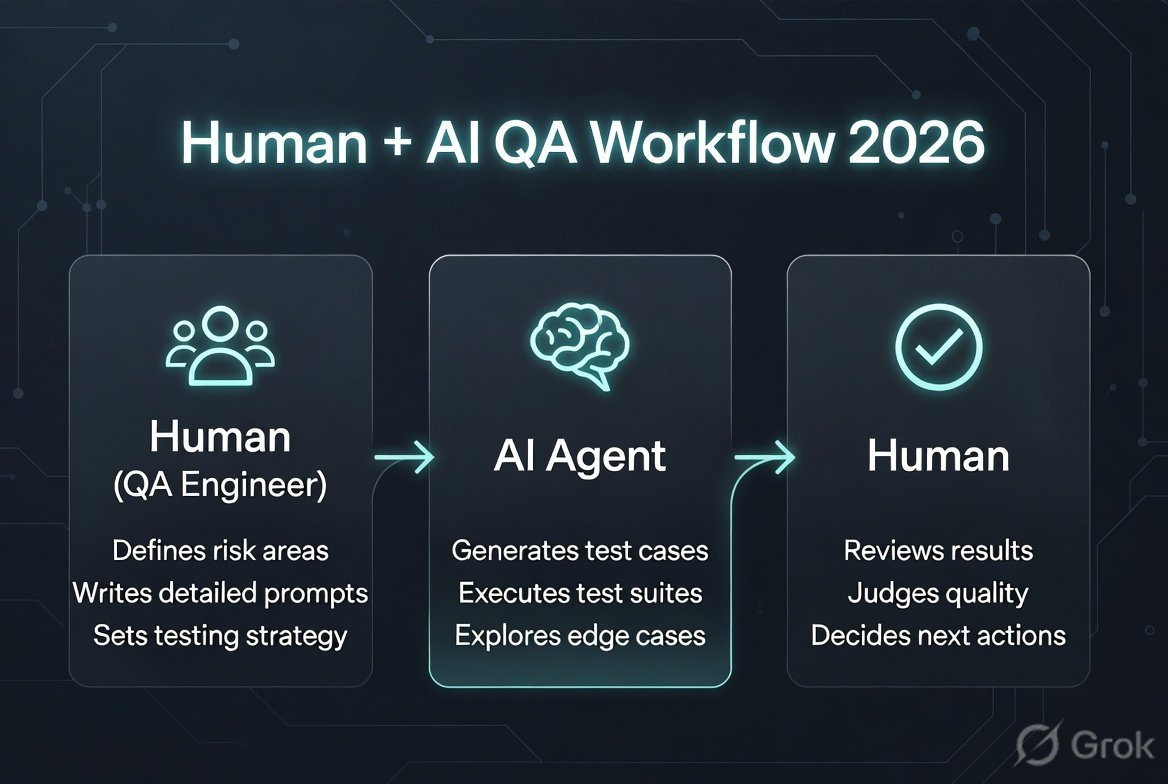
There is a dangerous misconception that AI testing means: “Give the application to AI and let AI test everything.”
That isn’t a strategy. That’s abdication. And it produces results that are proportionally disappointing—lots of generated tests, lots of green results, and no actual confidence that the application works correctly.
1. Start with the business risk
Ask:
- What can seriously hurt the customer?
- What can cause financial loss?
- What can expose sensitive data?
- What can break critical workflows?
- What changes frequently?
- What has historically produced defects?
AI should help prioritize these areas. When you use AI to generate tests, start with the highest-risk areas first. A comprehensive set of tests for the payment processing workflow is infinitely more valuable than a comprehensive set of tests for the “About Us” page.
Risk-based thinking also helps you evaluate AI-generated tests more effectively. When AI generates a test for a critical payment flow, scrutinize every assertion. When it generates a test for a static content page, a lighter review is appropriate. Not all tests deserve the same level of human attention.
For a structured approach to risk prioritization, the test strategy 2026 template gives you the exact five questions to ask.
2. Give AI good context
The quality of AI output is directly proportional to the quality of the input. Vague prompts produce vague tests. Specific prompts produce specific, useful tests.
Bad prompt: Test checkout.
Better:
Test the checkout workflow for a returning customer.

Verify:
- Existing cart items remain intact
- Discount codes are applied correctly
- Invalid payment information is rejected
- Order is not created after failed payment
- Successful payment creates exactly one order
- Customer receives confirmation
- Inventory is updated
Treat prompt engineering for test generation with the same seriousness you’d treat writing a test plan. The prompt is the specification; the generated tests are the implementation.
3. Ask AI for negative scenarios
AI is particularly useful for brainstorming failure modes. For example, asking for negative test scenarios for POST /api/payment might suggest: missing payment method, invalid card, expired card, duplicate transaction, invalid currency, amount = 0, negative amount, extremely large amount, invalid authentication, expired token, rate limit exceeded, duplicate request, timeout, dependency failure.
Some of these—like duplicate transactions and race conditions—are the kinds of scenarios that cause real production incidents but are frequently overlooked in manual test design.
4. Let AI generate the first draft
Instead of spending 30 minutes writing boilerplate automation, let AI handle the mechanical work. Then review it.
The important distinction is: AI-generated ≠ automatically accepted.
Treat generated tests as a draft. Review the assertions—are they checking the right things? Review the test data—is it realistic? Review the flow—does it match how users actually interact with the application?
This draft-and-review workflow can cut test creation time by 50-70% while maintaining quality.
5. Let AI investigate failures
Imagine a CI pipeline produces 487 tests with 42 failed. A QA engineer may spend hours determining which failures are real defects, which are flaky, which are infrastructure problems, and which share the same root cause.
AI can help cluster and analyze those failures. But the final decision should remain with an engineer when the consequence matters. AI can say “these 15 failures are probably all caused by the same database connection issue.” The engineer decides whether to treat that as a blocking issue or a known environment problem.
AI Testing Is Not Just About UI Automation
AI can assist across the entire QA lifecycle—from requirements analysis through release decisions.
Requirements: AI can read a requirement document and flag statements that are vague, contradictory, or untestable. “The system should respond quickly” is untestable without a specific threshold. Catching these issues before development begins prevents defects from being built into the system.
Test design: Requirement → AI generates scenarios → QA reviews risk
Test data: AI can generate realistic datasets for test data management that satisfy complex business rules—valid credit card numbers, addresses that pass geocoding validation, dates that respect business-day calculations.
Execution: Instead of running every test on every build, AI can determine which tests are most likely to catch defects based on the code that changed. This can reduce CI pipeline time from 90 minutes to 15 minutes while maintaining the same defect-detection rate.
Reporting: AI can transform raw execution data into a human-readable summary: “The payment module has three new failures related to currency conversion. All other critical paths are green. Visual testing shows no regressions.”
That is where AI becomes genuinely powerful—not as a replacement for any single testing activity, but as an accelerator across the entire lifecycle.
A Practical AI Testing Workflow
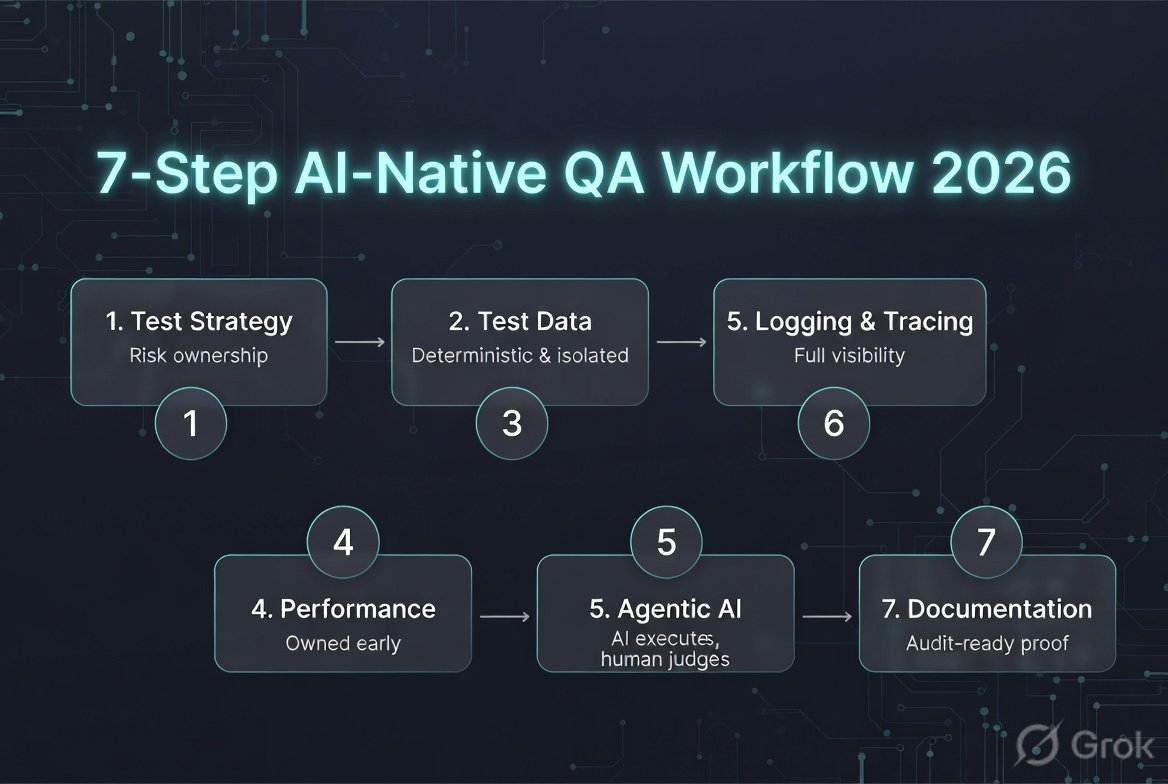
Here is a workflow I would recommend for a modern QA team. It’s designed to integrate AI at every stage where it provides genuine value while keeping human judgment at the decision points that matter.
Step 1 — Requirement analysis
Give the requirement to an AI assistant. Ask it to identify functional, negative, boundary, security, integration, performance, and data-related test scenarios. This single prompt can generate more comprehensive coverage thinking in five minutes than a team might produce in a two-hour test planning session.
Step 2 — Risk analysis
Ask: “Rank these scenarios by business risk.” Now your team has a prioritized test strategy. The highest-risk scenarios get the most thorough testing. Lower-risk scenarios might get a single automated check or might be covered by exploratory testing.
Step 3 — Test case generation
Generate detailed test cases. But don’t blindly accept them. Remove duplicates, irrelevant scenarios, impossible scenarios, and low-value tests. The QA engineer’s domain knowledge is the filter that transforms a broad list of AI-generated scenarios into a focused, valuable test suite.
Step 4 — Automation generation
Use your preferred framework or AI testing platform. Requirement → AI-generated test → Playwright / Selenium / API automation. The key is that the automation reflects the scenarios from Steps 1-3, not whatever the AI tool decides to generate from scratch.
Step 5 — Visual validation
For critical user journeys—login, checkout, payment, dashboard, reports—add visual validation. Tools such as Applitools and Percy can provide an additional visual layer that runs alongside your functional tests without requiring separate test scripts.
Step 6 — CI/CD
Run tests automatically on every code change: Pull Request → Smoke tests → API tests → UI tests → Visual tests → Regression. The ordering matters. Fast, reliable tests run first to provide immediate feedback. This test pyramid approach, combined with AI-powered risk-based test selection, can dramatically reduce feedback time.
Step 7 — AI failure analysis
Instead of reading hundreds of logs manually: CI failures → AI clustering → Root-cause candidates → QA verification. This final step transforms raw CI output into actionable intelligence. Instead of “42 tests failed,” the team sees “3 root causes identified” and can immediately focus on fixing the actual problems.
What AI Testing Tools Still Cannot Do
This is where QA engineers need to be careful. AI is not a replacement for engineering judgment, domain knowledge, or critical thinking. Understanding the limitations is as important as understanding the capabilities.
1. AI does not automatically understand business risk
An AI model might generate “Test login with invalid password” but may not understand that a payment duplication bug is more critical than a login UI alignment issue. That’s a product-risk decision requiring understanding of business context that AI cannot independently assess.
2. AI can generate bad tests
AI-generated tests can contain incorrect assumptions about application behavior, duplicate scenarios, weak assertions that verify the test ran but not that the application behaved correctly, unrealistic test data, missing edge cases, and incorrect business rules. A test with weak assertions can pass consistently while the application is fundamentally broken.
3. Self-healing can hide real defects
Imagine your application changes from “Delete Account” to “Deactivate Account.” An AI engine might decide the new button is the equivalent element and continue the test. The locator heals, the test passes—but what if the behavior actually changed? What if “Delete Account” permanently removed user data and “Deactivate Account” merely suspends it?
A self-healed test should be observable and reviewable.
Self-healing should reduce maintenance—not silently redefine expected behavior. Every healing event should be logged, flagged for review, and surfaced in a dashboard where the QA team can confirm that the adaptation was correct.
4. AI can create false confidence
1000 AI-generated tests with 999 passing sounds impressive. But if the assertions are weak, you may simply have created 1000 tests that prove very little. Quality is not measured by the number of automated tests—it is measured by the confidence those tests provide. Ten tests with precise, meaningful assertions about critical business behavior are more valuable than a thousand tests with generic assertions about page loads.
5. AI-generated tests can become duplicated noise
If five different prompts generate essentially the same scenario, your test suite becomes larger without becoming smarter. This creates longer execution times, higher maintenance costs, more flaky tests, more reporting noise, and more CI cost. AI should help reduce duplication—not increase it.
How to Evaluate an AI Testing Tool
Don’t evaluate an AI testing platform using only a polished demo. Run a real proof of concept with your actual application and the same workflows for every vendor.
Test scenarios to include: Login (SSO, MFA, error handling), Search (autocomplete, filters, empty results), Add to cart (variants, quantities, inventory limits), Checkout (discount codes, payment failures, order confirmation), API validation, Dynamic UI (modals, infinite scroll), Broken locator (intentionally change element attributes), and Failure investigation (introduce a real defect).
Then measure across these metrics:
| Metric | Question |
|---|---|
| Test generation | How accurate are generated tests? |
| Maintenance | How often do tests require human fixes? |
| Self-healing | Does healing make the test correct? |
| False positives | How many failures are noise? |
| False negatives | What defects are missed? |
| Execution speed | How quickly does the suite run? |
| CI integration | How easily does it fit your pipeline? |
| Debugging | Can engineers understand failures? |
| Security | Where does application data go? |
| Governance | Can humans review AI decisions? |
| Cost | What is the total cost at scale? |
The most important metric may actually be: How much engineering time does this tool save without reducing confidence?
Questions QA Teams Should Ask Vendors
AI model: Which AI models power the product? Can models change without notification? Is customer data used for model training?
Test generation: How are tests generated? Can engineers edit generated tests? Can we control generated assertions?
Self-healing: What exactly gets healed? Can engineers review healing decisions? Are healing events logged? Can healing be disabled?
Security: Where is test data processed? Is data encrypted? Is private-cloud deployment available?
CI/CD: Does it support GitHub/GitLab/Jenkins? Can tests run on pull requests?
Debugging: Does it capture screenshots, videos, console logs, network logs, DOM snapshots, and AI failure explanations?
AI Testing and the QA Engineer’s Role
AI will automate many tasks that QA engineers currently perform. Test creation, test execution, test maintenance, failure triage—all of these are being automated to varying degrees. But that doesn’t mean QA engineering becomes less important. It changes what matters.
Old model: Write test → Execute test → Fix test → Repeat
Emerging model: Understand product → Identify risk → Define quality strategy → Guide AI → Review evidence → Investigate important failures → Improve the system
The value moves from test execution toward quality engineering. This is a higher-value role, not a diminished one. It requires deeper product knowledge, stronger analytical skills, better communication with stakeholders, and a more strategic mindset.
The QA Engineer of 2026
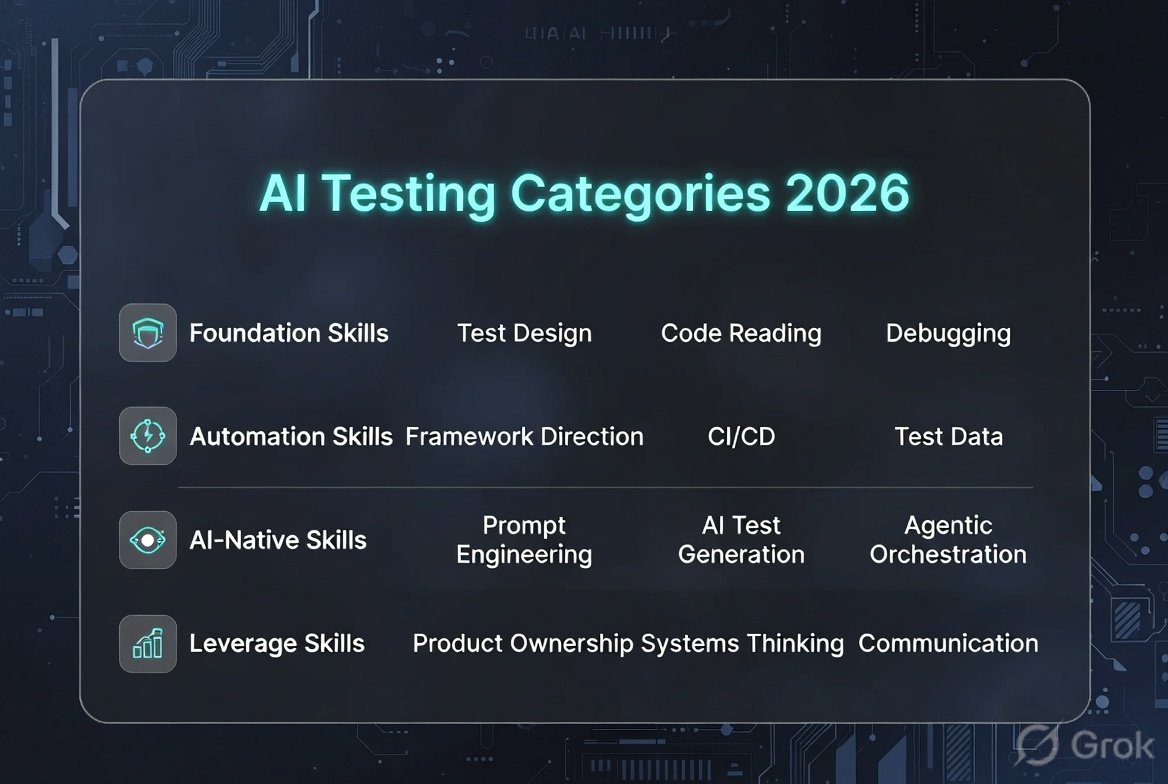
A strong QA engineer increasingly needs to understand a broader range of technologies and concepts. The skill set is expanding, not contracting.
The complete breakdown of which skills matter most is in the QA skill map for 2026.
Testing fundamentals
- Functional testing
- API testing
- Integration testing
- Regression testing
- Exploratory testing
- Performance testing
- Security awareness
Automation
- Playwright
- Selenium
- Cypress
- Appium
- API automation
- CI/CD
Understanding automation frameworks is still essential, even when AI generates the tests. You need to understand the framework to review generated code, debug failures, and extend tests beyond what AI can produce.
AI
- LLMs
- Prompt engineering
- AI agents
- AI test generation
- AI failure analysis
- AI evaluation
- AI-assisted coding
Engineering
- Git
- APIs
- Databases
- Cloud
- Containers
- Observability
- Distributed systems
The winning skill is not: “I know how to use one AI testing tool.”
It is: “I know how to use AI to build a better quality system.”
Tool proficiencies become obsolete when tools change. Engineering capabilities compound over time.
AI Testing vs AI Application Testing
AI testing tools use AI to help test traditional applications.
But AI application testing means testing applications that themselves contain AI. These are two different problems requiring different approaches, different tools, and different expertise.
Testing an AI application (chatbot, LLM-powered feature) introduces completely different challenges. The behavior is non-deterministic—the same input can produce different outputs. You may need to test:
- Hallucinations — does the AI generate factually incorrect information?
- Prompt injection — can users manipulate the AI to behave in unintended ways?
- Bias — does the AI treat different demographic groups unfairly?
- Toxicity — does the AI generate harmful or offensive content?
- Data leakage — does the AI reveal sensitive information from its training data?
- Model consistency — does the AI produce reasonably consistent responses to similar inputs?
- Groundedness — are the AI’s claims supported by its knowledge base?
- Retrieval quality — when the AI uses RAG, does it retrieve relevant context?
- Agent behavior — when the AI acts autonomously, does it stay within intended boundaries?
- Safety boundaries — does the AI refuse harmful requests appropriately?
This is going to become one of the biggest QA disciplines of the coming years. The tools and methodologies for this are still maturing, making it a particularly important area for QA engineers to watch.
The Future of AI Testing

The direction is becoming increasingly clear. We are moving from Manual Testing → Scripted Automation → AI-Assisted Automation → AI-Generated Testing → Self-Healing Testing → Agentic Testing.
But the final stage is unlikely to be “AI replaces QA.” That prediction has been made about every wave of automation technology, and it has never been correct. ATMs didn’t eliminate bank tellers. Automated manufacturing didn’t eliminate factory workers. AI testing won’t eliminate QA engineers—it will change what QA engineers do.
A more realistic future: AI becomes the execution and analysis engine. Humans remain responsible for intent, risk, judgment, and accountability. The human defines what quality means for this product, for these users, in this market context. AI does the heavy lifting of validating whether that definition is being met. The human makes the final call on whether the software is ready to ship.
What I Expect to Matter Most in 2026
The bigger trend is: AI is beginning to operate parts of the testing lifecycle. That means more tools will focus on:
Autonomous test discovery: AI observes application behavior and identifies what should be tested, continuously recommending testing priorities based on real user behavior and code changes.
Autonomous regression: Instead of maintaining a fixed regression suite forever, AI continuously updates coverage based on application changes. Tests for deprecated features are automatically flagged for removal.
AI-powered failure triage: Thousands of failures become a smaller number of actionable root causes—transforming the daily experience of a QA team.
Risk-based test selection: AI determines which tests should run first based on code changes, historical defects, production behavior, business criticality, and failure history. This can dramatically reduce pipeline time without sacrificing coverage.
AI-generated test data: AI creates realistic datasets for complex workflows—healthcare records, financial transactions, e-commerce orders—respecting constraints and relationships in seconds.
AI agents testing AI agents: As software development becomes more agentic, QA systems will increasingly need to independently verify code generated by other AI agents.
The system generating the software should not be the only system deciding whether that software is correct.
So, Which AI Testing Tool Should You Choose?
There is no universal winner. The right tool depends on your specific context.
- Choose Testim if you want AI-powered E2E automation and self-healing with the flexibility to write custom code when needed.
- Choose mabl if you are interested in AI-native and agentic testing with strong failure analysis capabilities.
- Choose Applitools if visual quality is a major concern and you need to validate UI consistency across browsers and devices at scale.
- Choose BrowserStack if cross-browser, mobile, real-device testing, and AI-assisted automation are important, and you want AI capabilities integrated with a comprehensive device cloud.
- Choose Functionize if you want generative AI test creation with the ability to describe complex workflows in natural language.
- Choose Katalon if you want a broader QA platform covering multiple testing types with AI augmentation throughout.
- Choose ACCELQ if you want codeless enterprise automation accessible to team members with varying technical backgrounds.
- Choose Tosca if you operate in a complex enterprise testing environment with governance requirements and need AI capabilities that work across legacy and modern systems.
- Choose testRigor if you want natural-language/codeless automation that abstracts away implementation details and keeps tests readable by non-technical stakeholders.
- Choose Percy if visual regression is your primary requirement and you need fast, intelligent screenshot comparison integrated with your CI pipeline.
Final Thoughts
AI testing in 2026 is not about finding a magical tool that can replace your entire QA team. No such tool exists, and any vendor claiming otherwise is overpromising.
It is about finding the right places where AI can remove repetitive work while improving testing depth and speed. The repetitive work is real and substantial—writing boilerplate test code, maintaining locators after UI changes, triaging CI failures, generating test data, reviewing screenshots across browser combinations. AI can handle most of that, freeing QA engineers to focus on the work that actually requires human intelligence.
The strongest approach is not: “Let’s replace Selenium with AI.”
It is: “Let’s rethink our entire quality engineering process with AI as an additional engineering capability.”
Use AI to generate ideas, expand coverage, create automation drafts, generate test data, maintain tests automatically, analyze failures, prioritize testing based on risk, validate visual changes, discover user journeys, and accelerate debugging.
But keep humans responsible for business risk assessment, test strategy decisions, quality decisions that affect release readiness, critical assertions, exploratory thinking, product understanding, and final release confidence.
The future of QA isn’t AI vs QA engineers.
It is QA engineers who know how to work with AI vs QA processes that don’t.
Teams that figure out how to integrate AI into their quality engineering process—thoughtfully, with appropriate skepticism, and with clear governance—will ship better software faster. Teams that ignore AI will fall behind. And teams that blindly trust AI without human oversight will ship confidently broken software.
The sweet spot is in the middle: AI as a powerful tool wielded by skilled engineers who understand both its capabilities and its limitations.
Quick Reference: AI Testing Tools in 2026
AI E2E Automation: Testim · mabl · Functionize
Visual AI: Applitools Eyes · BrowserStack Percy
AI + Cross-Browser / Mobile: BrowserStack
Enterprise AI Testing: Tricentis Tosca · Katalon · ACCELQ
Natural-Language Testing: testRigor
Sources & further reading
The capabilities described above were checked against current 2026 product documentation and vendor material, including current AI/agentic capabilities from Testim, mabl, Applitools, BrowserStack, Katalon, Functionize and Tricentis.
Academic research also supports the broader shift toward AI-assisted test generation, intelligent maintenance, test prioritization, test-data generation and other AI-assisted testing activities.
This post is part of the QA in the Age of AI series on Testheon.