
Affiliate disclosure: This article may contain links to tools or services mentioned for educational purposes. If Testheon ever uses affiliate links in the future, recommendations will remain based on practical QA relevance, not commissions.
If you are trying to build a modern QA career, the biggest problem is not a lack of information.
It is the opposite.
There are too many tools, too many “become a QA engineer in 30 days” promises, and too many roadmaps that tell you to learn everything at once.
A practical QA roadmap in 2026 should help you answer three simple questions:
- What should I learn first?
- What should I learn next?
- What can I safely ignore for now?
The short answer is this: start with software testing fundamentals, then learn how web applications work, pick up practical SQL and API testing, choose one programming language, learn one automation framework, and then grow into Git, CI/CD, framework design, non-functional testing, AI-assisted testing, and quality-engineering leadership.
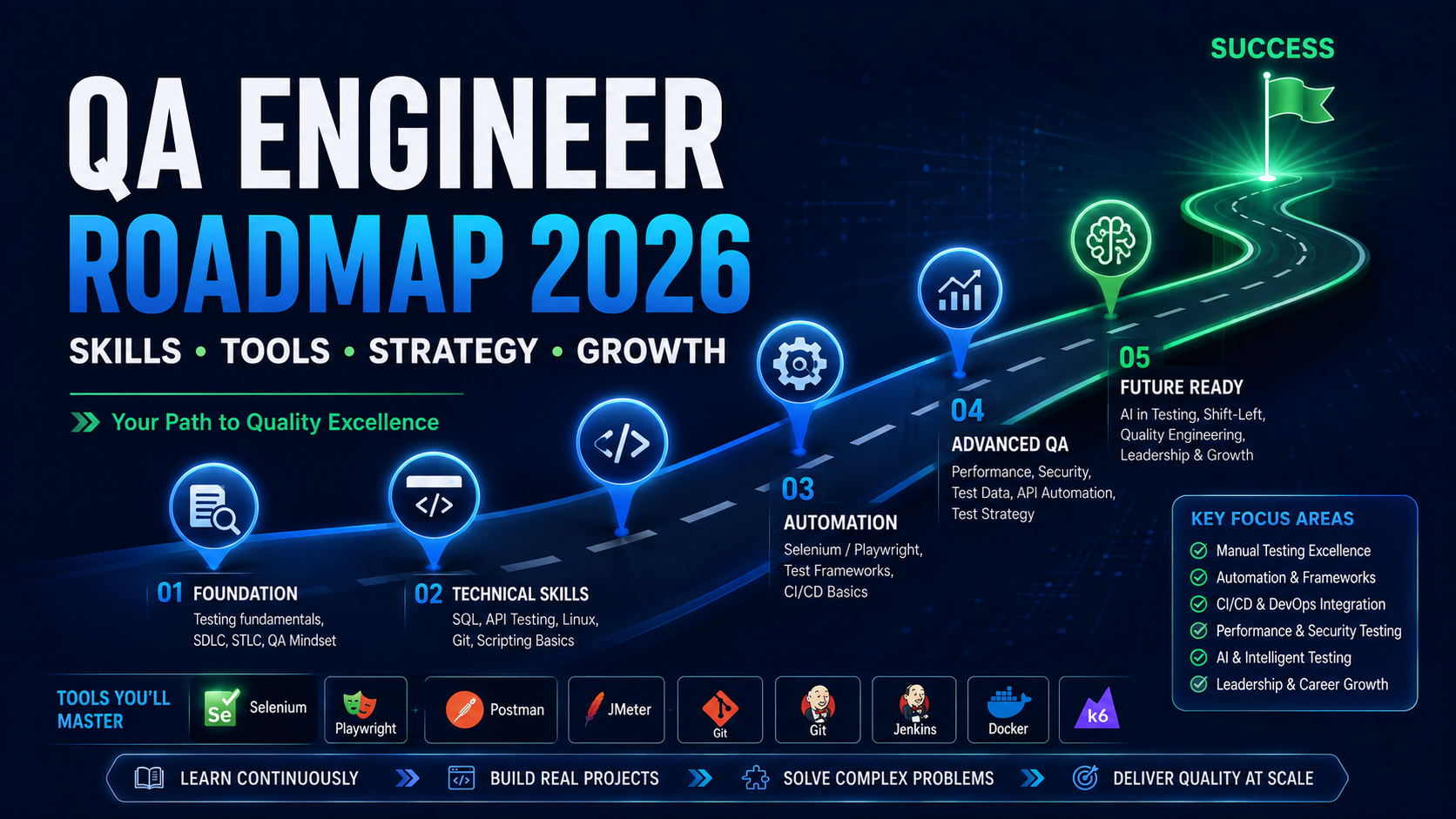
If that already feels more practical than a giant tool list, you are in the right place.
This guide gives you a complete QA engineer roadmap 2026 that is designed for real learners: students, manual testers, junior QA engineers, automation engineers, and even senior engineers who want to understand what comes after basic automation.
Key Takeaways
- A modern qa roadmap should start with testing fundamentals before automation tools.
- API testing should usually come before deep UI automation because it gives you a faster and cleaner way to validate business behaviour.
- You do not need to learn Java, Python, and TypeScript together. Pick one language first.
- You do not need to learn Selenium, Playwright, and Cypress together. Pick one primary framework.
- Git and CI/CD are not optional add-ons for automation engineers. They are part of the job.
- Performance, security, Docker, and AI testing matter, but they should usually come after core testing and automation foundations.
- AI can help you learn, design tests, generate first drafts, and scaffold frameworks faster—but you still own correctness.
QA Roadmap 2026 at a Glance
A qa engineer roadmap is an ordered learning path. It is different from a general skill checklist.
- A roadmap tells you what to learn and in what order.
- A skill map tells you what abilities a strong QA engineer should eventually have.
That distinction matters because beginners often get overwhelmed by seeing advanced skills too early.
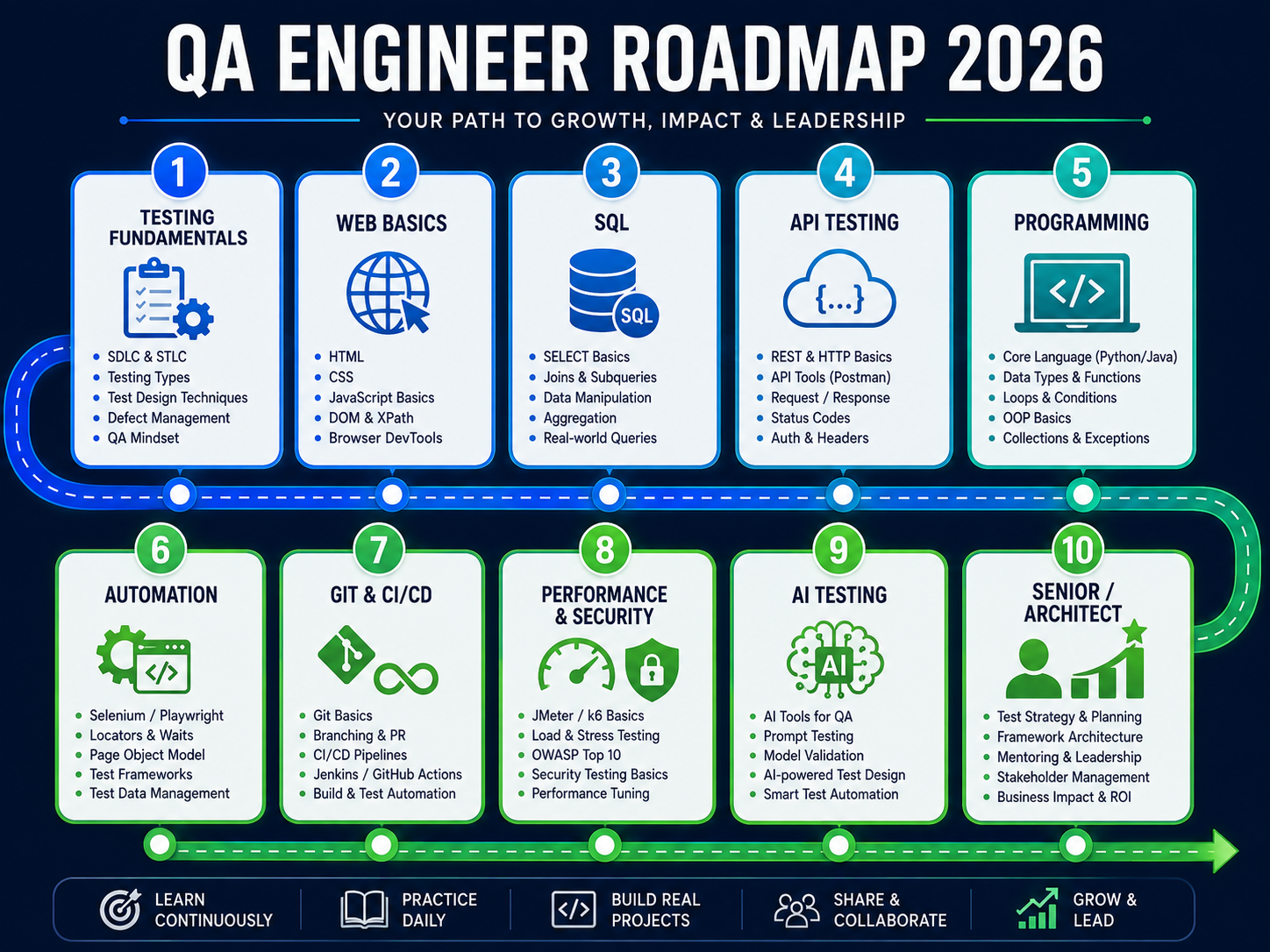
Here is the complete learning sequence we recommend:
| Stage | What to learn | Why it matters | Outcome |
|---|---|---|---|
| 1 | Testing Fundamentals | Builds judgment and test design | You can think like a tester |
| 2 | Web / App Basics | Helps you understand systems | You can debug beyond the UI |
| 3 | SQL & Database Validation | Confirms backend behaviour | You can verify data correctly |
| 4 | API Testing | Tests business logic directly | You can test faster and deeper |
| 5 | One Programming Language | Enables real automation work | You can write maintainable test code |
| 6 | Test Automation | Makes checks repeatable | You can automate critical workflows |
| 7 | Framework Design | Makes automation scalable | You can build team-usable test suites |
| 8 | Git & Collaboration | Fits QA into engineering teams | You can work in a real codebase |
| 9 | CI/CD | Turns local scripts into delivery feedback | You can run automation where it matters |
| 10 | Performance & Security Basics | Expands quality ownership | You can identify non-functional risks |
| 11 | Docker & Test Environments | Improves reproducibility | You can manage test dependencies better |
| 12 | AI-Assisted Testing | Increases productivity | You can use AI without losing QA judgment |
| 13 | Testing AI / LLM Systems | Supports emerging QA work | You can evaluate probabilistic systems |
| 14 | Senior / Lead / Architect Skills | Moves beyond execution | You can own quality strategically |
If you want a related competency-based view, compare this roadmap with our complete QA skill map.
Start With Testing Fundamentals, Not Automation Tools
The strongest QA engineers are not the ones who started with the fanciest framework.
They are the ones who learned how to think.
At this stage, focus on the fundamentals of software testing:
- what software testing actually tries to achieve;
- the difference between a bug, a test failure, and an environment issue;
- test scenarios and test cases;
- defect reporting;
- severity vs priority;
- smoke, sanity, regression, and exploratory testing;
- test planning and test strategy basics;
- risk-based thinking.
What to learn
You do not need to memorize a certification glossary word for word. You do need to understand the logic behind good testing decisions.
A good beginner should be able to answer questions like:
- What is the risk if this feature fails?
- What is the most valuable thing to test first?
- What data or state is required?
- How do I report a defect clearly enough that others can reproduce it?
Why it matters
Automation executes checks. It does not decide what is worth checking.
That is why manual and exploratory testing are still relevant. They build:
- product understanding;
- observation;
- risk awareness;
- test design ability;
- defect analysis.
What not to overlearn yet
Do not spend weeks learning every test-management tool, every documentation template, or every certification acronym before you have touched a real application.
You are ready for the next stage when…
- you can create meaningful test scenarios from a requirement;
- you can report defects clearly;
- you understand the purpose of common test types;
- you can explain why one test matters more than another.
Learn How Web Applications Actually Work
A QA engineer does not need to become a full frontend or backend developer before starting.
But you do need enough application knowledge to avoid testing blindly.
What to learn
At minimum, understand:
- client and server basics;
- HTTP and HTTPS;
- request and response;
- status codes;
- cookies;
- sessions;
- local storage;
- the difference between authentication and authorization;
- HTML and CSS basics;
- JSON;
- browser developer tools and the network tab.
Why it matters
When you understand what the application is doing under the hood, debugging gets easier.
For example:
- a missing UI element may actually be an authorization problem;
- a failed page action may really be a 500 API response;
- a “logout issue” may actually be a cookie or session problem.
What not to overlearn yet
You do not need to become a React, Angular, or Node expert at this stage. Learn just enough to understand application behaviour.
You are ready for the next stage when…
- you can inspect requests in DevTools;
- you understand basic response codes;
- you can explain how login/session behaviour works at a high level.
Learn Practical SQL and Database Validation
A large number of QA engineers delay SQL because it looks “backend” or “developer-ish”.
That is a mistake.
Practical SQL is one of the most useful skills in any software testing roadmap.
What to learn
Focus on practical, job-relevant SQL:
SELECTWHEREORDER BYJOINGROUP BY- CRUD awareness
- validating backend state after UI or API actions
Why it matters
SQL helps you answer questions like:
- Did the record get created?
- Was the correct field updated?
- Is the UI showing stale data or is the database wrong?
- Did a negative scenario incorrectly write data?
What not to overlearn yet
Do not turn this stage into a DBA course. You do not need deep indexing theory, replication tuning, or database administration to get started.
Mini example
SELECT order_id, status, updated_at
FROM orders
WHERE customer_id = 1024
ORDER BY updated_at DESC;
That simple query can confirm whether a workflow behaved correctly.
You are ready for the next stage when…
- you can write basic queries without copying everything from the internet;
- you can validate data after executing a test case;
- you can compare UI/API output with database state.
Learn API Testing Before Going Deep Into UI Automation
This is one of the most important decisions in this article.
Many people jump directly from manual testing to browser automation.
A better path is usually:
testing fundamentals → SQL → API testing → browser automation
Why API testing comes first
API testing often gives you:
- faster feedback;
- fewer UI distractions;
- easier debugging;
- more direct access to business logic;
- easier data setup.
If a system is heavily service-driven, API testing can validate core behaviour before you even open a browser.
What to learn
At this stage, cover:
- REST basics;
- HTTP methods;
- headers;
- status codes;
- request and response bodies;
- JSON validation;
- authentication;
- positive and negative testing;
- schema or contract awareness;
- test-data setup through APIs where possible.
Good starting tools
Use one manual tool and one code-friendly mindset:
- Postman for exploration and fast validation;
- REST Assured if you follow a Java track;
- Playwright API testing if you follow a Playwright-first path.
From a QA Engineer’s Perspective
Do not make the browser your only test interface.
Use APIs to create data, validate state, and test business rules directly. Then keep browser automation for the critical journeys where the actual UI experience matters.
Example API + UI mindset
- Create a customer through an API.
- Validate the response.
- Open the browser only for the workflow that needs UI validation.
- Confirm the final state through UI and, where needed, through the backend.
What not to overlearn yet
Do not try to master GraphQL, gRPC, performance tooling, API mocking platforms, and contract-testing frameworks all at once.
You are ready for the next stage when…
- you can test common REST endpoints;
- you can validate responses and negative scenarios;
- you understand why API testing can be more stable than browser-only testing.
Pick One Programming Language
This is where many roadmap articles overwhelm readers.
A practical qa engineer roadmap 2026 should not tell you to learn Java, Python, and TypeScript simultaneously.
Pick one.
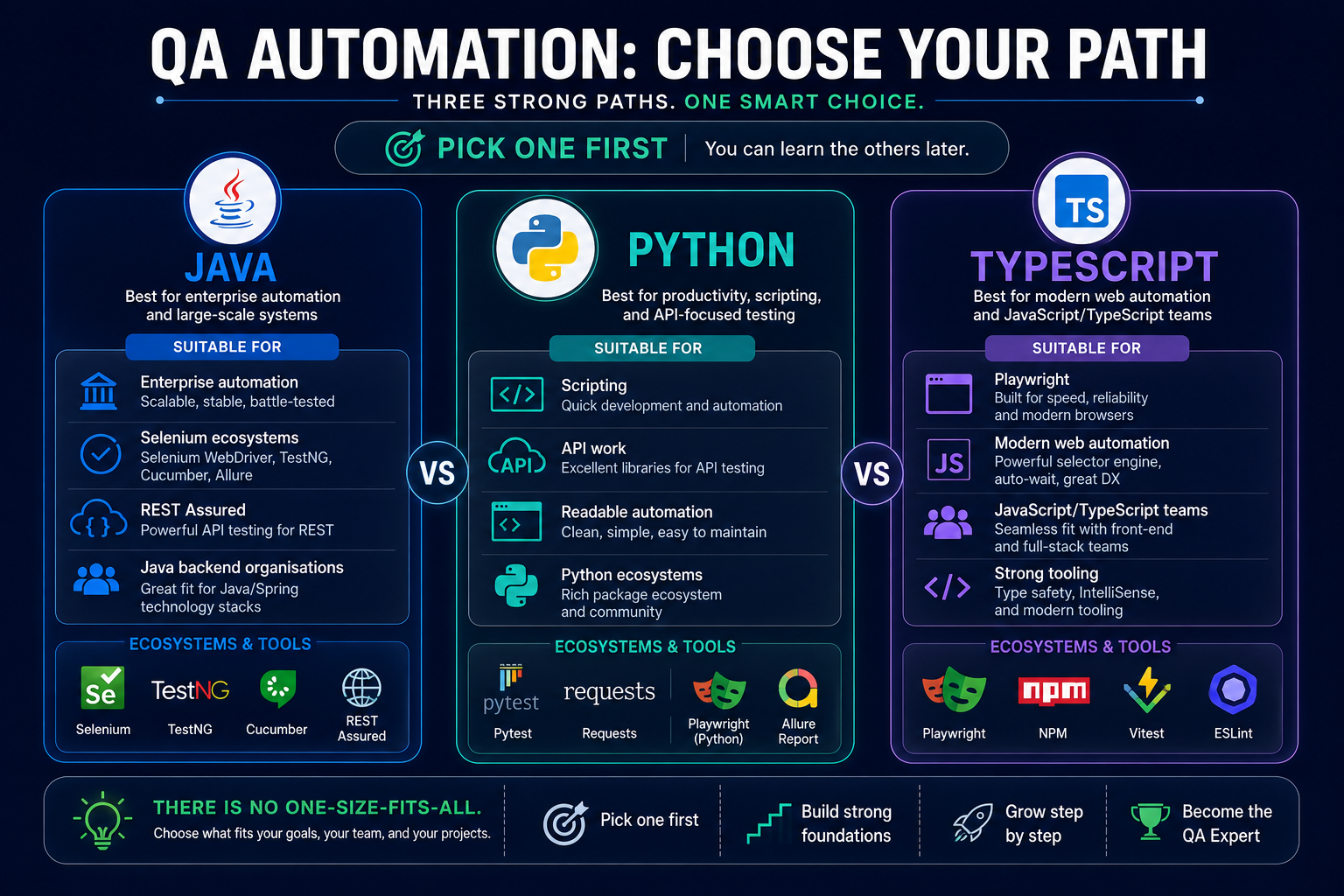
The three sensible tracks
| If your target context looks like this… | Start with this language |
|---|---|
| Enterprise Selenium / REST Assured / Java backend environments | Java |
| Readable scripting / automation support / API-heavy work | Python |
| Playwright-first modern web automation / frontend-adjacent teams | TypeScript |
What you actually need to learn
For QA automation, focus on:
- variables;
- functions or methods;
- conditions;
- loops;
- collections;
- basic object-oriented concepts where relevant;
- exceptions or error handling;
- modules/packages;
- dependency management;
- file handling basics;
- HTTP/client libraries.
What not to do
Do not turn this into a huge programming curriculum before you build anything practical.
You do not need to complete “all of computer science” before writing your first automated checks.
Rule of thumb
Choose the language that is closest to:
- your target team;
- your chosen framework;
- your current ecosystem.
Then stay with it long enough to build a real project.
You are ready for the next stage when…
- you can read and modify test code confidently;
- you can write functions and small reusable helpers;
- you understand what your automation framework code is actually doing.
Pick One Automation Framework and Learn the Concepts Deeply
Once you have testing fundamentals, system understanding, SQL, APIs, and one language, you are ready for serious automation.
The key phrase here is one framework.
What matters more than the framework name
Before obsessing over a tool brand, learn the concepts:
- locators;
- assertions;
- synchronization and waits;
- test isolation;
- setup and teardown;
- data-driven testing;
- reusable code;
- reporting;
- debugging.
Sensible framework choices
| Framework | Best for | Why people choose it | Keep in mind |
|---|---|---|---|
| Playwright | Modern web automation | Great DX, strong API + UI story, good isolation, debugging support | Ideal for many greenfield web teams, but not mandatory everywhere |
| Selenium | Existing enterprise ecosystems | Mature WebDriver ecosystem, broad adoption, many legacy and active estates | Still highly relevant, especially when joining established teams |
| Cypress | JS/TS web teams | Clean testing experience and fast frontend feedback | Useful in the right environment, but not the only modern option |
Practical advice
If you are starting from scratch and targeting modern web automation, Playwright is a strong choice.
If you are joining a company with an established Selenium framework, learning Selenium may be the smartest move.
If your team is deeply JavaScript-focused and Cypress fits the application and workflow, that can also be valid.
What not to do
Do not learn all three in parallel.
That usually leads to:
- shallow knowledge;
- repeated beginner mistakes;
- confusion about concepts;
- tutorial addiction.
You are ready for the next stage when…
- you can build a few stable automated tests;
- you understand why hard-coded sleeps are risky;
- you can debug failures without guessing.
Move From Test Scripts to Framework Engineering
This is the stage where many people stop, but strong automation engineers keep going.
There is a big difference between:
“I wrote 20 automated tests”
and
“I built automation that a team can use and maintain.”
What to learn
Focus on:
- project structure;
- fixtures and reusable setup;
- configuration;
- environment handling;
- test data;
- logging and reporting;
- screenshots and traces;
- retries;
- parallel execution;
- maintainability.
This is where test data becomes real
At small scale, you can get away with manually prepared test accounts.
At larger scale, shared test data becomes a problem.
As your automation grows, you should start learning about:
- unique test data per run;
- isolated setup;
- cleanup strategies;
- repeatable data creation.
That is exactly where our guide to test data management becomes useful.
What not to overbuild
Do not create a giant “enterprise framework” on day one.
First build a few real tests, observe duplication, then design abstractions around real pain points.
You are ready for the next stage when…
- your tests are easier to maintain than rewrite;
- multiple tests can share stable setup patterns;
- failures produce useful evidence.
Put Your Automation in Git and CI/CD
A lot of people think they know automation because tests run on their machine.
That is not the real milestone.
The real milestone is:
another engineer can pull the project, run it, and trust the results.
Learn the Git basics
At minimum, know how to:
- clone a repository;
- create a branch;
- commit changes;
- pull and merge;
- open a pull request;
- handle basic conflicts;
- participate in code review.
Git turns test code into engineering work instead of personal scripting.
Learn one CI/CD system
Do not try to master every pipeline tool.
Pick one:
- GitHub Actions; or
- Jenkins.
Then learn:
- how to trigger tests on push or pull request;
- how to pass environment variables;
- how to manage secrets;
- how to run headless tests;
- how to publish reports and artifacts;
- how to interpret pass/fail pipeline results.
From a QA Engineer’s Perspective
Local automation is useful.
Pipeline automation is what creates delivery feedback.
If your test suite cannot run consistently in CI, you have not fully finished the engineering side of automation yet.
You are ready for the next stage when…
- your tests run from a clean environment;
- the project works in version control;
- you can explain how the CI pipeline executes the suite.
Add Performance, Security, and Docker Later
This is where many roadmap articles become unrealistic.
Performance, security, and environment engineering matter—but not on day one.
Treat them as advanced layers that come after you have a foundation.
Performance testing basics
You do not need to become a performance specialist immediately.
But you should eventually understand:
- load testing;
- stress testing;
- throughput;
- latency;
- concurrency;
- bottlenecks;
- response-time patterns.
Starter tools:
- k6
- Apache JMeter
Security testing basics
A QA engineer should understand security risks even without becoming a penetration tester.
Learn the basics of:
- authentication;
- authorization;
- input validation;
- session handling;
- API security;
- common web risks.
A good starting reference is OWASP.
Docker and test environments
You do not need Kubernetes before you understand automation.
But Docker becomes valuable when you need:
- local dependencies;
- reproducible services;
- cleaner environment setup;
- better CI consistency.
Learn to Use AI Without Outsourcing QA Judgment
By 2026, AI is no longer a side topic in QA.
But that does not mean QA engineers should hand over quality decisions to a model.
What AI can help with
AI tools such as ChatGPT, Claude, Cursor, and Windsurf can accelerate:
- first-pass test ideas;
- edge-case brainstorming;
- test-data drafts;
- API scenario generation;
- starter automation code;
- debugging summaries;
- documentation;
- framework scaffolding.
What AI should not own
AI should not be trusted blindly for:
- final correctness;
- expected-result logic;
- business-critical assumptions;
- security-sensitive outputs;
- production-risk decisions.
Good rule
Use AI for the first draft.
Use QA judgment for the final answer.
Internal next step
If you want tool-specific ideas, explore our guide to AI testing tools for QA teams.
Learn How to Test AI and LLM Systems
Testing AI systems is not the same as using AI to help with normal software testing.
That difference matters.
Traditional software testing asks
- Did the expected output happen?
- Did the exact rule work?
- Did the workflow succeed?
AI-system testing asks
- Is the response useful?
- Is it factually reliable?
- Is it safe?
- Is it biased?
- Is it consistent enough?
- How much latency and cost does it introduce?
- How do we evaluate non-deterministic outputs?
What to learn at a roadmap level
You do not need to become an AI specialist immediately.
But advanced QA engineers should understand:
- evaluation datasets;
- rubrics and grading;
- hallucinations;
- safety;
- bias;
- cost;
- latency;
- regression evaluation;
- observability for AI systems;
- agentic workflow validation.
This is especially important for people who want to move toward an AI Quality Engineer path.
Grow From Senior QA to SDET, Specialist, Lead, or Architect
At a certain point, the roadmap stops being about “more tools”.
It becomes about bigger responsibility.
Senior QA / Automation Engineer
At this level, you should start thinking about:
- maintainability;
- quality risk;
- test strategy;
- team-wide standards;
- release confidence;
- observability;
- testability.
For a deeper strategy view, see our guide to modern test strategy.
Career Branches After the Core Roadmap
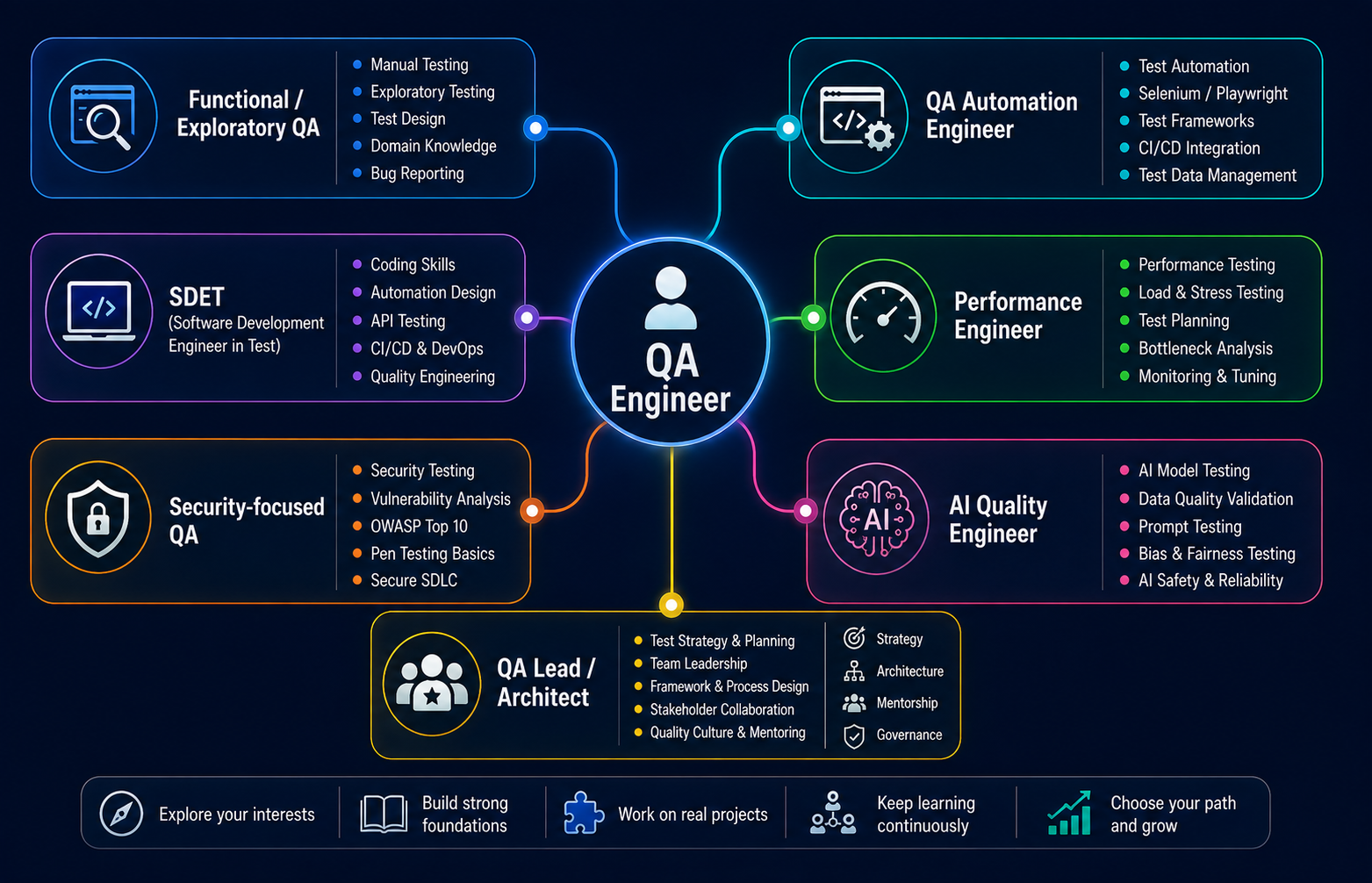
| Path | Best for | What to deepen next |
|---|---|---|
| Functional / Exploratory QA | Product understanding and test design | domain expertise, exploratory skill, risk analysis |
| QA Automation Engineer | Automation + CI workflows | frameworks, API/UI strategy, maintainability |
| SDET | Deeper engineering work | stronger programming, tooling, testability, platform ownership |
| Performance Engineer | Scalability and workload behaviour | load models, bottleneck analysis, observability |
| Security-focused QA | Security-aware testing | OWASP-guided risk analysis, API/web security awareness |
| AI Quality Engineer | AI / LLM evaluation | evals, rubrics, safety, reliability, cost and latency |
| QA Lead / Architect | Team/system quality strategy | governance, release confidence, quality architecture, mentoring |
This article does not try to fully own every one of those paths.
Instead, it helps you understand when each path becomes relevant.
What Not to Learn All at Once
This may be the most important section in the entire article.
You do not need to learn:
- every programming language;
- every automation framework;
- every CI tool;
- every non-functional specialty;
- every AI workflow.
A much better strategy is:
- Learn the foundation.
- Pick one path.
- Build one real project.
- Add the next layer only when the previous layer is usable.
That is what makes a roadmap practical.
A Sample 90-Day QA Learning Plan
This is a sample starter sequence, not a guarantee that someone becomes job-ready in exactly 90 days.
If you already have experience, you may move faster in some stages and slower in others.
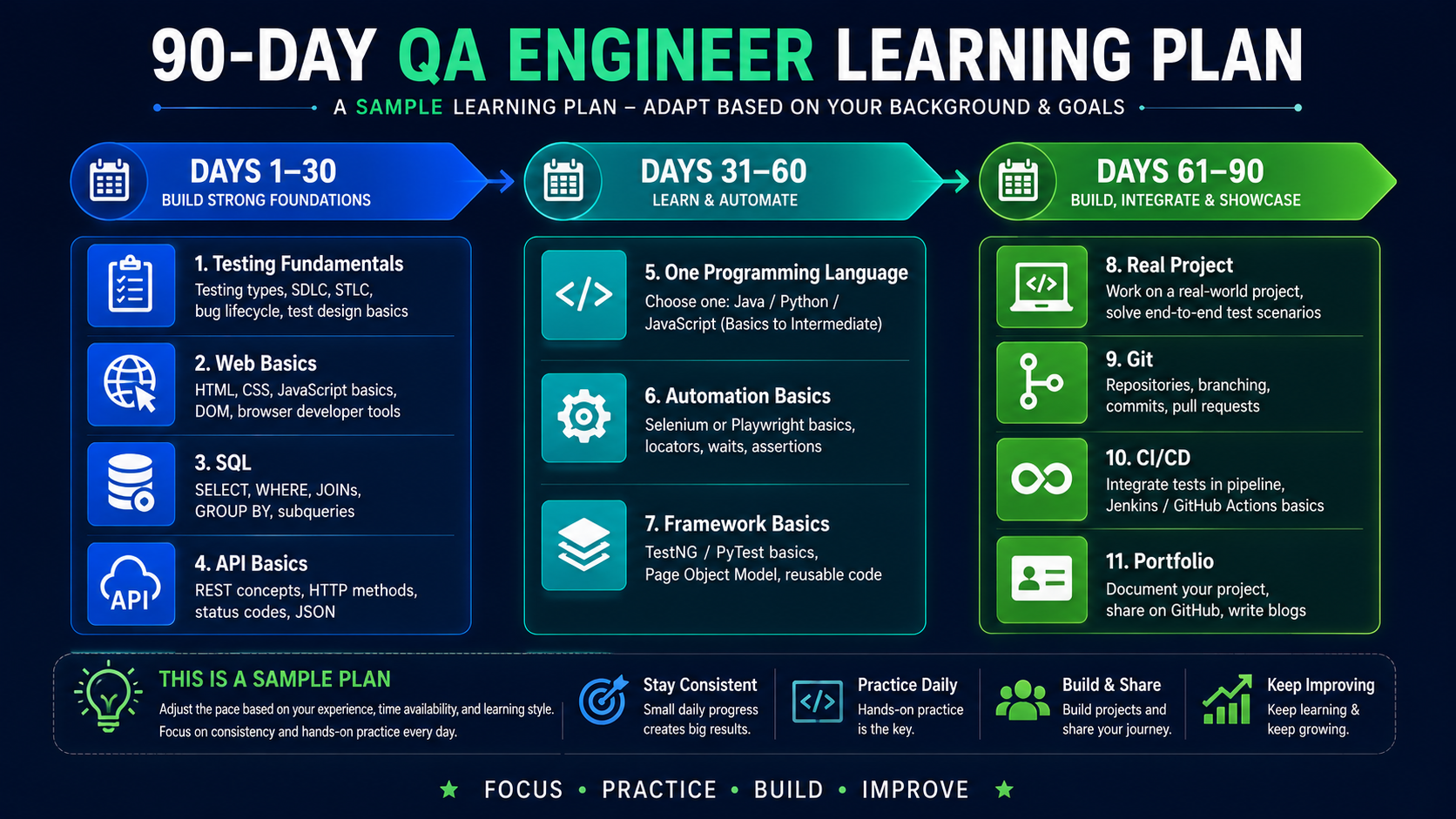
Days 1–30
Focus on:
- testing fundamentals;
- web/application basics;
- SQL basics;
- API basics.
Output:
- write test scenarios for a real app;
- validate simple data with SQL;
- create a small Postman collection.
Days 31–60
Focus on:
- one programming language;
- automation basics;
- one framework.
Output:
- automate a simple API flow;
- automate one UI workflow;
- store the code in Git.
Days 61–90
Focus on:
- framework cleanup;
- reusable structure;
- test data;
- CI/CD;
- portfolio quality.
Output:
- a small but serious automation project;
- a CI workflow that runs your tests;
- a README that explains what you built and why.
⚡ AI Shortcut: Turn This QA Roadmap Into Your Personal Learning Plan
A lot of learners waste hours trying to convert a general roadmap into a personalized plan.
This is exactly the kind of work AI can speed up.
Use ChatGPT or Claude to turn the roadmap in this article into a study plan that matches your current experience, target role, and weekly study time.
You are my QA engineering learning mentor.

I want you to create a personalized QA learning roadmap for me.

MY CURRENT PROFILE

Current role:
[student / manual tester / QA engineer / automation engineer / developer]

Years of experience:
[enter experience]

Current QA skills:
[list what you know]

Programming knowledge:
[none / Java / Python / JavaScript / TypeScript / other]

Automation experience:
[none / Selenium / Playwright / Cypress / other]

API testing experience:
[none / beginner / intermediate / advanced]

SQL experience:
[none / beginner / intermediate / advanced]

CI/CD experience:
[none / GitHub Actions / Jenkins / other]

My target role:
[QA Engineer / Automation Engineer / SDET / Senior QA / AI Quality Engineer / QA Lead]

Time I can study each week:
[number of hours]

Target timeframe:
[3 months / 6 months / 12 months]

MY GOAL

Create the most efficient learning sequence for reaching my target role.

Do NOT tell me to learn every QA tool.

Prioritize skills according to dependencies.

For every stage give me:

1. What to learn
2. Why I need it
3. Minimum depth required
4. What I should NOT learn yet
5. One practical exercise
6. One portfolio task
7. How I know I am ready for the next stage

Organize the roadmap week by week.

Use this general progression where appropriate:

Testing fundamentals
→ Web/application basics
→ SQL
→ API testing
→ One programming language
→ One automation framework
→ Framework design
→ Git
→ CI/CD
→ Performance/security basics
→ Docker
→ AI-assisted testing
→ Testing AI/LLM systems
→ Senior/architecture skills

Adjust the order only when my existing experience makes a stage unnecessary.

At the end create:

- My top 5 priorities
- My "skip for now" list
- A portfolio plan
- Monthly checkpoints
- Skills I should revisit later

Do not make employment guarantees.

Do not assume completing a course means I understand the skill.

Ask me to demonstrate each major skill through a practical task.
Human verification checklist
Even if AI gives you a good plan, you should still verify:
- does the order actually match my current level?
- is AI telling me to learn too many tools at once?
- is the plan forcing advanced topics too early?
- are the projects practical, or just tutorial exercises?
- do the milestones prove skill, or just course completion?
Build a Portfolio That Shows Engineering, Not Tutorials
A weak QA portfolio says:
“I completed a course.”
A strong QA portfolio shows:
“I can apply QA thinking and automation engineering to a real problem.”
Project 1: API testing portfolio
Build:
- authentication flow tests;
- positive and negative scenarios;
- response validation;
- reusable data setup;
- simple reporting.
Project 2: UI automation portfolio
Build:
- login;
- search or filter;
- one meaningful business workflow;
- stable locators;
- useful failure evidence;
- a maintainable project structure.
Project 3: CI/CD integration
Show that your tests run:
- on push or pull request;
- with environment variables;
- with a report artifact;
- without depending on your personal machine.
⚡ AI Shortcut: Use Cursor or Windsurf to Scaffold a Starter Framework
Framework setup can take beginners days.
A coding agent such as Cursor or Windsurf can generate a strong first version in minutes—if you give it clear engineering constraints.
Use this when you want a starter Playwright portfolio project without wasting time on repetitive scaffolding.
Act as a Senior QA Automation Engineer.

Create a beginner-friendly but professionally structured QA automation project for my portfolio.

STACK

Language:
TypeScript

Framework:
Playwright

Testing goals:

- API testing
- UI testing
- reusable test data
- environment configuration
- screenshots and traces on failure
- HTML reporting
- GitHub Actions CI

PROJECT REQUIREMENTS

Create a clean project structure.

Include:

1. package configuration
2. Playwright configuration
3. environment configuration
4. API client layer
5. test-data factory
6. reusable fixtures
7. UI page/component abstractions only where useful
8. API tests
9. UI tests
10. automatic screenshot/trace collection
11. CI workflow
12. README

Create only a small number of meaningful example tests.

Example workflow:

API:
- create test data
- validate response
- verify negative scenario

UI:
- login
- perform one business workflow
- validate result

CI:
- run automatically on pull request
- save test report as artifact

IMPORTANT ENGINEERING RULES

Do not:

- use hard-coded passwords
- use arbitrary sleeps
- create unnecessary abstractions
- create a giant Page Object Model
- add dependencies without explaining them
- hide configuration inside test files

For every major file you create, explain:

- why it exists
- what the QA engineer should understand
- what should be customized

Before finishing:

Review the project for:

- test isolation
- maintainability
- duplicated code
- flaky-test risks
- test-data collisions
- secret exposure
- CI compatibility

Do not tell me the framework is production-ready until those checks pass.
Human verification checklist
Before trusting AI-generated framework code, verify:
- are locators stable?
- is there any hard-coded secret?
- are tests isolated?
- did the tool create unnecessary abstractions?
- does the CI configuration actually match the project?
- are the example tests meaningful or just demo fluff?
Frequently Asked Questions
What is a QA roadmap?
A QA roadmap is an ordered learning path that shows what a QA engineer should learn first, what to learn next, and which skills can wait until later.
What should a QA engineer learn first?
Start with testing fundamentals, then learn web/application basics, SQL, and API testing before going deep into automation.
Should I learn manual testing before automation?
Yes. Manual and exploratory testing teach product understanding, test design, and risk thinking. Automation becomes much more useful when built on those foundations.
Do QA engineers need SQL?
Yes, practical SQL is extremely useful. You do not need DBA-level depth, but you should be able to validate backend data and investigate failures.
Is API testing required for QA engineers?
Not every QA role requires deep API expertise, but API testing is highly valuable for modern systems and should usually come before deep UI automation.
Which programming language is best for QA automation?
There is no universal winner. Java fits many enterprise and Selenium/REST Assured ecosystems, Python is excellent for readable scripting and API work, and TypeScript is strong for Playwright-first modern web automation.
Should I learn Selenium or Playwright?
Choose the framework that best matches your target team and ecosystem. Playwright is a strong choice for many modern greenfield projects, while Selenium remains highly relevant in established WebDriver-based environments.
Do QA engineers need CI/CD?
Automation engineers absolutely should understand Git and CI/CD. Tests become more valuable when they run automatically and provide fast delivery feedback.
Is performance testing required for beginners?
No. Performance testing is important, but it is usually an advanced or specialist skill that comes after core testing and automation foundations.
How is AI changing QA engineering?
AI is helping QA engineers generate ideas, write first drafts, summarize failures, and scaffold automation faster. But AI output still requires human verification and should not replace QA judgment.
What is the difference between a QA automation engineer and an SDET?
Both may automate tests, but an SDET path usually goes deeper into software engineering, framework/platform ownership, tooling, and testability.
Can a manual tester move into automation?
Yes. The most practical path is to strengthen testing fundamentals, learn SQL and APIs, choose one programming language, learn one automation framework, and then use Git and CI to build a real project.
How long does it take to learn QA automation?
There is no universal timeline. Your progress depends on your background, practice depth, and consistency. A 90-day plan can be a useful starting structure, but it is not a guarantee of readiness.
Final Thoughts
The best qa roadmap is not the one with the most tools.
It is the one that helps you move forward without confusion.
If you remember only one thing from this guide, remember this:
Learn in layers, not all at once.
Start with testing fundamentals.
Then understand how applications work.
Then learn SQL and APIs.
Then choose one language and one framework.
Then grow into maintainability, Git, CI/CD, non-functional testing, AI-assisted testing, and leadership.
That path is practical, realistic, and sustainable.
And if you want to keep building your Testheon learning path, continue with these related guides:
- QA Engineers 2026
- QA Skill Map 2026
- Test Strategy 2026
- Test Data Management 2026
- AI Testing Tools 2026
Series: QA in the Age of AI Part: QA Roadmap 2026: Complete QA Engineer Learning Path