
Playwright automation is a modern approach to browser-based testing that lets QA engineers automate web applications across Chromium, Firefox, and WebKit using JavaScript/TypeScript, Python, Java, or .NET. It can cover UI workflows, end-to-end scenarios, API-assisted setup and verification, cross-browser checks, debugging, and CI/CD execution.
The important part is not just that Playwright can click buttons faster. It gives QA teams a practical way to combine browser automation, API workflows, isolation, debugging, and delivery-pipeline feedback in one modern testing stack.
This article is the starting point for Testheon’s complete Playwright learning series. It will show you what Playwright is, where it fits, which language path makes sense, what to learn first, what not to expect from it, and where to go deeper next.
What You Will Learn
By the end of this guide, you should understand:
- what Playwright automation actually is;
- where Playwright fits in a QA strategy;
- what Playwright can and cannot test;
- how UI and API testing can work together;
- which programming language path fits your team;
- what a first Playwright test looks like;
- how locators, isolation, debugging, and CI/CD fit together;
- when Selenium may still be the right choice;
- how Playwright CLI, MCP, and Test Agents fit into the 2026 automation landscape;
- which Playwright topic you should learn next.
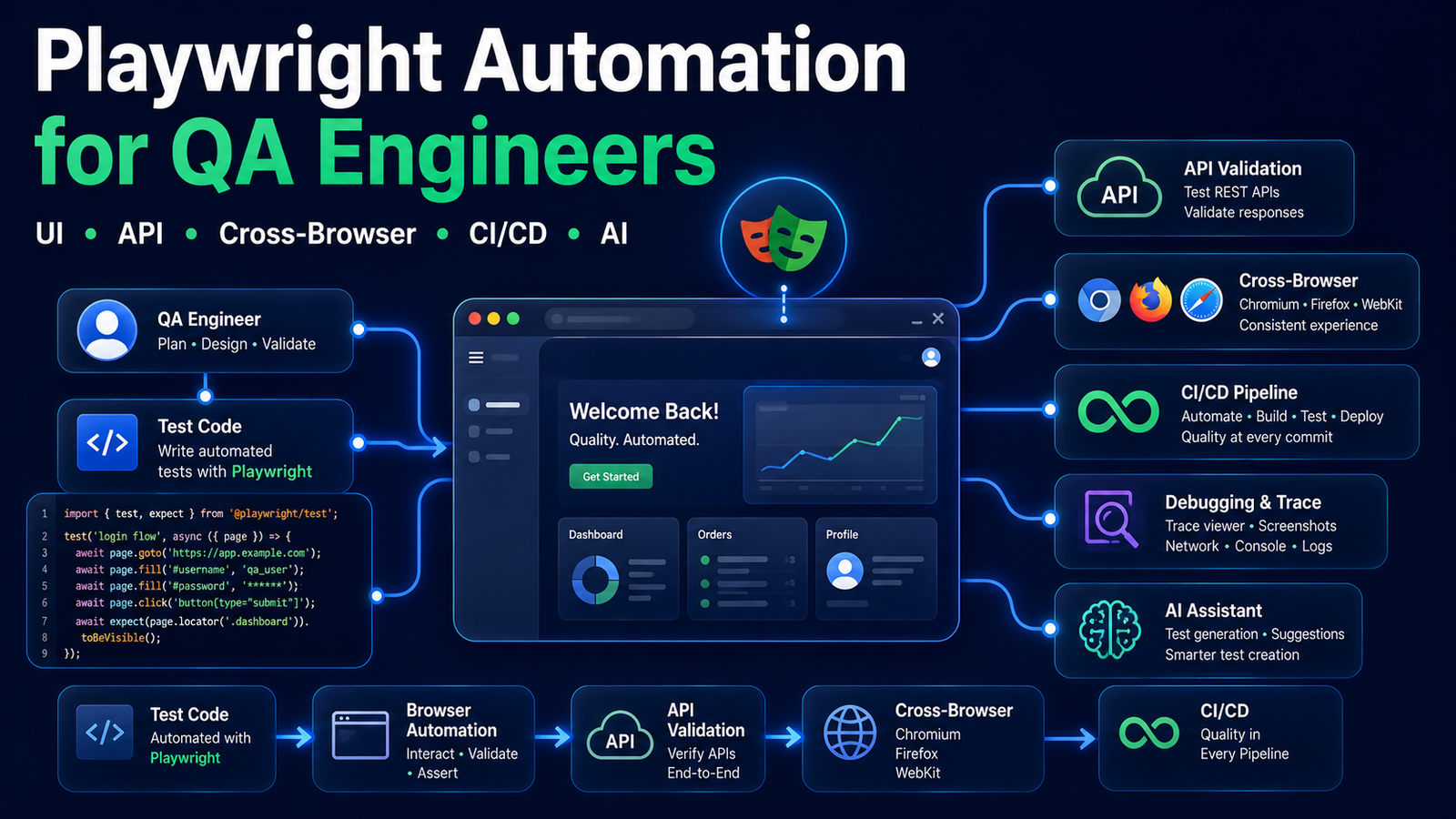
What Is Playwright Automation?
Playwright is an open-source browser automation technology from Microsoft. Its core purpose is automating modern web applications, and the official ecosystem supports Chromium, Firefox, and WebKit.
For QA teams, Playwright can be used for:
- browser UI automation;
- end-to-end web testing;
- cross-browser regression;
- API-assisted setup and backend validation;
- authentication-state workflows;
- screenshots, traces, and other debugging evidence;
- parallel test execution;
- CI/CD pipelines;
- agent-assisted browser workflows.
A useful distinction is that Playwright is not just one thing.
Playwright Library vs Playwright Test
The Playwright library exposes browser automation APIs.
For JavaScript/TypeScript users, Playwright Test adds an integrated test runner with test execution, assertions, parallelisation, reporting, retries, and tracing.
Python, Java, and .NET are officially supported too, but they integrate with their own testing ecosystems such as Pytest, JUnit/TestNG, MSTest, NUnit, or xUnit.
That distinction matters when you choose a language.
Official reference: Playwright documentation
Why QA Engineers Are Learning Playwright
QA engineers are not adopting Playwright because Selenium suddenly stopped being useful.
They are adopting it because Playwright combines several modern browser-automation capabilities into a cohesive workflow.
1. Modern browser automation
Playwright is designed around automating modern web applications and supports Chromium, Firefox, and WebKit.
2. Actionability and automatic waiting
Playwright checks whether an element is ready for an action before performing it. Its assertions can also retry while the expected state is becoming true.
That removes many cases where older automation code relied on arbitrary sleeps.
It does not mean Playwright guarantees zero flaky tests.
Shared data, unstable environments, third-party systems, poor assertions, race conditions, and test design can still create unreliable suites.
3. Test isolation
Playwright Test commonly runs tests in isolated browser contexts.
That helps prevent cookies, local storage, and browser state from leaking between tests.
But browser isolation does not automatically isolate your database, shared user accounts, orders, inventory, or third-party state.
For that, you still need proper test data management.
4. Strong debugging evidence
Playwright supports rich failure investigation through capabilities such as traces, screenshots, reports, and other debugging tools.
This matters because the value of automation is not just finding a failure.
It is helping the team understand why the failure occurred.
5. API + UI workflows
Playwright can call APIs directly using APIRequestContext.
That allows a test to create data through an API, perform only the important browser workflow, and then validate the result through the backend.
That can make end-to-end tests clearer and reduce unnecessary UI setup.
From a QA Engineer’s Perspective
The browser is often the most expensive place to prepare test state.
If an API can create an account, cart, order, or other prerequisite safely, use the API for setup and keep the browser focused on behaviour a real user actually performs.
That is not “less end-to-end.” It is often better test architecture.
What Can Playwright Test?
Playwright is strongest as a web automation platform.
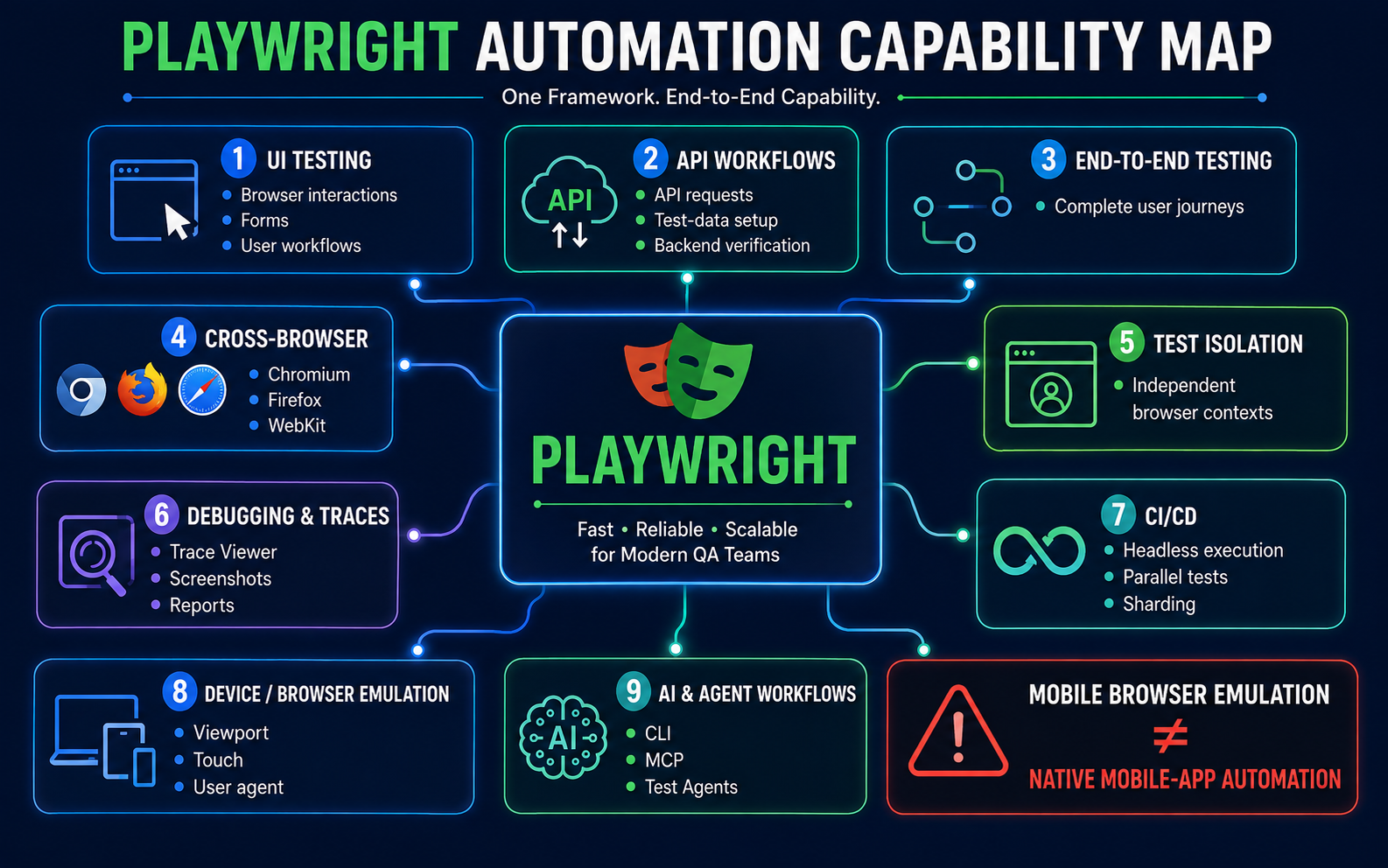
| Capability | Playwright | Important nuance |
|---|---|---|
| Browser UI automation | Yes | Core use case |
| Web end-to-end testing | Yes | Strong fit |
| API testing workflows | Yes | Via API request contexts |
| API setup/cleanup for UI tests | Yes | Useful for test data |
| Cross-browser testing | Yes | Chromium, Firefox, WebKit |
| Multiple programming languages | Yes | TS/JS, Python, Java, .NET |
| Parallel execution | Yes | Depends on runner/configuration |
| Screenshots | Yes | Useful test evidence |
| Video | Yes | Configurable |
| Traces | Yes | Strong debugging capability |
| CI/CD | Yes | Official CI guidance exists |
| Mobile-browser/device emulation | Yes | Emulation of web context/device parameters |
| Native Android/iOS app automation | Not the core scope | Do not treat emulation as native-app automation |
| AI/agent browser control | Yes | Via current CLI/MCP/agent tooling |
Browser support: a wording trap to avoid
Playwright supports WebKit.
That does not mean you should casually say “Playwright runs branded Safari.”
WebKit gives a Safari-like browser-engine environment, especially on macOS, but it is not the same thing as testing the actual branded Safari application.
Likewise, Playwright device emulation can model viewport, user agent, touch, geolocation, and other browser/device characteristics.
That is mobile web testing, not general native Android/iOS application automation.
Official references:
Playwright for UI Testing
UI testing is the use case most people associate with Playwright.
Typical scenarios include:
- login;
- form submission;
- navigation;
- search and filters;
- checkout flows;
- account workflows;
- permissions;
- validation messages;
- cross-browser regression.
The framework can navigate pages, locate user-facing elements, perform interactions, and verify expected results.
The bigger engineering challenge is deciding which user journeys deserve browser automation.
Not every UI test should become an end-to-end test.
If business logic can be tested at the API layer, keep browser automation focused on workflows where the UI actually matters.
For a broader view of how automation should fit into multiple test layers, see Testheon’s modern test strategy.
Can Playwright Do API Testing?
Yes.
Playwright provides APIRequestContext for sending HTTP(S) requests.
QA teams can use it to:
- test application APIs directly;
- create server-side data before a UI test;
- authenticate or prepare state;
- validate backend results after browser interactions;
- clean up test data.
One useful workflow is:
Create test data through API → execute the user-facing browser flow → verify the server-side result.
This reduces unnecessary browser setup while keeping the critical user journey automated.
Official reference: Playwright API testing
Small example: API-assisted UI testing
import { test, expect } from '@playwright/test';

test('API setup -> UI behaviour -> API verification', async ({
  request,
  page,
}) => {
  const create = await request.post('/api/test-orders', {
    data: {
      customer: 'pw01-test-user',
      item: 'QA Handbook',
    },
  });

  expect(create.ok()).toBeTruthy();

  const { id } = await create.json();

  await page.goto(`/orders/${id}`);

  await expect(
    page.getByRole('heading', { name: /QA Handbook/i })
  ).toBeVisible();

  await page.getByRole('button', { name: 'Confirm order' }).click();

  const result = await request.get(`/api/test-orders/${id}`);
  expect(result.ok()).toBeTruthy();

  const body = await result.json();
  expect(body.status).toBe('confirmed');
});
The API endpoints above are illustrative. A real framework still needs proper authentication, data cleanup, isolation, and environment configuration.
A dedicated Testheon Playwright API guide will go deeper later.
Playwright for End-to-End Testing
Playwright is well suited to validating complete web user workflows.
A practical E2E pattern might look like:
- create isolated test data;
- authenticate;
- open the application;
- complete the user workflow;
- verify the visible result;
- validate backend state where useful;
- clean up.
The critical word is isolated.
If ten parallel tests modify the same account or order, browser-context isolation will not save you from data collisions.
That is why strong automation frameworks eventually need deliberate test-data design.
Which Programming Language Should You Use With Playwright?
Playwright officially supports JavaScript/TypeScript, Python, Java, and .NET.
Do not choose a language because an influencer says it is “the best.”
Choose the language that matches your project and team.
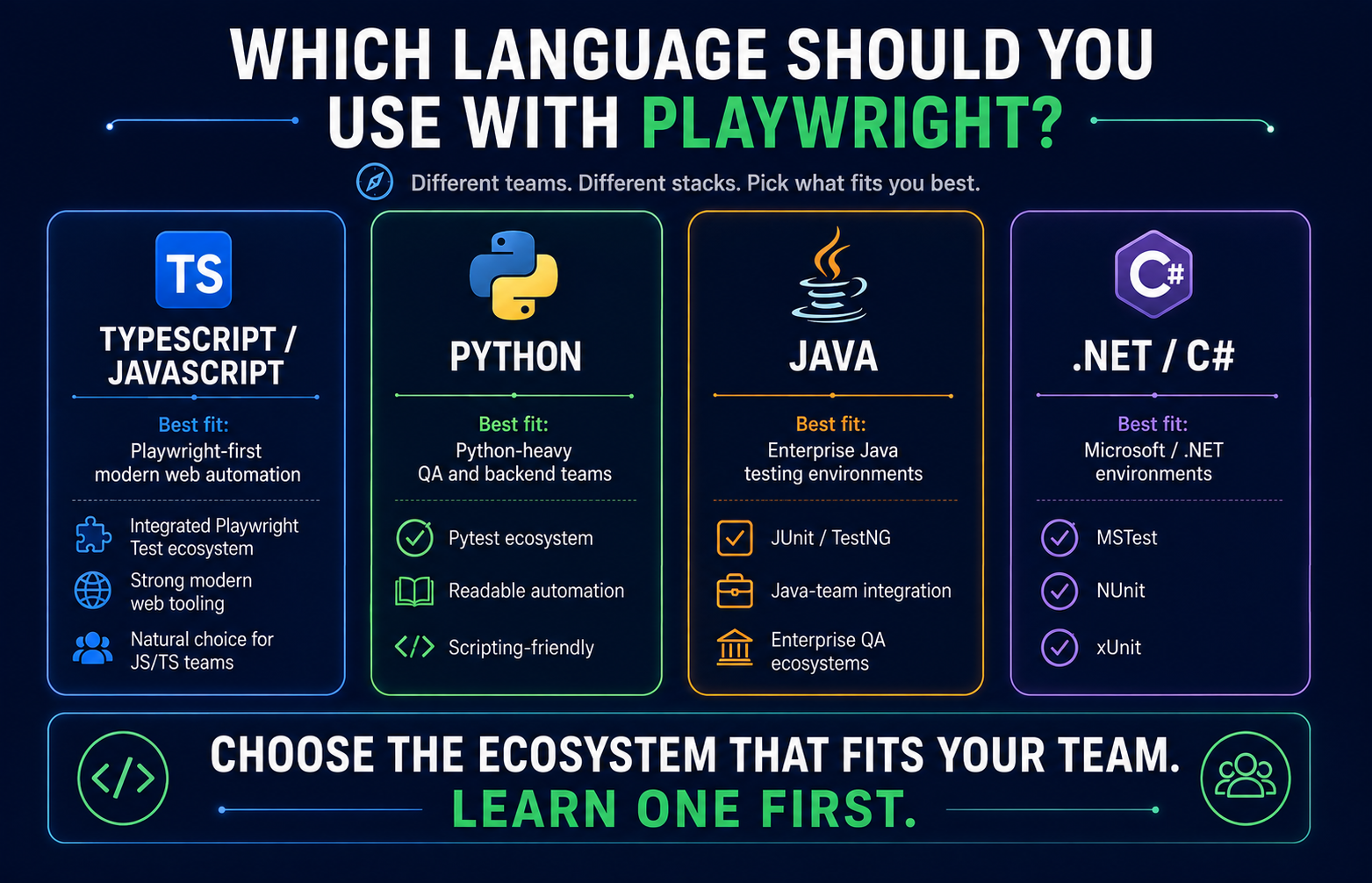
| Your environment | Consider | Why |
|---|---|---|
| Playwright-first modern web automation | TypeScript | Integrated Playwright Test experience |
| Python-heavy QA/backend team | Python | Fits Pytest and scripting ecosystems |
| Java enterprise/test ecosystem | Java | Fits JUnit/TestNG and Java teams |
| Microsoft/.NET ecosystem | .NET | Fits MSTest, NUnit, xUnit environments |
TypeScript / JavaScript
This is the most direct path into the full Playwright Test ecosystem.
For an introductory Testheon example, TypeScript is a good default because the runner, assertions, reporting, and configuration are part of the same first-party experience.
Python
Python is attractive for QA engineers who already use Pytest, scripting, data tooling, or Python-heavy backend systems.
Java
Java is relevant in enterprise environments where QA frameworks already use Java, JUnit, TestNG, REST Assured, or Java backend stacks.
.NET / C#
For Microsoft/.NET teams, Playwright provides official integrations with common .NET testing frameworks.
The important point:
You do not need to learn all four.
Pick one ecosystem and become comfortable with test design, debugging, and maintainability before adding another.
Official reference: Supported Playwright languages
How Do You Get Started With Playwright?
The setup process depends on your language, so this pillar intentionally does not turn into four installation tutorials.
The high-level flow is simple:
- choose your language;
- install its runtime and dependencies;
- install the appropriate Playwright package;
- install required browser binaries;
- create a first test;
- run it;
- inspect the result.
For TypeScript/JavaScript, the current official project bootstrap uses:
npm init playwright@latest
Playwright versions are tied to compatible browser binaries, so browser installation may need to be updated when the framework version changes.
A dedicated Install Playwright guide should own the complete OS/language setup process.
Official reference: Playwright installation
What Does a Playwright Test Look Like?
A first test should teach four concepts:
navigate → locate → interact → assert
import { test, expect } from '@playwright/test';

test('user can add a todo', async ({ page }) => {
  await page.goto('https://demo.playwright.dev/todomvc/');

  const todoInput = page.getByPlaceholder('What needs to be done?');

  await todoInput.fill('Learn Playwright automation');
  await todoInput.press('Enter');

  await expect(
    page.getByText('Learn Playwright automation')
  ).toBeVisible();
});
That is enough for the pillar.
You do not need Page Objects, data factories, fixture architecture, environment management, and CI configuration before understanding a simple test.
Those belong in later stages.
How Playwright Finds Elements
Stable locators are one of the most important ideas in browser automation.
Playwright supports user-facing locator strategies such as:
- roles;
- labels;
- visible text;
- test IDs.
A useful preference order is:
Role / accessible name
        ↓
Label / user-facing text
        ↓
Explicit test ID
        ↓
CSS/XPath when genuinely necessary
This is not because CSS or XPath is automatically “bad.”
The problem is usually selectors that are tightly coupled to implementation details or DOM hierarchy.
A locator that represents the way a user understands the page is often easier to read and maintain.
Official reference: Playwright test generator and locator guidance
A dedicated Playwright Locators guide will go deeper into this.
From Playwright Tests to an Automation Framework
Writing five tests and engineering a framework for hundreds of tests are different skills.
A maintainable Playwright framework eventually needs decisions around:
- folder structure;
- fixtures;
- configuration;
- environments;
- reusable helpers/components;
- authentication;
- test data;
- logging;
- screenshots and traces;
- reports;
- retries;
- parallel execution;
- CI/CD.
Do not over-engineer too early
A common mistake is building a giant framework before the team has enough tests to understand what should actually be reusable.
Start with real scenarios.
Observe duplication.
Create abstractions around repeated, stable concepts.
Isolation is more than a fresh browser
Playwright Test can give each test clean browser state.
That does not automatically create:
- a unique customer;
- a unique order;
- separate inventory;
- isolated backend records.
Parallel automation often exposes bad test-data design before it exposes browser problems.
For deeper guidance, see Test Data Management 2026.
Debugging Playwright Tests
A mature test suite needs good failure evidence.
Playwright supports debugging features such as:
- Trace Viewer;
- screenshots;
- video;
- reports;
- debug workflows.
Trace Viewer is particularly useful because it can help reconstruct what happened around a failure rather than leaving you with only a final error line.
A dedicated Playwright Trace Viewer article will cover this in depth.
Official reference: Playwright Trace Viewer
Running Playwright in CI/CD
Automation becomes far more valuable when it runs automatically as part of software delivery.
Playwright can run in CI pipelines such as:
- GitHub Actions;
- Jenkins;
- other container/VM-based CI systems.
At a pillar level, understand these concepts:
- headless execution;
- browser/dependency installation;
- environment variables;
- secrets;
- reports;
- artifacts;
- retries;
- workers;
- sharding.
Do not begin by memorizing large YAML files.
First understand what your pipeline needs to do:
checkout code → install dependencies → install browsers → run tests → publish evidence → fail or pass the quality gate.
A dedicated Playwright CI/CD article should own provider-specific configuration.
Playwright vs Selenium: Should You Switch?
Playwright and Selenium are both serious browser-automation options.
Neither is universally better.
| Factor | Playwright | Selenium |
|---|---|---|
| Browser automation model | Playwright APIs | W3C WebDriver ecosystem |
| Language support | TS/JS, Python, Java, .NET | Broad established bindings |
| Waiting model | Actionability + web-first assertions | Explicit/implicit wait patterns |
| Integrated Node runner | Playwright Test | Usually paired with separate test framework |
| Debugging | Traces, reports, screenshots, etc. | Depends on framework/tooling stack |
| Distributed execution | Workers + CI sharding | Selenium Grid is a mature distributed option |
| Best fit | Many modern web automation projects | Existing WebDriver estates, enterprise frameworks, Grid-heavy environments |
A new team may prefer Playwright because its modern testing stack is cohesive.
An established Selenium team may have:
- years of useful coverage;
- strong framework architecture;
- infrastructure;
- skilled engineers;
- integration with other systems.
Throwing that away because another API looks cleaner can be a bad engineering decision.
From a QA Engineer’s Perspective
Migration cost is a testing requirement.
Do not ask only:
Which framework looks better?
Also ask:
What risk, time, retraining, infrastructure work, and coverage loss will migration create?
A dedicated Playwright vs Selenium article will examine this separately.
Official Selenium reference: Selenium WebDriver
Playwright, CLI, MCP, and AI Test Agents
This is where Playwright’s 2026 ecosystem becomes especially interesting.
The modern stack is broader than traditional browser automation.
At a high level:
Deterministic test suite
→ Playwright Test

Coding agent controlling browser
→ Playwright CLI

Persistent / specialised agent integration
→ Playwright MCP

AI-assisted planning / generation / healing
→ Playwright Test Agents
These are not interchangeable.
Playwright CLI
Playwright now provides agent-oriented CLI tooling intended for coding-agent browser workflows.
The key idea is that a coding agent can control and inspect a browser using concise commands while working inside a codebase.
Playwright MCP
Playwright MCP exposes browser-control capabilities to MCP-compatible AI clients.
This can be useful when an agent needs structured browser tools during exploratory or persistent workflows.
MCP is not a replacement for committed Playwright Test suites.
It is another interface for agent-driven browser interaction.
Playwright Test Agents
Official Playwright Test Agents currently include concepts such as:
- Planner — explores and produces a test plan;
- Generator — turns plans into executable tests;
- Healer — investigates failing tests and can propose changes.
That can accelerate parts of automation.
It does not remove the need for QA review.
A healer making a test green is not proof that the application is correct.
If the healer weakens the expected result or changes the intended business behaviour, the “fixed” test may now be wrong.
This topic will get dedicated Testheon articles because the tooling is changing rapidly.
Official references:
⚡ AI Shortcut: Turn a User Story Into a Playwright Automation Plan
A QA engineer can spend substantial time reading a requirement, identifying risks, deciding which scenarios belong in UI automation, which should stay at API level, and what test data each scenario needs.
AI can create the first draft of that analysis quickly.
The QA engineer should still own the final test strategy.
📋 Copy this ChatGPT / Claude prompt
You are assisting a QA engineer who is deciding what to automate
with Playwright.

APPLICATION CONTEXT
[Describe the web application and user role.]

USER STORY / REQUIREMENT
[Paste the requirement.]

ACCEPTANCE CRITERIA
[Paste acceptance criteria.]

KNOWN CONSTRAINTS
- Target browsers: [Chromium / Firefox / WebKit / branded browsers]
- Authentication model: [describe]
- APIs available for test setup: [describe or "unknown"]
- Test-data limitations: [describe]
- External integrations: [describe]
- CI environment: [describe or "unknown"]

TASK

Create a first-pass Playwright automation test plan.

Do not generate Playwright code yet.

For each scenario provide:

1. Scenario name.
2. Business risk covered.
3. Preconditions.
4. Required test data.
5. Happy path, negative, boundary, permission, and state-transition
   coverage where relevant.
6. Whether the scenario should be:
   - browser/UI automation,
   - API-level automation,
   - combined API setup + UI verification,
   - manual/exploratory,
   - or out of scope for Playwright.
7. Expected result.
8. Browser/cross-browser relevance.
9. Isolation or cleanup requirement.
10. Reason the scenario is or is not a good automation candidate.

Then produce:

A. A prioritised P0/P1/P2 automation matrix.
B. Duplicated or low-value scenarios to remove.
C. Missing requirement questions the QA engineer must clarify.
D. Risks that Playwright automation alone will not validate.
E. A recommended minimal smoke suite.
F. A broader regression suite.

Rules:
- Do not assume Playwright can automate native mobile apps.
- Do not invent APIs or database access.
- Prefer API setup when it makes browser tests more isolated,
  but mark the API as "needs verification" if it was not provided.
- Do not treat generated scenarios as approved requirements.
- Explicitly call out security, performance, accessibility, or
  exploratory risks that need separate testing disciplines.
Human Verification Checklist
Before turning AI output into automation work, verify:
- expected results match the actual acceptance criteria;
- the model did not invent application behaviour;
- suggested APIs really exist;
- user roles and permissions are correct;
- test data is actually available;
- duplicate scenarios are removed;
- important business risks are not missing;
- UI automation is not being used where API/component/manual testing would be better.
That review step is the difference between AI-assisted QA and blindly generated tests.
For more AI-focused testing workflows, see AI Testing Tools 2026.
What Playwright Does Not Automatically Solve
Playwright is powerful, but it is still a tool.
It does not automatically give you:
Good test design
A framework can execute a bad test perfectly.
Correct assertions
A green test can still assert the wrong thing.
Perfect test data
Browser isolation does not reset your database.
Zero flaky tests
Auto-waiting helps with timing problems, not every nondeterministic system behaviour.
Maintainable architecture
You can still build an unreadable Playwright framework.
Environment stability
A broken API, database, queue, third-party integration, or CI agent can still fail the suite.
Complete test coverage
More automated tests do not automatically mean more meaningful risk coverage.
Performance or security testing
Playwright browser workflows are not a replacement for specialist performance and security testing.
Exploratory testing
Automation checks expected behaviour. Humans still discover unexpected risks.
Native mobile automation
Device emulation is not the same as native Android/iOS automation.
That realism is important.
A good QA engineer chooses the right tool for the risk rather than forcing one tool into every testing problem.
Who Should Learn Playwright?
Manual QA engineers
Learn Playwright if you want to move toward automation, but build basic programming, HTTP/API, and web-application understanding first.
Selenium automation engineers
Playwright is worth learning because it exposes a different modern automation model.
You do not have to rewrite your existing framework immediately.
API-focused QA engineers
Playwright becomes useful when you want to combine API setup/verification with browser workflows.
SDETs
Playwright is relevant for framework design, fixtures, CI/CD, test-data architecture, and agent-assisted workflows.
QA leads
You do not need to write every test, but you should understand where Playwright fits into the overall test strategy and what migration or adoption would cost.
For broader QA skill sequencing, connect this series with the Testheon QA roadmap when the page is live and verified.
How Should a QA Engineer Learn Playwright?
Do not learn Playwright as a random collection of commands.
Learn it in layers.
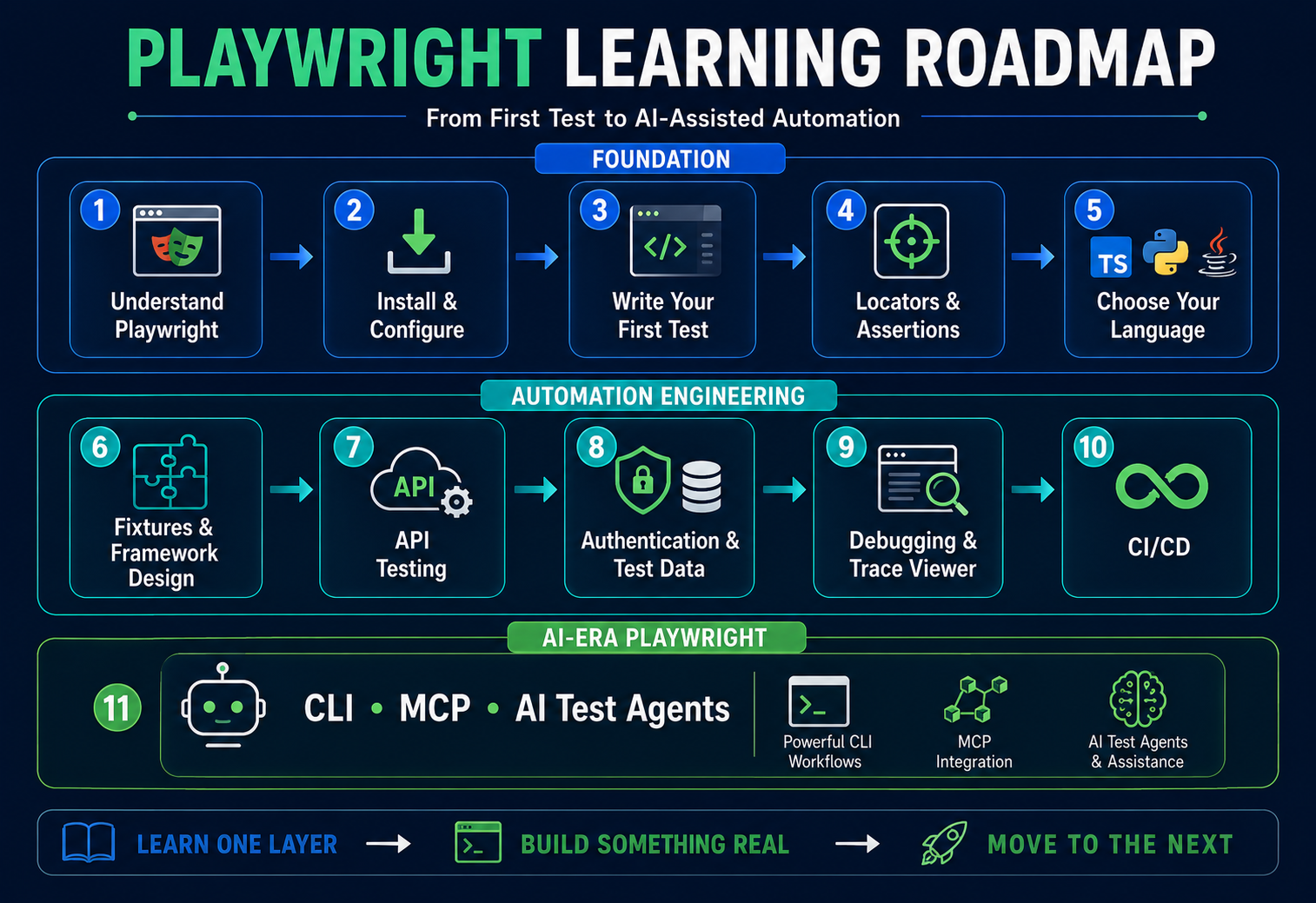
Recommended sequence
- Understand what Playwright is.
- Install it correctly.
- Write one simple test.
- Learn locators and assertions.
- Become comfortable with one language ecosystem.
- Learn fixtures and configuration.
- Build maintainable project structure.
- Add API workflows.
- Handle authentication and test data.
- Debug using traces and reports.
- Run the suite in CI/CD.
- Explore Playwright CLI, MCP, and AI Test Agents.
You do not need to master all twelve stages in the first week.
A much better approach is:
Learn one layer, build something real, then add the next layer.
Testheon Playwright Learning Series
PW-01 is the parent article for a complete Playwright series.
As the child guides are published, this section should become the navigation hub.
Foundation
- Playwright Automation — Complete Guide for QA Engineers — this article
- Install Playwright
- Playwright Tutorial
- Playwright Python
- Playwright TypeScript
- Playwright Java
Core Automation
- Playwright Locators
- Playwright Automation Framework
- Playwright vs Selenium
- Playwright API Testing
- Playwright Authentication
- Playwright E2E Testing
- Playwright Interview Questions
Advanced / AI Era
- Playwright MCP
- Playwright AI
- Playwright Test Agents
- Playwright Fixtures
- Playwright Trace Viewer
- Playwright Visual Testing
- Playwright CI/CD
Frequently Asked Questions
What is Playwright automation?
Playwright automation uses Microsoft’s open-source browser automation framework to test modern web applications across Chromium, Firefox, and WebKit. QA teams can use it for UI and end-to-end tests, API-assisted workflows, cross-browser checks, debugging, and CI/CD.
Is Playwright a testing tool?
Yes. More precisely, Playwright includes browser automation libraries, and its JavaScript/TypeScript ecosystem includes the Playwright Test framework and runner.
Is Playwright easy to learn?
Playwright reduces some browser-automation boilerplate through integrated tooling and automatic actionability checks, but you still need programming basics, web concepts, assertions, and good test design.
Which language is best for Playwright?
There is no universal winner. TypeScript gives the integrated Playwright Test experience, Python fits Pytest teams, Java fits JUnit/TestNG environments, and .NET fits Microsoft ecosystems.
Can Playwright be used with Java?
Yes. Java is officially supported and can be integrated with Java testing frameworks such as JUnit or TestNG.
Can Playwright be used with Python?
Yes. Playwright officially supports Python, including Pytest integration for end-to-end testing.
Is Playwright only for UI testing?
No. Playwright can send API requests and combine API setup/verification with browser workflows.
Can Playwright test APIs?
Yes. APIRequestContext can test APIs directly, create setup data, and validate backend state around UI tests.
Is Playwright better than Selenium?
Not universally. Playwright provides an integrated modern testing ecosystem, while Selenium remains highly relevant for existing WebDriver frameworks, distributed Grid use cases, and organisations with significant existing investment.
Does Playwright support mobile testing?
Playwright supports mobile-browser/device emulation. That should not be confused with general native Android or iOS application automation.
What browsers does Playwright support?
Playwright supports Chromium, Firefox, and WebKit. It can also work with selected branded Chromium channels such as Chrome or Edge.
Can Playwright run in CI/CD?
Yes. Playwright provides official CI guidance and can run headlessly with reports, artifacts, parallel workers, and sharding depending on the setup.
What is Playwright MCP?
Playwright MCP exposes browser automation capabilities to MCP-compatible AI clients so an agent can inspect and interact with web pages using structured browser information.
Does Playwright use AI?
Traditional Playwright tests do not require AI. The wider ecosystem now includes agent-oriented CLI/MCP workflows and official Test Agents for planning, generating, and healing tests.
Is Playwright good for QA engineers?
Yes, especially for QA engineers working on modern web applications, UI/API workflows, cross-browser regression, CI/CD, and maintainable automation. It still requires sound test design and QA judgment.
Final Takeaway
Playwright is not valuable because it gives you another syntax for clicking buttons.
It is valuable because it can connect several important parts of modern QA engineering:
browser workflows + APIs + isolation + debugging + CI/CD + agent-assisted automation.
The best way to learn it is not to memorize every API.
Start with:
one language → one test → stable locators → API/UI thinking → maintainability → CI/CD → advanced AI/agent workflows.
And keep one principle throughout the entire series:
The automation framework can execute your decisions. It cannot make good quality decisions for you.
Pingback: Playwright Visual Testing: Screenshot Regression Guide
Pingback: Playwright CI/CD: GitHub Actions, Jenkins & Sharding