
Playwright CI/CD turns a local browser suite into a repeatable quality gate. A reliable pipeline installs the locked Node dependencies and matching browser dependencies, runs tests headlessly on a known runner, scales deliberately with workers or shards, and preserves reports, traces and screenshots when something fails. The YAML or Jenkinsfile is only one part; isolation and evidence make the result trustworthy.
This guide uses Playwright Test with TypeScript and covers GitHub Actions and Jenkins. It assumes the tests already run locally. If you need that foundation first, begin with the Playwright automation guide. For repository structure and environment configuration, use the Playwright framework guide.
npm ci install and npx playwright install --with-deps. Add a small retry policy and a trace on the first retry. When the suite is stable and its data is isolated, scale across CI jobs with --shard=x/y, merge blob reports, and retain one reviewable HTML report.
How a Playwright CI/CD pipeline works
A useful pipeline has five contracts. Each one answers a different failure question.
| Contract | What the pipeline controls | Failure it prevents |
|---|---|---|
| Runner | OS, Node version, browser libraries and fonts | “Works on my machine” environment drift |
| Install | Lockfile, Playwright package and browser binaries | Unreviewed dependency or browser changes |
| Execution | Projects, workers, shards, timeouts and retries | Resource contention and hidden flaky behavior |
| Evidence | JUnit, HTML, traces, screenshots and videos | A red job with no practical diagnosis path |
| Retention | Where artifacts live, who can read them and for how long | Missing evidence or unnecessary exposure of sensitive data |
The official Playwright CI guide gives the minimal sequence: ensure the agent can run browsers, install packages with npm ci, install browsers and operating-system dependencies with npx playwright install --with-deps, then run npx playwright test. Playwright launches browsers headlessly by default, so a normal CI job does not need a display server.
Headed execution on Linux requires Xvfb. Keep that as a focused diagnostic lane when visual observation is genuinely needed; do not make headed mode the default simply to resemble a developer laptop.
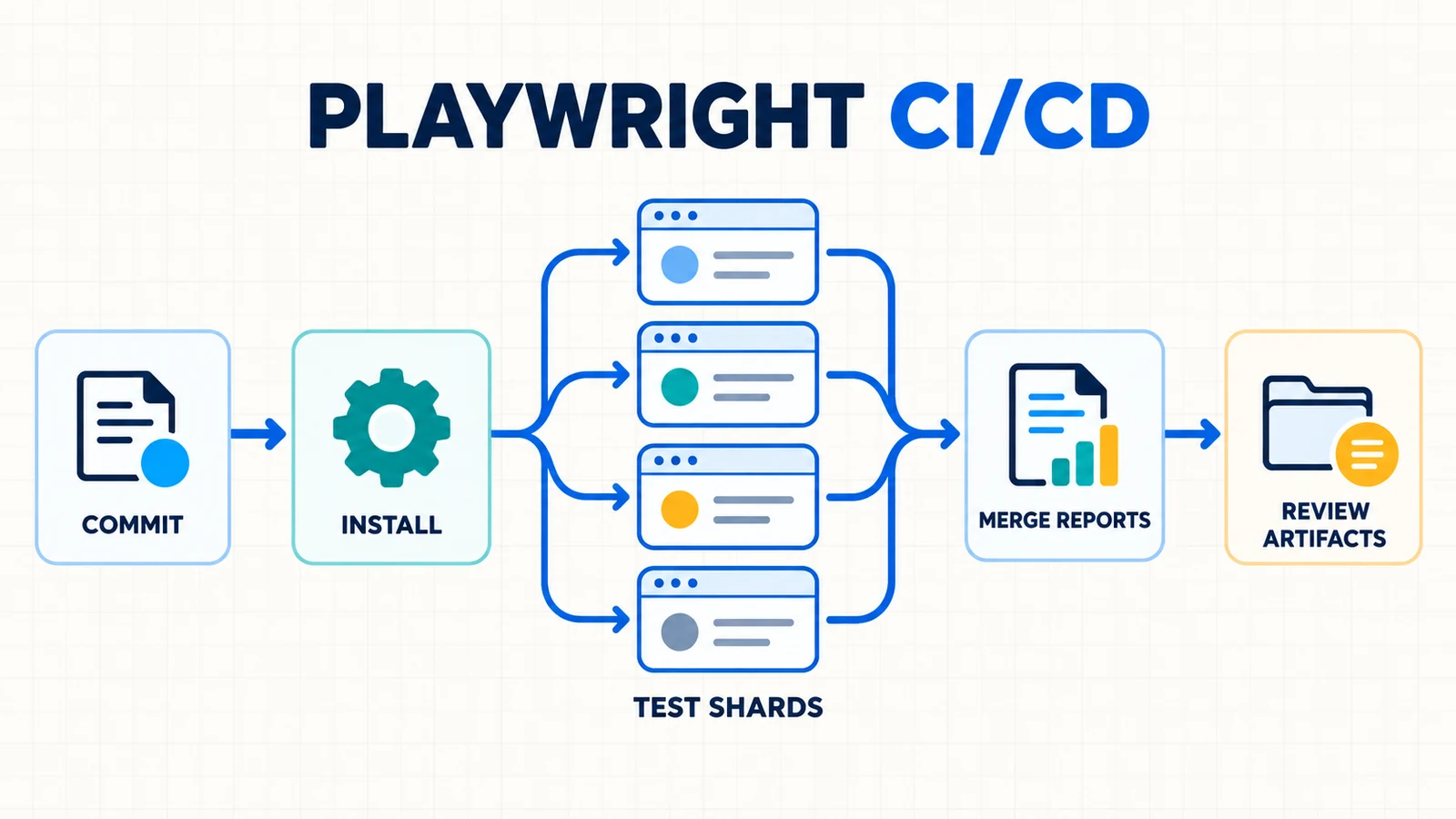
Prepare Playwright for headless pipeline execution
A lockfile is part of the test environment. Commit it, use npm ci in automation, and review dependency upgrades. An ordinary Linux runner can install the exact browsers and host libraries required by the repository:
npm ci
npx playwright install --with-deps
npx playwright test
A version-matched Playwright Docker image is another option, especially for self-managed Jenkins agents or stable screenshot baselines. Replace X.Y.Z with the version compatible with the repository’s installed @playwright/test package:
mcr.microsoft.com/playwright:vX.Y.Z-nobleDo not float the image independently of the package. A mismatch can leave the runner without the expected browser executable or silently change browser behavior. Pinning the environment is especially important for the Playwright visual testing workflow, where the OS, browser, fonts and rendering path affect pixels.
Do not treat browser caching as the default optimization
Playwright’s CI documentation does not recommend caching browser binaries by default: restoring that cache can take about as long as downloading the browsers, and Linux operating-system dependencies still need installation. Cache package-manager downloads when that produces measured value, but do not confuse a dependency cache with a test artifact. A cache speeds another run; an artifact preserves evidence from this run.
Use one CI-aware Playwright configuration
Keep the runner rules in version control instead of scattering flags across provider files. This example uses blob output for GitHub shards, JUnit plus HTML for Jenkins, and an ordinary HTML report for local runs:
import { defineConfig } from '@playwright/test';

const isCI = Boolean(process.env.CI);
const isJenkins = Boolean(process.env.JENKINS_URL);

export default defineConfig({
  testDir: './tests',
  fullyParallel: true,
  forbidOnly: isCI,
  retries: isCI ? 2 : 0,
  workers: isCI ? 1 : undefined,

  reporter: isCI
    ? isJenkins
      ? [
          ['line'],
          ['junit', { outputFile: 'test-results/junit.xml' }],
          ['html', { open: 'never' }],
        ]
      : [['blob']]
    : [['html', { open: 'never' }]],

  use: {
    trace: 'on-first-retry',
    screenshot: 'only-on-failure',
    video: 'retain-on-failure',
  },
});
forbidOnly blocks an accidentally committed test.only. Two retries are an example policy, not a universal target. The official default is no retries. A test that fails first and passes on retry is classified as flaky; the team should track and fix that signal rather than call the run fully healthy.
The trace setting follows Playwright’s CI recommendation: capture on the first retry. Tracing every test is expensive and creates a large sensitive artifact set. A retained screenshot or video can add context, but the Playwright Trace Viewer usually gives the strongest failure evidence because it connects actions, DOM snapshots, network, console and source.
GitHub Actions: run Playwright in four shards
The following workflow follows the current official Playwright sharding pattern. Four matrix jobs run independently, each uploads a uniquely named blob report, and a final job merges the blobs into one HTML report. fail-fast: false lets all shards finish so one early failure does not erase evidence from the rest of the suite.
name: Playwright Tests

on:
  push:
    branches: [main]
  pull_request:
    branches: [main]

jobs:
  playwright-tests:
    timeout-minutes: 60
    runs-on: ubuntu-latest
    strategy:
      fail-fast: false
      matrix:
        shardIndex: [1, 2, 3, 4]
        shardTotal: [4]

    steps:
      - uses: actions/checkout@v6

      - uses: actions/setup-node@v6
        with:
          node-version: lts/*

      - name: Install dependencies
        run: npm ci

      - name: Install Playwright browsers
        run: npx playwright install --with-deps

      - name: Run Playwright shard
        run: >-
          npx playwright test
          --shard=${{ matrix.shardIndex }}/${{ matrix.shardTotal }}

      - name: Upload blob report
        if: ${{ !cancelled() }}
        uses: actions/upload-artifact@v4
        with:
          name: blob-report-${{ matrix.shardIndex }}
          path: blob-report
          retention-days: 1

  merge-reports:
    if: ${{ !cancelled() }}
    needs: [playwright-tests]
    runs-on: ubuntu-latest

    steps:
      - uses: actions/checkout@v6

      - uses: actions/setup-node@v6
        with:
          node-version: lts/*

      - name: Install dependencies
        run: npm ci

      - name: Download blob reports
        uses: actions/download-artifact@v5
        with:
          path: all-blob-reports
          pattern: blob-report-*
          merge-multiple: true

      - name: Merge Playwright reports
        run: >-
          npx playwright merge-reports
          --reporter html
          ./all-blob-reports

      - name: Upload merged HTML report
        uses: actions/upload-artifact@v4
        with:
          name: playwright-report-${{ github.run_attempt }}
          path: playwright-report
          retention-days: 14
The shard blob files include the shard identity, so they can share one download directory without clashing. The merge command creates the standard playwright-report directory. Uploading intermediate blobs for one day and the human-readable report for 14 days is a sensible example split; adjust it to incident-response, audit and data-classification needs.
GitHub supports repository and organization retention limits, so a workflow’s retention-days cannot exceed the governing policy. Artifact action major versions also change over time. Recheck the official Playwright sharding example and GitHub artifact guidance when adopting this workflow.
When should you change the shard count?
Do not assume twice as many shards halves the total feedback time. Measure queue delay, install time, test duration, merge time and runner cost. Increase shards when test execution dominates and jobs start promptly. Reduce them when setup or queue time dominates, or when the application under test cannot support the resulting load.
If an organization limits concurrent matrix jobs, GitHub Actions also supports strategy.max-parallel. That controls how many generated jobs run at once; it does not change the Playwright shard definition. Keep shardTotal aligned with the number of shard identities even when runner availability serializes some jobs.
Jenkins: run Playwright in a controlled Docker agent
Jenkins is a strong fit when a team owns its build agents, network routes and credential integrations. That control also means the team owns Docker availability, plugins, agent capacity and image updates. The official Playwright CI guide demonstrates a Jenkins Docker agent; Jenkins requires the Docker Pipeline plugin for this Declarative syntax.
This production-oriented baseline adds a timeout, retention policy, JUnit result publishing and failure artifacts. Replace the image placeholder with the Playwright version matching the repository package:
pipeline {
  agent {
    docker {
      image 'mcr.microsoft.com/playwright:vX.Y.Z-noble'
    }
  }

  options {
    timeout(time: 60, unit: 'MINUTES')
    buildDiscarder(logRotator(numToKeepStr: '30'))
  }

  environment {
    CI = 'true'
  }

  stages {
    stage('Install') {
      steps {
        sh 'npm ci'
      }
    }

    stage('Playwright E2E') {
      steps {
        sh 'npx playwright test'
      }
    }
  }

  post {
    always {
      junit allowEmptyResults: true,
        testResults: 'test-results/junit.xml'

      archiveArtifacts allowEmptyArchive: true,
        artifacts: 'playwright-report/**,test-results/**'
    }
  }
}
The Jenkins environment normally exposes JENKINS_URL, so the earlier Playwright configuration selects line, JUnit and HTML reporters. The post { always { ... } } block runs whether the test stage passes or fails. That detail matters: a report uploaded only on success is least available when engineers need it.
junit gives Jenkins structured test history rather than a wall of console text. archiveArtifacts preserves the HTML report and test attachments with the retained build. Jenkins documents build artifacts as basic reporting and archival—not a replacement for an external artifact repository when volume, lifecycle or compliance requirements demand one.
How to shard on Jenkins
The Playwright command does not change:
npx playwright test --shard=1/4
npx playwright test --shard=2/4
npx playwright test --shard=3/4
npx playwright test --shard=4/4
Run those commands as parallel Jenkins stages or generated jobs on separate agents, not four processes competing blindly on one small node. Give each branch a distinct blob artifact, gather the blobs in a merge stage, and run npx playwright merge-reports --reporter html. Jenkins installations vary in controller topology, agents and plugins, so keep the provider orchestration local while preserving the same Playwright contract used in GitHub Actions.
Workers versus sharding: choose the right parallelism
A worker and a shard are not synonyms. Playwright workers are operating-system processes on one machine. Shards divide the suite across separate CI jobs or machines. A shard can itself use multiple workers.
| Control | Resource boundary | Best first use | Main risk |
|---|---|---|---|
workers: 1 |
One runner, sequential worker capacity | Stable CI baseline and diagnosis | Long elapsed time for a large suite |
| Multiple workers | CPU and memory on one runner | Powerful self-hosted agent with isolated tests | Browser/resource contention |
--shard=x/y |
Multiple CI jobs or machines | Scaling a stable suite horizontally | Queue cost, imbalance and shared backend load |
fullyParallel: true |
Individual tests eligible for distribution | More even shard balance | Exposes hidden test dependencies |
Official Playwright CI guidance recommends one worker for stability and reproducibility, then suggests sharding for wider parallelization. That is a good default. A two-core hosted runner with four busy browser workers may be slower and less predictable than one worker. More concurrency is valuable only when the agent and application under test can support it.
With fullyParallel: true, Playwright can balance individual tests across shards. Without it, sharding uses file-level granularity, and one very large spec can become the long tail. Fully parallel execution is not a free switch: tests must stop relying on another test’s order or shared side effects.
Isolate data before increasing concurrency
BrowserContext isolation keeps cookies and in-memory browser state separate. It does not isolate a shared account, order, file, mailbox or database row. Two tests editing the same record can race even when their pages are perfectly isolated.
- Create unique data from the test or worker identity.
- Use dedicated accounts per worker when workflows mutate account state.
- Write files through test-scoped output paths.
- Make cleanup idempotent so retrying setup does not corrupt the environment.
- Protect truly singleton resources with an explicit serial lane or lock.
The Playwright fixtures guide owns reusable test- and worker-scoped setup. Fixing data ownership there is more durable than lowering concurrency whenever a race appears.
Set a retry policy that exposes flakiness
Playwright retries a failed test in a fresh worker process. That protects later tests from the failed worker’s browser and in-memory state. It does not roll back the application database or external services. Cleanup and unique data still matter.
Use a small CI-only retry count to collect diagnostic evidence and separate deterministic failures from intermittent behavior. Then treat all three result classes deliberately:
- Passed: succeeded on the first run.
- Flaky: failed first, then passed on a retry.
- Failed: exhausted the configured retries.
A flaky result should create work, ownership and a deadline. If the dashboard collapses flaky into green, retries become a masking system. Do not add retries to compensate for missing assertions, arbitrary timeouts, environment shortages or shared test data.
For a catastrophically broken environment, consider Playwright’s maxFailures or the CLI --max-failures option to stop wasting runners after a chosen number of failures. Pick that number from suite size and triage value, not from a copied template.
Design reports and artifact retention for investigation
A useful CI failure must answer: which commit, environment, browser project, shard, attempt and assertion failed—and what did the application do immediately before it failed?
| Evidence | Purpose | Retention approach |
|---|---|---|
| JUnit XML | Provider-native test counts, history and failed cases | Follow build/report history policy |
| Blob report | Mergeable shard result plus attachments | Short-lived after successful merge |
| HTML report | Human review of the complete run | Long enough for normal triage and review |
| Trace | Actions, DOM snapshots, network, console and source | First retry or failed runs; restrict access |
| Screenshot/video | Visual symptom and temporal context | Failure-only unless a documented need exists |
Upload evidence on failure, not only on success. In GitHub Actions, if: ${{ !cancelled() }} keeps the artifact step eligible after a failed test command. In Jenkins, post { always } provides the same intent. A cancelled run may be incomplete, so treating cancellation separately is reasonable.
Artifacts can contain internal URLs, source snippets, request payloads, user names and screenshots. Traces may expose more application context than a console log. Use synthetic test data, private artifact stores, access controls and the shortest useful retention. Never archive storage-state files, cookies, raw tokens, secret files or credential output.
Investigate a failed Playwright pipeline in order
- Classify the layer. Did checkout/install fail, could the browser launch, was the application unavailable, or did a test assertion fail?
- Record identity. Note commit SHA, environment, Playwright project, shard and retry attempt.
- Find the first meaningful error. Ignore the cascade caused by an earlier setup or navigation failure.
- Open the merged report. Use the test attachment and trace rather than relying on the provider log alone.
- Compare attempts. A retry-only pass points to flakiness, contention or shared state—not success.
- Reproduce narrowly. Run the smallest test and project with the same environment and config.
- Fix the owning layer. Separate a product defect from a test defect, data race or runner drift.
- Rerun the normal path. Prove the fix without debug-only flags or hidden state.
The real-world Playwright E2E guide shows how setup, UI actions, backend validation and cleanup fit together. CI should execute that workflow consistently, not replace its assertions with a green process exit.
GitHub Actions or Jenkins for Playwright?
GitHub Actions gives a repository-native matrix, simple pull-request integration and managed artifact actions. Jenkins gives self-managed agents, network placement, plugins and deep enterprise integration. Neither provider makes a weak suite reliable.
| Question | GitHub Actions tends to fit | Jenkins tends to fit |
|---|---|---|
| Where is the code? | GitHub repository and pull-request workflow | Mixed SCM or established internal pipelines |
| Who manages agents? | GitHub-hosted or standardized self-hosted runners | Platform team owns custom agents and networks |
| How is sharding expressed? | Matrix jobs and a merge job | Parallel stages/jobs designed for the local estate |
| How are results stored? | Workflow artifacts and checks | JUnit history, archived artifacts or external store |
| Main operating burden | Workflow/action lifecycle and runner spend | Controller, plugins, agents, images and capacity |
Keep the Playwright layer portable: one lockfile, one versioned config, the same test command, isolated data and standard outputs. Provider files should schedule that contract, supply approved secrets and transport evidence.
Common Playwright CI/CD anti-patterns
- Starting with maximum parallelism. Establish a stable one-worker baseline before measuring workers and shards.
- Floating the runner. Unreviewed Node, browser, image or font changes create diagnostic noise.
- Caching everything. Browser caches may not save time and do not provide OS dependencies.
- Retrying until green. High retry counts hide ownership and waste runner capacity.
- Uploading only on success. The failure evidence disappears exactly when needed.
- Keeping every artifact forever. Cost and data exposure increase without proportional QA value.
- Sharing one mutable account. Parallel tests race on server-side state even with isolated browser contexts.
- Printing secrets for debugging. Masked logs are not a license to echo credentials or storage state.
Use AI to triage CI evidence, not declare quality
A repository-aware coding agent can compare a redacted pipeline log with the Playwright config, failed test and trace summary, then propose the smallest diagnostic step. It should not rotate secrets, change infrastructure, raise retries or delete evidence without human authority.
📋 Copy this Playwright CI failure-triage prompt
Review this Playwright CI failure.

Inputs I will provide:
- redacted provider log and failed test output;
- Playwright config and relevant workflow/Jenkinsfile section;
- commit, project, shard, attempt and runner metadata;
- redacted HTML-report or trace observations.

Tasks:
1. Classify the failure layer: install, browser launch, application,
   test code, product behavior, shared data, resource contention,
   reporter/artifact handling or unknown.
2. Cite evidence for and against each plausible cause.
3. Propose the smallest read-only diagnostic action first.
4. Separate product fixes, test fixes and CI-infrastructure fixes.
5. Do not increase retries, add fixed sleeps, disable assertions,
   expose secrets or invent Playwright/provider APIs to make it green.
6. Flag commands or syntax that need current official verification.

Output:
- classification and confidence;
- evidence table;
- minimal reproduction plan;
- proposed fix, if justified;
- validation and rollback checks.
Before sharing evidence with an external AI service, remove tokens, cookies, storage state, private URLs, customer data and confidential source unless the organization explicitly approves that data flow. A QA engineer must inspect the original artifacts, verify suggested syntax against current official documentation and rerun the focused test in the same controlled environment.
Playwright CI/CD FAQ
Does Playwright run headless in CI by default?
Yes. Playwright launches browsers headlessly by default. Headed Linux runs need Xvfb and are better treated as a focused diagnostic option than the standard pipeline mode.
How many Playwright workers should CI use?
Start with one worker for stability, as the official CI guide recommends. Increase workers only on agents with measured CPU and memory headroom and after tests and backend data are isolated.
What is the difference between Playwright workers and shards?
Workers are parallel Playwright processes on one runner. Shards divide the suite across multiple CI jobs or machines using --shard=x/y. Each shard may still use one or more workers.
How do I merge Playwright reports from parallel jobs?
Configure the blob reporter on CI, upload each shard’s blob output, download all blobs into one directory, then run npx playwright merge-reports --reporter html ./all-blob-reports.
Should Playwright retry failed tests in CI?
A small CI-only retry count can distinguish deterministic failures from intermittent behavior and capture a first-retry trace. Treat a retry-only pass as flaky work, not as an ordinary green result.
How long should Playwright artifacts be retained?
Retain intermediate blob reports only long enough to merge them. Keep the merged HTML report and failure evidence long enough for normal investigation, while considering cost, privacy and organizational retention rules.
Build the pipeline in the right order
First make one clean runner boring: locked dependencies, matching browsers, one worker, deterministic data and a useful failure trace. Then add provider-native reports and retention. Only after that should you shard the suite and tune concurrency.
This order preserves trust while reducing feedback time. A fast pipeline without isolation produces faster uncertainty; a stable pipeline with merged evidence gives the team a quality gate it can explain. Return to the Playwright automation hub for the broader learning path.