
Playwright AI is not a separate Playwright package. It is a practical way to use a generative-AI assistant around Playwright work: turning requirements into test ideas, drafting test code, reviewing automation, and diagnosing failures. The assistant proposes; Playwright executes; a QA engineer decides whether the result is correct.
That last boundary matters. AI can produce convincing TypeScript that compiles and passes while checking the wrong outcome. A reliable workflow therefore keeps the test oracle—the rule that says what should happen—independent of the generated code and validates every suggestion with runtime evidence.
What does “Playwright AI” mean?
In this guide, Playwright AI means human-directed use of a general AI coding assistant with a Playwright project. The assistant might be embedded in an editor, available as a coding agent, or used through a chat interface. It receives selected requirements, repository conventions, test output, or trace evidence and returns a plan, candidate test, review, or patch.
Playwright remains the browser automation and test framework. Its authored code, browser contexts, locators, assertions, projects, retries, reports, and traces behave according to the repository and runtime—not according to an AI’s confidence. If you are new to the runner itself, start with the Playwright automation guide.
A useful one-sentence definition is:
Playwright AI is a workflow in which generative AI assists test design, code creation, review, and debugging while a human owns requirements, validation, and acceptance.
Playwright AI vs Codegen, MCP, and Test Agents
These surfaces can work together, but they are not synonyms.
| Surface | Who chooses the next step? | Typical output | Best use |
|---|---|---|---|
| AI-assisted Playwright workflow | A human directs an AI assistant and reviews its work. | Test ideas, code drafts, explanations, review findings, or patches. | Accelerating design, implementation, learning, and diagnosis. |
| Playwright Codegen | The tester interacts with a browser; the recorder follows those actions. | Recorded Playwright actions, locators, and selected assertions. | Capturing a known path and discovering locator candidates. |
| Playwright MCP | An AI model selects structured browser tool calls through an MCP client. | Live browser actions, observations, evidence, and optional proposed code. | Exploration and browser-assisted reasoning. |
| Playwright Test Agents | Playwright-defined planner, generator, and healer workflows guide an AI tool. | Markdown plans and generated or repaired tests. | A formal agentic test-production loop. |
Playwright Codegen is a deterministic recorder, not generative AI. It watches browser actions and generates code, prioritizing role, text, and test-id locators. Its own documentation tells users to inspect and manually improve the result.
Playwright MCP is the protocol-and-browser-tool path. It lets a compatible AI client interact with a page through structured accessibility snapshots and Playwright-backed tools. The session can help an assistant gather live evidence, but MCP does not define your requirements or make a result trustworthy by itself.
Playwright also documents three formal Playwright Test Agents: a planner that produces a Markdown plan, a generator that creates tests from the plan, and a healer that runs and repairs tests. Those agents are a specific product workflow. This article focuses on the broader, human-directed practice that can be used with or without them.
Where AI changes the Playwright workflow
Without AI, an automation engineer translates a requirement into scenarios, writes code, runs it, reads failures, and edits the test. AI does not remove those stages. It changes the cost of producing and comparing candidates.
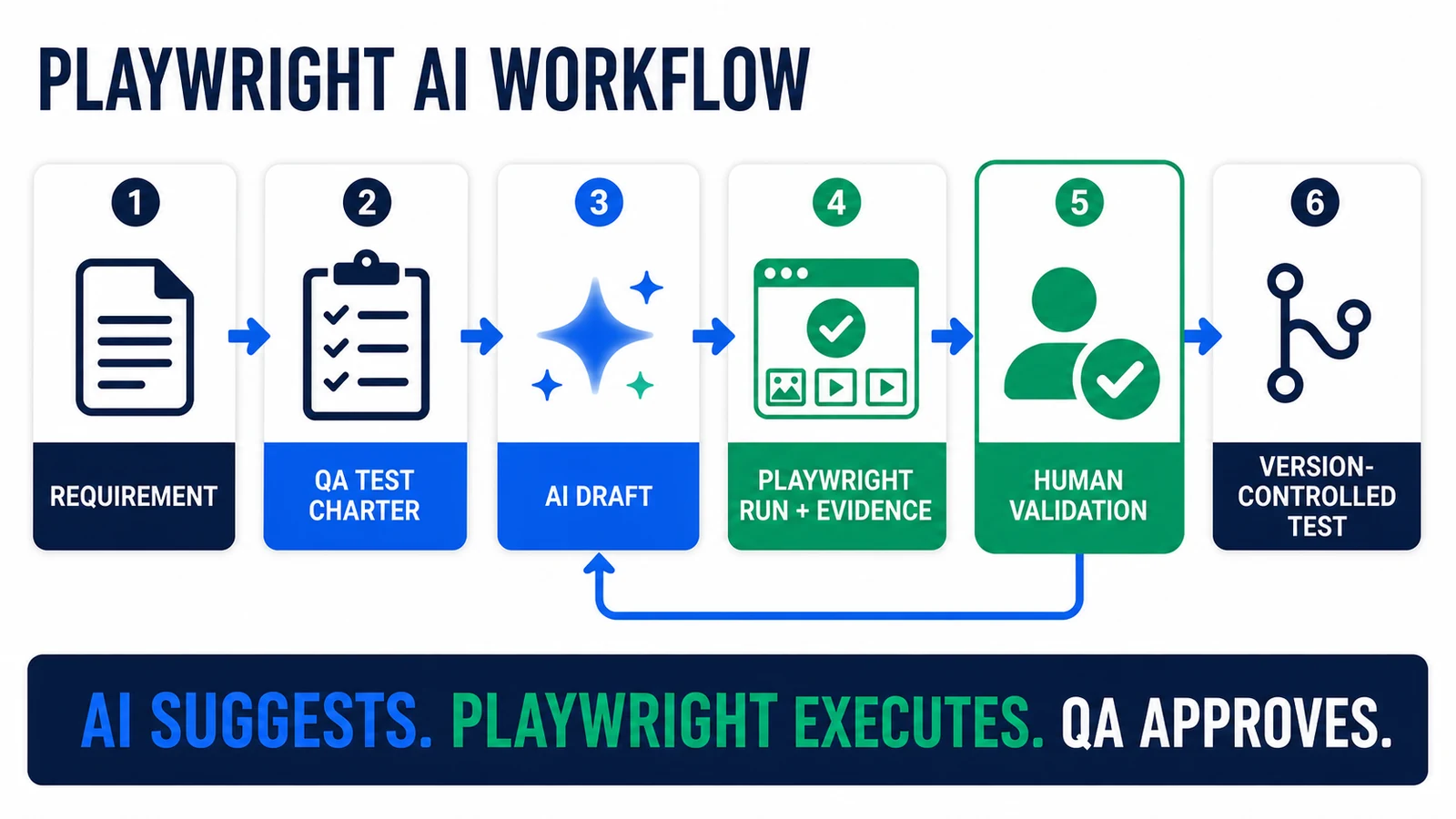
AI suggests, Playwright executes, and QA approves. Evidence can send a weak draft back for revision before it reaches version control.
- Requirement: the team states the intended behavior and business risk.
- QA test charter: a tester defines scope, preconditions, data, negative cases, and observable expected results.
- AI draft: the assistant proposes scenarios or Playwright code using supplied project context.
- Playwright run and evidence: the candidate executes and produces results, errors, reports, traces, console output, or network evidence.
- Human validation: an engineer checks the oracle, locators, assertions, state, security, and failure behavior.
- Version-controlled test: only the accepted artifact enters the maintained suite and CI.
This loop keeps speed and accountability in the same system. An AI answer is a hypothesis. A reviewed test, demonstrated to fail and pass for the intended reasons, is an engineering artifact.
1. Use AI for test design before code generation
The highest-leverage starting point is often scenario design, not syntax. Give the assistant a requirement and ask it to identify risks, partitions, boundary values, role differences, state transitions, and observable outcomes. This exposes ambiguity before the model writes a line of Playwright.
For a checkout discount requirement, a useful design response might include:
- eligible and ineligible customer roles;
- values immediately below, at, and above the threshold;
- expired, reused, malformed, and conflicting codes;
- tax, shipping, currency, and rounding effects;
- refresh, back-navigation, and multi-tab behavior;
- the UI result plus the persisted order or API state.
Do not ask the assistant to infer correctness from the current application. Supply the acceptance criteria, API contract, calculation rule, or approved example. Otherwise it may faithfully automate existing behavior—including the defect.
A compact design prompt
You are reviewing a requirement for Playwright coverage.

Requirement:
[paste the approved requirement]

System boundaries:
- Browser-visible behavior: [what the user can observe]
- Backend contract: [API or persisted state, if relevant]
- Roles and permissions: [roles]
- Test environment and owned data: [constraints]

Before writing code:
1. List ambiguities that could change the expected result.
2. Create a risk-ranked scenario matrix with preconditions, action,
   expected UI result, expected backend result, and cleanup.
3. Identify cases that should remain at API/unit level instead of E2E.
4. Do not infer an oracle from implementation code.
5. Stop after the plan so a QA engineer can approve it.
The “stop after the plan” instruction creates a deliberate review point. It also makes it easier to compare the proposed coverage with the requirement before implementation details bias the discussion.
2. Generate a Playwright test with the right context
“Write a Playwright test for checkout” is underspecified. The assistant cannot know your fixtures, base URL, authentication model, test-data API, locator contracts, cleanup policy, projects, or reporting conventions unless you provide them.
A good context packet is small but concrete:
- the approved scenario and expected outcomes;
- the relevant existing spec and fixture files;
- one representative test that demonstrates team style;
- page or component objects that the project already owns;
- test-data creation and cleanup helpers;
- the installed Playwright version and TypeScript rules;
- constraints such as parallel execution, supported browsers, and forbidden production systems.
Ask for the smallest coherent diff. A new helper, fixture, page object, and configuration option for a one-test change may increase maintenance rather than reduce it.
Example generation request
Implement only the approved scenario below in Playwright Test with TypeScript.

Approved scenario:
[paste one approved scenario]

Project context:
- Existing fixture: tests/fixtures/checkout.ts
- Style reference: tests/checkout/guest-checkout.spec.ts
- Data helper: tests/support/orders.ts
- Run tests in parallel; every test owns its records.

Rules:
- Assert user-visible behavior and the named business outcome.
- Prefer getByRole/getByLabel or an approved test ID.
- Use web-first assertions; do not add waitForTimeout.
- Do not invent endpoints, fixtures, environment variables, or selectors.
- Keep secrets and storage state out of code and output.
- Show assumptions first, then provide a minimal diff and run command.
- If required context is missing, identify it instead of guessing.
The generated candidate might use a pattern like this:
import { test, expect } from '@playwright/test';

test('applies an approved discount at checkout', async ({ page }) => {
  await page.goto('/checkout');

  await page.getByLabel('Discount code').fill('QA20');
  await page.getByRole('button', { name: 'Apply' }).click();

  await expect(page.getByTestId('discount-row')).toHaveText('-$20.00');
  await expect(page.getByTestId('order-total')).toHaveText('$80.00');
  await expect(page.getByRole('status')).toContainText('Discount applied');
});
This is intentionally a pattern, not a drop-in test for an unknown application. The requirement must establish the currency and calculation. The project must establish how the cart and code are created, why those test IDs are valid contracts, and how records are removed.
3. Review AI-generated Playwright code like production code
Compilation proves syntax and types, not test value. A passing run proves only that the candidate and current system agreed once. Review the following dimensions before merge.
| Review area | Question to answer | Common AI failure |
|---|---|---|
| Oracle | Does each assertion come from an approved requirement or contract? | Mirrors whatever text or value the app currently shows. |
| Assertion strength | Would the test catch the business defect? | Checks only that a page, button, or success message is visible. |
| Locators | Are locators user-facing, unique, and intentionally stable? | Uses generated CSS/XPath or .first() to hide ambiguity. |
| Waiting | Does synchronization rely on Playwright actionability and web-first assertions? | Adds arbitrary sleeps, retries, or large timeouts. |
| Isolation | Can the test run alone, in any order, and in parallel? | Depends on another test, shared account state, or fixed record names. |
| Data | Who creates, identifies, and cleans up every record? | Mutates a pre-existing account or assumes a pristine database. |
| Scope | Is this behavior best tested through the browser? | Builds a slow E2E matrix for logic better covered below the UI. |
| Security | Are logs, prompts, traces, and fixtures safe to share with the AI service? | Includes credentials, tokens, customer data, or storage state. |
These checks align with Playwright’s current best practices: test user-visible behavior, keep tests isolated, use resilient locators, and diagnose CI failures with traces. The Playwright locators guide goes deeper on role, label, text, test ID, chaining, filtering, and strictness.
Prove the test can fail
The most revealing validation is a controlled negative check. Temporarily change the expected value, disable the feature in a test environment, substitute ineligible data, or introduce a safe local mutation. The test should fail at the assertion that represents the requirement, with evidence a reviewer can understand. Revert the controlled change afterward.
Also run the test alone, repeatedly, with the project’s supported browsers, and under parallel conditions when those modes matter. A test that passes only in a warm local session has not demonstrated isolation.
4. Debug Playwright failures with evidence, not guesses
AI is useful at compressing a large failure bundle into hypotheses. It is much less reliable when given only “the test is flaky.” Supply the exact command, failing test, error, relevant test/config files, and a sanitized trace or selected observations.
The Playwright Trace Viewer provides a timeline, before/action/after DOM snapshots, action logs, source locations, console messages, and network activity. That evidence helps distinguish several failure classes:
- Application defect: the UI or backend violates the requirement.
- Test defect: the assertion, locator, setup, or cleanup is wrong.
- Data defect: the scenario began in an invalid or colliding state.
- Environment defect: a dependency, feature flag, deployment, or service is unavailable.
- Timing symptom: the test observes a real asynchronous boundary incorrectly.
A disciplined debugging prompt asks the assistant to cite evidence for each hypothesis, state what evidence would disprove it, and propose the smallest diagnostic step before editing code. If a patch removes an assertion, skips the test, adds a long timeout, or hides a strictness error with .first(), reject it unless the requirement justifies that change.
Example trace-led debugging prompt
Analyze this Playwright failure as evidence, not as a request to make it pass.

Inputs:
- Test and relevant fixture/config files: [paths or excerpts]
- Exact command and error: [output]
- Sanitized trace observations: [timeline, locator, DOM, console, network]
- Requirement/oracle: [approved expected behavior]

Return:
1. A ranked classification: app, test, data, environment, or synchronization.
2. Evidence supporting and contradicting each leading hypothesis.
3. One smallest diagnostic experiment.
4. A minimal patch only if the evidence identifies the cause.

Do not skip tests, delete assertions, loosen expected values, add arbitrary sleeps,
or expose secrets. State uncertainty explicitly.
The official Playwright VS Code extension also documents a Fix with AI action that asks Copilot for a code-change suggestion after a failure. Treat that suggestion like any other candidate patch: inspect the evidence and diff, run the test, and preserve the oracle.
Reliability limits of AI-generated tests
AI-assisted testing is useful precisely because it can generate plausible alternatives quickly. Plausibility is also its central risk.
Hallucinated project details
An assistant may invent a fixture, endpoint, environment variable, data-testid, helper, or Playwright option. Ground it with repository files and package metadata. Compile and run the candidate instead of debating whether the output looks right.
The wrong test oracle
A model can write a clean test for an incorrect expected result. Derive expected behavior from requirements, contracts, and product decisions. Ask who approved each important assertion.
Coupled code and test errors
A July 2026 software-engineering preprint on LLM test-generation workflows reported lower fault detection when tests were generated after faulty code than when tests were generated independently: 14% versus 25% in its studied programming tasks. This is preliminary and not a Playwright UI benchmark, so the percentages should not be generalized. The practical warning is still valuable: if the same model sees an implementation first, it may reproduce the implementation’s misconception in the test.
Counter that risk by creating the scenario matrix and oracle first, reviewing them separately, and asking a reviewer—human or independent process—to challenge what the test fails to observe.
Coverage without confidence
Balanced evidence matters. An MSR 2026 empirical study of 2,232 test-related commits found that AI-generated tests produced coverage gains comparable to human-written tests in the repositories studied, while showing different structural patterns. That supports AI as a useful contributor. It does not show that coverage equals semantic correctness, that all repositories benefit equally, or that Playwright E2E tests should be generated without review.
Overfitting and “healing”
A system optimized to make red tests green may adapt the test to the defect. Self-healing must not weaken assertions, silently skip scenarios, or switch to a different control because it is easier to locate. A healed test needs the same requirement review as a newly generated one.
Sensitive context leakage
Prompts, transcripts, screenshots, videos, HTML reports, traces, request logs, storage-state files, and fixture data can contain secrets or personal information. Follow the approved AI service’s retention and access policy. Redact evidence and use dedicated non-production identities. Never paste credentials or authentication state into a prompt.
Human validation checklist
Use this as the acceptance gate for an AI-assisted Playwright change:
- The requirement and expected result are named, approved, and independent of the implementation.
- Every assertion contributes to detecting the intended defect or contract violation.
- The test can be demonstrated to fail for the right reason.
- Locators use intentional user-facing attributes or explicit test contracts.
- No arbitrary sleep, unjustified retry, swallowed error, or weakened strictness exists.
- The test owns its data, cleanup, account state, and unique identifiers.
- It runs alone and under the suite’s relevant browser and parallel modes.
- The change reuses project fixtures and abstractions where they improve clarity.
- Logs and artifacts are useful for diagnosis without exposing sensitive data.
- A human reviewed the diff and runtime evidence before merge.
How to introduce Playwright AI to a QA team
Start with a narrow, reversible workflow and measure review effort as well as generation speed.
- Explain: use AI to summarize existing tests or explain a trace. No generated changes enter the repository.
- Design: generate risk and scenario matrices from approved requirements, then compare them with human analysis.
- Draft: generate one small test inside an established Playwright framework. Require the validation checklist and normal code review.
- Debug: use sanitized traces and error bundles to rank hypotheses before suggesting a patch.
- Scale selectively: add repository instructions, reusable prompts, evaluation examples, and security controls only after the pilot shows a net benefit.
Track more than “tests generated.” Useful measures include time from requirement to reviewed test, acceptance rate of suggestions, review minutes, escaped defects, flaky-test rate, mutation or controlled-failure detection, maintenance changes, and sensitive-data incidents. A fast stream of brittle tests is negative productivity.
When not to use AI
Do not add AI merely because the test is difficult. Direct engineering is often clearer when the change is small, the requirement is already precise, or the test depends on specialized domain judgment. Avoid sharing evidence with an AI service when policy, customer confidentiality, regulated data, or contract terms do not permit it.
For stable repeated regression, ordinary Playwright Test remains the default execution mechanism. For quick capture of a known interaction, Codegen may be enough. For live AI-controlled browser exploration, use the security model in the Playwright MCP guide. Choose the simplest surface that solves the actual problem.
Frequently asked questions
Does Playwright have built-in AI?
Playwright has AI-related integrations and documented Test Agents, but “Playwright AI” is not one universal package. Teams may use editor assistants, coding agents, Playwright Test Agents, or MCP-powered clients around ordinary Playwright projects.
Can AI write complete Playwright tests?
It can draft complete-looking tests, especially when given real project context. A QA engineer must still validate the oracle, assertions, locators, fixtures, data, cleanup, browser coverage, and failure behavior. Complete syntax is not complete testing.
Is Playwright Codegen an AI test generator?
No. Codegen records a tester’s browser actions and converts them into Playwright code, using locator-generation rules. It is valuable for a first draft, but it is different from a generative model reasoning over requirements or failures.
Is Playwright MCP the same as Playwright AI?
No. MCP is one way to give an AI client structured access to a Playwright-controlled browser. AI-assisted test design, code review, or debugging can happen without MCP, and the MCP architecture has its own security and session concerns.
Should an AI-generated test block a release?
Only after it has become an ordinary owned test: reviewed, validated against requirements, demonstrated to fail correctly, stable in the target environment, and accepted into the team’s normal CI policy. Its origin should not lower the release-gate standard.
Can AI fix flaky Playwright tests?
AI can help interpret errors and traces, classify likely causes, and propose a minimal patch. It cannot turn a timing workaround into a root cause. Reject fixes that merely add sleeps, inflate timeouts, hide strictness, delete assertions, or increase retries without evidence.
Which AI assistant should a Playwright team use?
Choose an approved tool that fits the repository, editor, privacy rules, model-access policy, and review workflow. Product names matter less than the controls: scoped context, transparent diffs, evidence access, permission boundaries, and mandatory human acceptance. Tools such as Copilot or Codex can assist with code, but neither replaces Playwright execution or QA ownership.
Final takeaway
Playwright AI is most valuable as a disciplined collaboration pattern. Let AI widen scenario thinking, draft a small change, review repetitive details, and compress failure evidence. Let Playwright provide the executable behavior and traceable artifacts. Keep the oracle, risk judgment, security boundary, and final acceptance with the QA engineer.
Begin with one approved requirement and one existing test pattern. Design before generating, run every candidate, prove it can fail, and merge only what your team is prepared to own. For a realistic UI-plus-API implementation pattern, continue with the Playwright E2E workflow guide.