
Playwright Test Agents are three Playwright-provided agent definitions—planner, generator, and healer—that guide an AI coding tool through test planning, code generation, execution, and repair. They can accelerate the work around a Playwright suite, but they do not replace requirements, test oracles, code review, or QA judgment.
The useful mental model is simple: an agent proposes an artifact, Playwright executes code, and a QA engineer decides whether the evidence is good enough. A passing rerun is not proof that a test still checks the right behavior.
What are Playwright Test Agents?
Playwright Test Agents are specialized instructions and tools for an AI client. The official Playwright guide currently provides three roles out of the box:
| Agent | Primary job | Main input | Main output | QA gate |
|---|---|---|---|---|
| Planner | Explore the application and design scenarios | Clear request, seed test, optional PRD | Markdown plan in specs/ |
Approve coverage, expected outcomes, risk, and scope |
| Generator | Perform planned scenarios and write tests | Approved Markdown plan | Playwright test files under tests/ |
Review code, assertions, data, isolation, and execution evidence |
| Healer | Investigate and patch failing tests | Failing test name and runtime evidence | Passing patch—or potentially a skipped test | Classify the cause and reject behavior-masking changes |
The roles can be invoked independently or used in sequence. “Agent” here does not mean a new browser engine or a replacement test runner. Your Playwright tests still execute through Playwright Test. The definitions tell an AI tool how to explore, write, debug, and edit with Playwright-aware tools.
Those definitions use instructions plus Model Context Protocol (MCP) tools. If you need the protocol, server/client, permission, and security details, read the separate Playwright MCP guide. For the wider landscape of AI-assisted test design and debugging, see Playwright AI for QA engineers.
How the planner, generator, and healer fit together
A controlled workflow produces a chain of reviewable artifacts instead of one opaque “make my tests” operation:
- A request, optional product requirement document, and seed test establish context.
- The planner explores the application and writes scenarios to
specs/*.md. - A QA engineer checks the plan against requirements and risks.
- The generator performs the approved scenarios and writes
tests/*.spec.ts. - Playwright executes the tests and records results, traces, and reports.
- The healer can investigate failures and propose test-code changes.
- A QA engineer reviews the cause, diff, and evidence before the change joins the maintained suite.
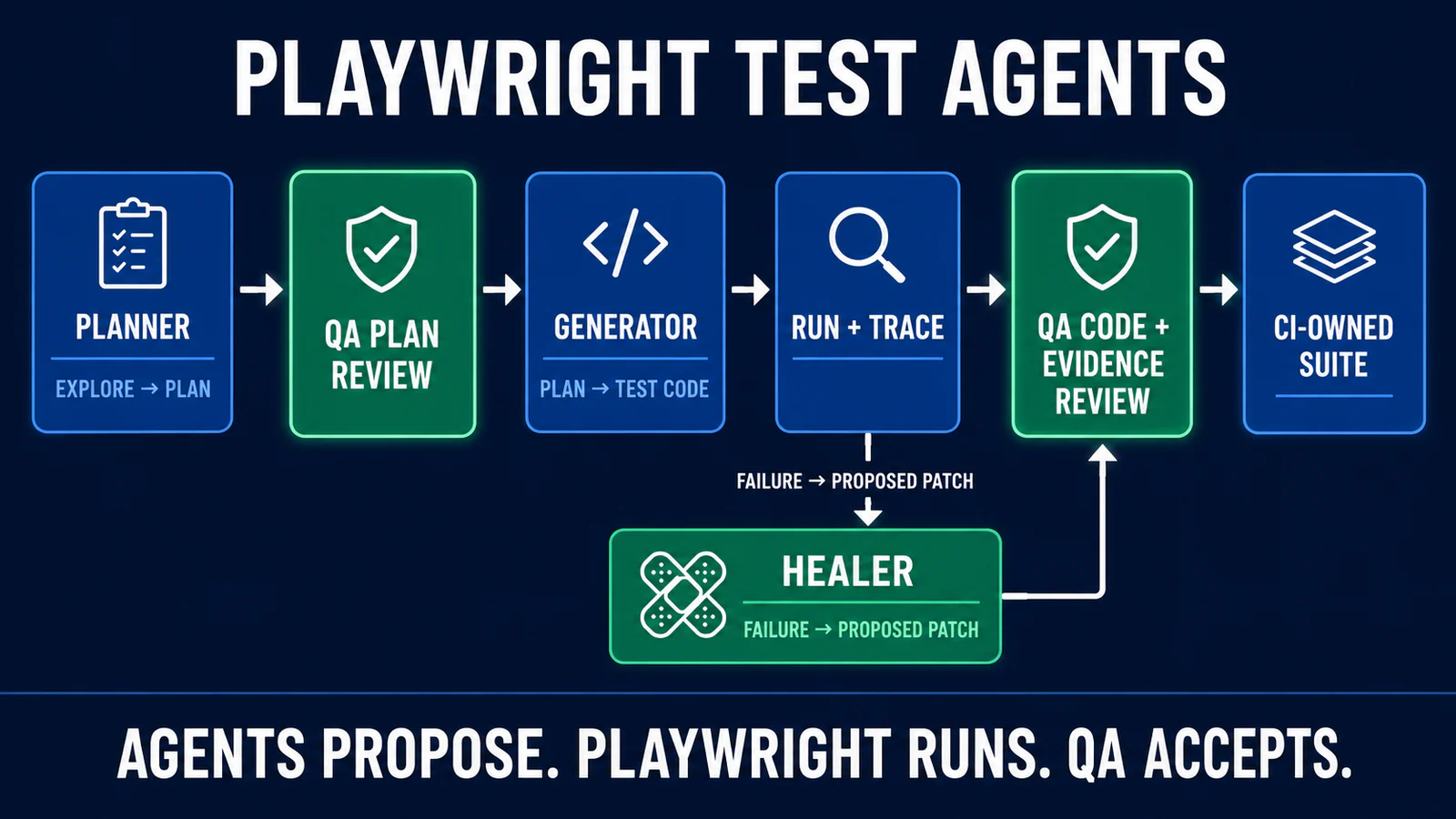
This separation matters. A plan is not executable evidence. Executable code is not necessarily a meaningful test. A passing test may still contain a weak assertion. A healer’s patch may repair test code—or hide an application regression. Each artifact needs the right review.
Set up the agent definitions
Start from an existing Playwright Test project whose fixtures, configuration, environments, and test data are already understood. The current official command for the VS Code loop is:
npx playwright init-agents --loop=vscodeThe Playwright docs also list claude, codex, and opencode as loop values. For VS Code, the documented agentic experience requires VS Code 1.105 or newer. Treat the generated files as repository code: inspect the diff, review tool permissions, and commit them deliberately.
Playwright says to regenerate the definitions whenever Playwright is updated so that the project receives current tools and instructions. Regeneration is not a blind overwrite step. Review the resulting diff because capabilities, models, prompts, and tool access can change.
Use a seed test to carry project context
The planner accepts a seed test that initializes the environment and demonstrates the project’s fixtures and hooks. A minimal TypeScript example can look like this:
import { test } from './fixtures';

test('seed', async ({ page }) => {
  await page.goto('/');
});
The seed is a bootstrap artifact, not a business-level acceptance test. It may activate global setup, project dependencies, authentication state, custom fixtures, feature flags, or a base URL. Keep secrets outside the file and use a least-privilege test account.
If your fixture and project architecture is still unstable, solve that foundation first in a maintainable Playwright framework. Agents amplify the structure they receive—good or bad.
Planner agent: turn intent into a reviewable test plan
The planner explores the live application and creates a human-readable plan. Its official definition includes tools for navigation, interactions, snapshots, console and network inspection, page setup, and saving the plan. It is instructed to consider user journeys, user types, happy paths, boundaries, and error handling.
Give it a bounded request. “Plan checkout” is weaker than:
Using
tests/seed.spec.tsand the approved guest-checkout requirements, plan scenarios for one physical product. Cover valid checkout, required-field validation, payment rejection, duplicate submission prevention, and order confirmation. Do not purchase outside the staging environment. Save the plan underspecs/checkout/.
Before generation, review the plan for:
- Requirement traceability: each important acceptance criterion maps to a scenario and expected result.
- Risk coverage: money, permissions, data loss, privacy, and recovery paths receive proportionate attention.
- Observable outcomes: expected results describe user or system behavior, not vague “works correctly” statements.
- State assumptions: user role, data, feature flags, locale, and environment are explicit.
- Independence: scenarios can start from known state instead of depending on another test.
- Scope: the plan does not wander into unrelated features because they were visible during exploration.
Exploration can reveal behavior; it cannot prove what the behavior should be. If the UI currently violates the requirement, a planner that treats the current page as the oracle can faithfully document the wrong outcome. Keep the approved requirement beside the plan.
Generator agent: turn an approved plan into executable tests
The generator reads a Markdown plan from specs/, sets up the page for each scenario, performs the steps and verifications, and writes Playwright test files. The official guide says it verifies selectors and assertions live while performing scenarios.
That live feedback is valuable: the generator can see whether an element is present and whether a proposed interaction works in the current environment. It still needs code review. Check that generated tests:
- assert the business outcome rather than only checking that a page or button is visible;
- use web-first assertions instead of instant, race-prone state reads;
- prefer user-facing locators or explicit test contracts;
- avoid CSS/XPath chains tied to DOM implementation;
- create and clean up their own data;
- run independently and in parallel where the suite requires it;
- do not expose tokens, passwords, personal data, or storage state in source or output;
- retain one-to-one traceability to the approved plan where practical.
The detailed locator decisions belong in the Playwright locators best-practices guide. As a fast review rule, be suspicious when a generated test reaches for nth(), a long CSS chain, or a text match that is likely to occur in several components.
Require a controlled-failure check
A test can pass while asserting nothing useful. For a critical generated scenario, deliberately create a safe, temporary negative control: change the expected confirmation text, intercept a response with a known error, remove a required permission, or run against a fixture that violates the expected condition. Confirm that the test fails for the intended reason, then revert the temporary change.
This validates the test’s sensitivity. It is especially useful when an agent generated broad visibility assertions that may stay green even when the underlying transaction fails.
Healer agent: investigate failures without hiding defects
The healer runs tests, debugs failures, inspects UI and runtime evidence, edits test code, and reruns after a change. According to the official guide, it may produce a passing test or a skipped test when it believes the functionality is broken.
That last outcome needs a hard policy: a skipped test is an escalation, not a successful heal. The team must decide whether the failure is a product defect, environment problem, data issue, flaky test, or legitimate behavior change. Only then can it approve the correct action.
| Observed change | Default decision | Evidence required |
|---|---|---|
| Locator updated to a current accessible role/name | Reviewable | UI snapshot, requirement unchanged, targeted test passes |
| Expected value changed | Block until verified | Approved requirement or product-change reference |
| Assertion removed or broadened | Reject by default | Explicit test-design justification and replacement coverage |
| Timeout/retry increased | Investigate first | Timing diagnosis, trace/network evidence, bounded rationale |
| Arbitrary sleep added | Reject | Use a deterministic readiness signal instead |
| Test skipped or disabled | Escalate | Linked defect, owner, expiration, and retained visibility |
| Test data/setup corrected | Reviewable | Controlled data contract and cleanup proof |
Use the Playwright Trace Viewer to inspect actions, DOM snapshots, console messages, and network requests from a failing run. A trace can support a diagnosis; it cannot authorize an expectation change on its own.
A governed Playwright Test Agent workflow
A practical team workflow gives agents autonomy only inside explicit boundaries:
| Stage | Allowed agent autonomy | Required evidence | Human gate |
|---|---|---|---|
| Scope | Summarize requirements and identify questions | Approved story/PRD and risk notes | QA confirms oracle and environment |
| Plan | Explore read-safe flows and draft scenarios | specs/*.md diff and exploration notes |
QA approves coverage and expected results |
| Generate | Create test files on a branch | Source diff, run report, trace for important cases | Code owner reviews assertions, state, data, and security |
| Heal | Diagnose and propose bounded test patches | Original failure, root-cause classification, patch diff, rerun | QA rejects masking changes and approves the cause-specific fix |
| Merge | No independent merge authority | Required checks, browser/project matrix, review approvals | Repository policy decides whether code joins CI |
For a real end-to-end flow, apply the same controls to setup, UI actions, backend validation, and cleanup described in the Playwright E2E workflow guide. Agent output should fit your test strategy, not redefine it.
Validation checklist for AI-generated Playwright tests
Use this checklist before accepting a generated test or healer patch:
- Requirement: Is there an approved source for every important expected result?
- Assertion: Would the test fail if the business outcome were wrong?
- Locator: Does the test use user-facing attributes or an explicit test ID contract?
- Isolation: Can the test run alone, in a different order, and in parallel?
- Data: Are inputs deterministic, non-sensitive, uniquely created, and cleaned up?
- Environment: Are base URL, role, flags, locale, and dependencies intentional?
- Coverage: Are errors and boundaries included, not just the observed happy path?
- Security: Are secrets and customer data absent from prompts, files, logs, and traces?
- Execution: Does the test pass in the intended browser/project matrix and CI-like conditions?
- Negative control: Have you confirmed that a safe, deliberate fault makes the test fail correctly?
- Diff: Did the agent add a skip, weaken an assertion, alter retries, or change expected behavior?
- Evidence: Are the report, trace, failure message, and root-cause decision available for review?
What Playwright Test Agents can and cannot do
| They can help with | They cannot establish on their own |
|---|---|
| Exploring visible flows and drafting scenario coverage | The authoritative product requirement or risk appetite |
| Turning an approved plan into syntactically useful test code | That every assertion is semantically meaningful |
| Checking selectors and actions against the current UI | That the current UI behavior is correct |
| Gathering runtime evidence and proposing repairs | Whether a failure is a test defect or product regression |
| Reducing repetitive first-pass work | Permission to handle production data or merge changes |
Model output is probabilistic and context-dependent. An agent can miss hidden rules, hallucinate a fixture or API, mirror an implementation bug, or choose a brittle shortcut. It also consumes execution time and model context, so unrestricted loops can be expensive and noisy.
Security and governance guardrails
- Use staging or a disposable environment for exploratory actions and destructive flows.
- Give test accounts only the roles and data access the scenario needs.
- Keep credentials in approved secret stores; never place them in prompts, test files, plans, traces, or commits.
- Use synthetic or sanitized records and define cleanup for created data.
- Limit repository paths, browser domains, shell commands, and tool permissions to the task.
- Cap iterations, runtime, and the number of files an agent may change.
- Require branch protection, review, and CI checks for generated edits.
- Record which requirement, prompt, plan, model/tool configuration, and source diff produced a change.
- Review regenerated agent definitions after every Playwright update.
Storage-state files can contain reusable authenticated sessions. Treat them as secrets even when they do not show a plaintext password. Multi-role session design and parallel-test concerns are covered in the Playwright authentication guide.
An AI-assisted review prompt for agent output
A second-pass AI review can organize evidence, but QA still owns the decision. Use a repository-aware coding tool with a prompt like this:
Review these artifacts without editing files yet:
- approved requirement or PRD
- changed specs/*.md
- changed tests/*.spec.ts
- Playwright report and relevant trace summary
- original failure and healer patch diff, if present

Return:
1. Requirement-to-scenario-to-assertion traceability gaps.
2. Assertions that can pass without proving the business outcome.
3. Brittle locators, shared-state dependencies, or unsafe test data.
4. Added skips, removed/weakened assertions, retries, timeouts, or waits.
5. Evidence that supports—or fails to support—the proposed root cause.
6. A controlled-failure check for each critical scenario.
7. Findings ranked as block, investigate, or non-blocking improvement.

Do not expose secrets or customer data. Do not approve a behavioral
change unless it is supported by the requirement. Do not modify code
until a QA engineer accepts the findings.
Verify the review against the actual requirement and runtime evidence. Do not let one model validate another model by opinion alone.
How to adopt Test Agents without losing control
- Pilot one bounded flow. Choose a staging-safe feature with clear requirements and deterministic data.
- Baseline manual effort and quality. Record planning time, review time, escaped defects, flaky failures, and maintenance work without inventing a universal target.
- Start planner-first. Evaluate plan completeness before granting code-editing scope.
- Add generation on a protected branch. Require normal review and CI checks.
- Keep healing proposal-only. A person classifies the failure before accepting the patch.
- Measure review burden. Faster generation is not a win if weak tests create more diagnosis and maintenance.
- Expand by risk tier. Grant more autonomy only where evidence shows the controls are working.
The goal is not maximum test output. It is reliable coverage that the team can explain, trust, and maintain.
Frequently asked questions
Are Playwright Test Agents the same as Playwright codegen?
No. Codegen records interactions and helps generate locators/tests. Test Agents define specialized planning, generation, and healing workflows for AI clients, with plans and tests as reviewable artifacts.
Do Playwright Test Agents replace QA engineers?
No. They can accelerate exploration, drafting, code generation, and diagnosis. Humans still define risk, approve requirements, judge assertions, protect data, classify failures, and decide whether changes enter the suite.
Are Playwright Test Agents fully autonomous?
They can chain several tool-driven steps, but “autonomous” should not mean unsupervised authority. Tool permissions, environments, iteration limits, code review, and acceptance gates remain team decisions.
Can the healer fix every failing test?
No. A failure may come from a product defect, environment outage, test data, an ambiguous requirement, or a genuine test bug. The official workflow also allows a skipped-test outcome. QA must review the root cause and patch.
Should generated tests go straight into CI?
No. First review requirement traceability, assertions, locators, isolation, data, security, browser coverage, and controlled-failure behavior. Merge only through the repository’s normal review and CI policy.
Which agent should a team try first?
The planner is the lowest-risk starting point because its output is a readable plan rather than executable code. Once the team can review plans consistently, add generation on a protected branch and keep healer changes proposal-only.
Final recommendation
Playwright Test Agents are most useful as a disciplined artifact pipeline: planner for a proposed plan, generator for proposed code, and healer for a proposed repair. Playwright supplies execution evidence; QA supplies the oracle and acceptance decision.
Start with one bounded staging flow, use the validation checklist above, and keep every skip, assertion change, and behavioral expectation behind a human gate. Then connect the workflow to your broader Playwright automation strategy as the evidence earns trust.