
Playwright authentication is the practice of creating, saving, loading, and invalidating a user session so tests can start in the correct identity without repeating login in every scenario. The reliable design is not simply “save storageState once.” You must match the state’s scope to what parallel tests mutate, keep each role isolated, regenerate expired sessions deliberately, and protect auth files like credentials.
A good default is a setup project that authenticates once and writes a state file. Share one account only when tests cannot change conflicting server-side data. For state-changing suites, allocate one account per worker. Keep dedicated login tests separate so session reuse does not hide defects in the login flow itself.
Playwright authentication at a glance
| Test need | Authentication strategy | State ownership |
|---|---|---|
| Prove login, MFA, or callback behavior | Log in through the UI inside that test | Per test |
| Read-only authenticated journeys | Setup project with one reusable account | Per project/run |
| Tests that modify account data | One reusable account per worker | Per worker |
| Admin and user interaction | Separate state files and BrowserContexts | Per role/actor |
| Anonymous or access-denied coverage | Empty storage state | Per test/file |
The official Playwright authentication guide makes the same central distinction: a shared account fits tests that do not interfere through server-side state; tests that do should use different accounts. Browser isolation alone cannot protect a shared cart, profile, tenant, quota, or permissions record.
What Playwright storage state contains
A BrowserContext owns cookies and browser storage for its pages. Calling context.storageState() returns a serializable snapshot that can initialize a new context. In the common case, that means session cookies and local-storage values are available before the first protected page opens.
Two opt-in cases deserve attention in current Playwright:
- Use
indexedDB: truewhen the identity provider stores auth tokens in IndexedDB, as some Firebase-style applications do. - Use
credentials: trueonly when restoring virtual WebAuthn credentials is intentional. Those snapshots can carry passkey private keys and need stronger protection.
await page.context().storageState({
  path: 'playwright/.auth/user.json',
  indexedDB: true,
});
The current BrowserContext API reference is the source of truth for these options. Do not enable them “just in case”; the larger snapshot expands both security exposure and troubleshooting surface.
What storage state does not solve
storageState does not manage refresh-token policy, regenerate an expired session, isolate a shared backend account, or prove the login flow. It is a snapshot, not an authentication service. It also does not persist sessionStorage through the normal state file.
Choose the authentication scope before writing fixtures
| Question | If yes | If no |
|---|---|---|
| Is login itself under test? | Perform real UI login in that scenario | Reuse prepared state |
| Can parallel tests change the same account data? | Use one account per worker/test | A shared account may be safe |
| Do two roles interact in one scenario? | Create one context per role | Select one role state with test.use |
| Does identity vary by tenant or environment? | Key state by environment + tenant + role + worker | A simpler role key may work |
| Does the app use sessionStorage? | Use a narrow init-script bridge | Use normal storage state |
This decision belongs in the authentication layer of your Playwright framework. Page objects should model pages, not silently decide which human identity a test receives.
Start with a secure auth directory
Playwright recommends storing generated state under playwright/.auth and ignoring that directory. A state file may include cookies or headers that let someone impersonate the test account, so never commit it—even to a private repository.
# Generated Playwright authentication state
playwright/.auth/
Put usernames, passwords, client secrets, and one-time setup values in the CI secret store. Read them from environment variables at runtime and fail clearly when they are absent. Do not print the value, the cookie jar, or the complete state JSON.
Reuse UI login with a setup project
A setup project is the clearest baseline because authentication runs as a normal Playwright test. It can use fixtures, produce a trace, appear in reports, and participate in retries. Wait for a meaningful post-login signal before saving state; many systems set their final cookie during redirects.
import { test as setup, expect } from '@playwright/test';
import fs from 'node:fs/promises';
import path from 'node:path';

const authFile = path.resolve('playwright/.auth/user.json');

setup('authenticate user', async ({ page }) => {
  await fs.mkdir(path.dirname(authFile), { recursive: true });
  const username = process.env.E2E_USER;
  const password = process.env.E2E_PASSWORD;
  if (!username || !password) throw new Error('E2E credentials are required');

  await page.goto('/login');
  await page.getByLabel('Username').fill(username);
  await page.getByLabel('Password').fill(password);
  await page.getByRole('button', { name: 'Sign in' }).click();

  await expect(page).toHaveURL(/\/dashboard$/);
  await expect(page.getByRole('heading', { name: 'Dashboard' })).toBeVisible();
  await page.context().storageState({ path: authFile });
});
Use resilient, user-facing locators in the setup flow; the Playwright locators guide covers role and label locators in depth.
Connect the setup project to browser projects
import { defineConfig, devices } from '@playwright/test';

const baseURL = process.env.E2E_BASE_URL;
if (!baseURL) throw new Error('E2E_BASE_URL is required');

export default defineConfig({
  use: { baseURL },
  projects: [
    {
      name: 'setup',
      testMatch: /auth\.setup\.ts/,
    },
    {
      name: 'chromium',
      use: {
        ...devices['Desktop Chrome'],
        storageState: 'playwright/.auth/user.json',
      },
      dependencies: ['setup'],
    },
  ],
});
The project-dependencies documentation recommends this approach over a bare globalSetup for most test-runner workflows. One operational detail matters: UI mode does not run setup automatically by default, so regenerate expired state by enabling and running the setup project.
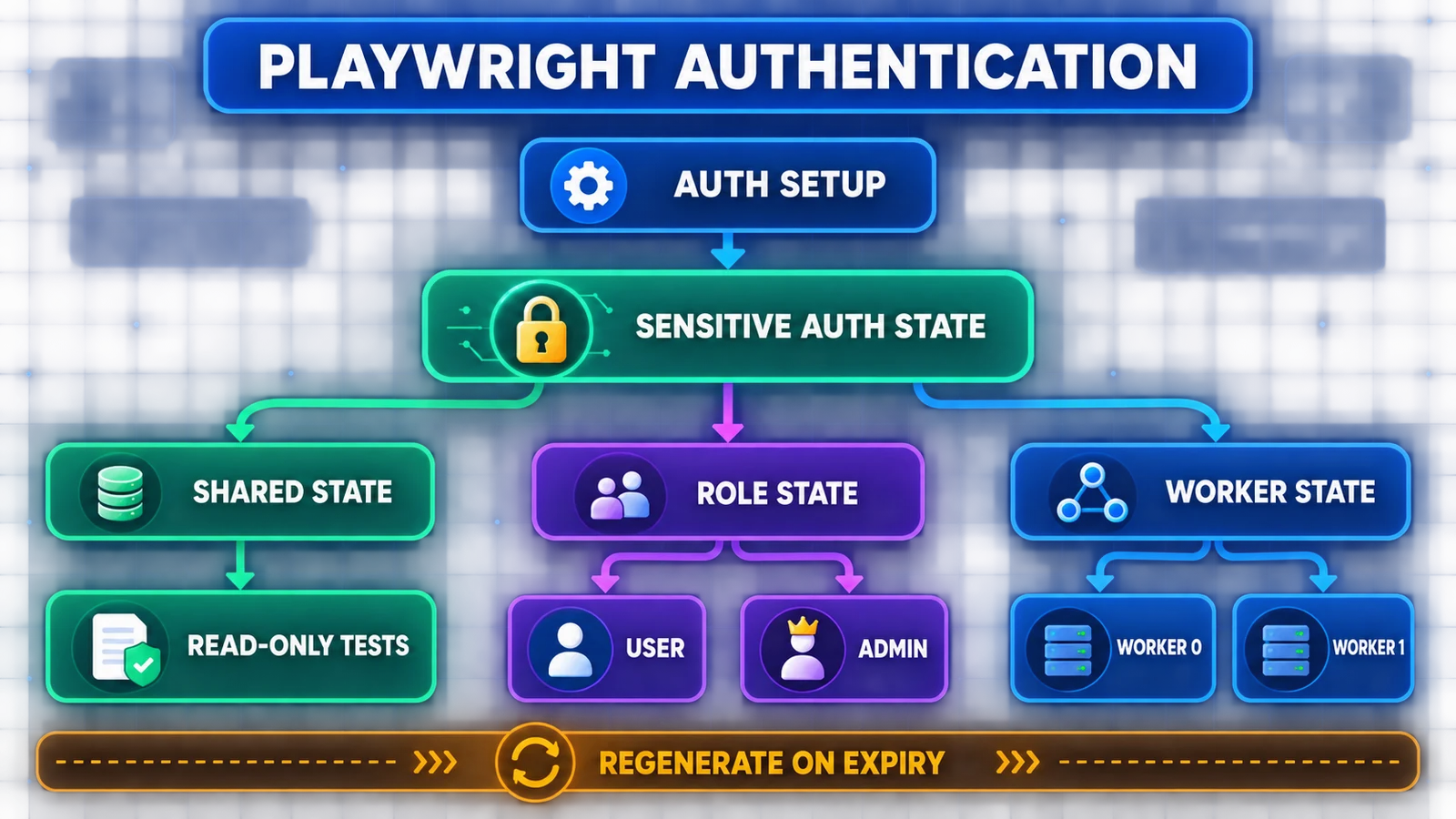
Scope the saved session to the smallest identity boundary that still avoids unnecessary login repetition.
Authenticate through an API when the login UI is not the target
If the application exposes a stable test-safe login endpoint, an API request can create the session faster and with fewer UI dependencies. Export the request context’s state and let a browser project load it. Keep a smaller, dedicated suite that still tests the real sign-in experience.
import { test as setup, expect } from '@playwright/test';
import fs from 'node:fs/promises';

setup('authenticate through API', async ({ request }) => {
  await fs.mkdir('playwright/.auth', { recursive: true });
  const response = await request.post('/api/login', {
    data: {
      username: process.env.E2E_USER,
      password: process.env.E2E_PASSWORD,
    },
  });

  await expect(response).toBeOK();
  await request.storageState({
    path: 'playwright/.auth/user.json',
  });
});
This is an authentication application of APIRequestContext. For request lifecycles, response assertions, and UI-plus-API workflows, use the dedicated Playwright API testing guide.
Validate saved state instead of trusting the file
A JSON file existing on disk does not mean the server still accepts it. Validate the identity at a protected page or a lightweight identity endpoint. The assertion should prove the expected account and role, not merely that navigation returned HTTP 200.
import { test, expect } from '@playwright/test';

test('prepared state belongs to the expected user', async ({ page }) => {
  await page.goto('/dashboard');
  await expect(page).toHaveURL(/\/dashboard$/);
  await expect(page.getByTestId('current-role')).toHaveText('user');
});
If state is only useful within one run, write it under the project output directory. Playwright cleans that directory before a new run, reducing stale-state reuse. Long-lived state should have an explicit refresh policy based on real expiry signals.
Handle session expiry and logout deterministically
Do not wait for a real token to expire with waitForTimeout(). Revoke the server-side session through a test-safe endpoint, shorten expiry in the test environment, or use a controlled clock when the application supports it. Then assert the observable contract: redirect to login, a 401 response, cleared storage, or a reauthentication prompt.
test('a revoked session returns the user to sign in', async ({ page }) => {
  await page.goto('/dashboard');

  const logout = await page.request.post('/api/logout');
  await expect(logout).toBeOK();

  await page.goto('/dashboard');
  await expect(page).toHaveURL(/\/login$/);
  await expect(page.getByRole('heading', { name: 'Sign in' })).toBeVisible();
});
A catch-all helper that silently logs in again after any redirect can hide genuine expiry defects. Regeneration belongs in the setup lifecycle; the product’s logout and expiry behaviors belong in focused tests.
Test multiple roles with separate BrowserContexts
Create one state file per role. When two actors interact in one test, open one BrowserContext per actor so their cookies and local storage cannot mix. Close both contexts in finally.
test('admin can approve what a user submits', async ({ browser }) => {
  const admin = await browser.newContext({
    storageState: 'playwright/.auth/admin.json',
  });
  const user = await browser.newContext({
    storageState: 'playwright/.auth/user.json',
  });

  try {
    const adminPage = await admin.newPage();
    const userPage = await user.newPage();

    await userPage.goto('/requests/new');
    await userPage.getByRole('button', { name: 'Submit' }).click();

    await adminPage.goto('/admin/requests');
    await adminPage.getByRole('button', { name: 'Approve' }).click();

    await userPage.reload();
    await expect(userPage.getByText('Approved')).toBeVisible();
  } finally {
    await admin.close();
    await user.close();
  }
});
Also test the negative boundary: the user should receive a 403 or lack the admin control. Role-based coverage is incomplete when it proves only the privileged path.
Use role state per file when actors do not interact
import { test } from '@playwright/test';

test.use({ storageState: 'playwright/.auth/admin.json' });

test('admin can open audit settings', async ({ page }) => {
  await page.goto('/admin/audit');
});
Do not encode identity selection inside a page-object constructor. Let the test or fixture declare the role so the authorization assumption remains visible.
Give parallel workers independent accounts
Playwright workers have separate browser contexts, but two workers can still edit the same server account. The official parallelism guide treats backend data as the common source of leakage. Allocate or lease one account per worker and key the state path by parallelIndex. The example below assumes your project implements acquireAccount and releaseAccount against a test-account pool.
import { test as base, request } from '@playwright/test';
import path from 'node:path';

type WorkerFixtures = { workerStorageState: string };

export const test = base.extend<{}, WorkerFixtures>({
  storageState: ({ workerStorageState }, use) => use(workerStorageState),

  workerStorageState: [async ({}, use, workerInfo) => {
    const file = path.resolve(
      workerInfo.project.outputDir,
      `.auth/${workerInfo.parallelIndex}.json`,
    );

    const account = await acquireAccount(workerInfo.parallelIndex);
    const api = await request.newContext({ baseURL: process.env.BASE_URL });
    try {
      await api.post('/api/login', { data: account });
      await api.storageState({ path: file });
    } finally {
      await api.dispose();
    }

    await use(file);
    await releaseAccount(account);
  }, { scope: 'worker' }],
});
The real cache key may need environment, tenant, identity provider, role, and worker—not just role. Align this with your test data management strategy so account leasing and cleanup have clear ownership.
Cover anonymous and access-denied behavior
If the project applies state globally, reset it for anonymous tests. This prevents a “logged-out” scenario from accidentally inheriting the default user.
import { test, expect } from '@playwright/test';

test.use({ storageState: { cookies: [], origins: [] } });

test('anonymous users are redirected to sign in', async ({ page }) => {
  await page.goto('/account');
  await expect(page).toHaveURL(/\/login$/);
});
Authentication proves identity; authorization decides what that identity may do. Include access-denied tests for role and tenant boundaries rather than assuming a successful admin case covers them.
Handle sessionStorage, IndexedDB, SSO, MFA, and passkeys deliberately
sessionStorage
Normal storage state does not persist sessionStorage. If the application genuinely stores authentication there, capture a small domain-specific object and install it before application scripts run. Avoid a generic cross-domain injector.
const saved = await page.evaluate(() => ({ ...sessionStorage }));

await context.addInitScript(storage => {
  if (location.hostname !== 'app.test.example.com') return;
  for (const [key, value] of Object.entries(storage)) {
    window.sessionStorage.setItem(key, String(value));
  }
}, saved);
IndexedDB and virtual WebAuthn credentials
Enable IndexedDB capture only when the app needs it. Treat virtual WebAuthn credential export as especially sensitive because current Playwright can include private-key material. Do not store those files in ordinary CI artifacts.
SSO and MFA
Prefer dedicated test tenants and accounts. Keep a focused contract for the redirect/callback and MFA behavior, then reuse established state for downstream product journeys. Do not automate a personal account or copy a developer’s persistent browser profile into CI.
Debug authentication failures by layer
| Symptom | Likely layer | First check |
|---|---|---|
| Setup passes, test redirects to login | State capture or expiry | Was state saved after the final auth redirect? |
| One role opens the wrong account | State-file mapping | Does each role use a distinct path and context? |
| Tests pass with one worker only | Shared backend account/data | Are workers mutating the same user or tenant? |
| UI mode suddenly appears logged out | Stale setup output | Run the setup project and regenerate state |
| Cookies exist but app is anonymous | Origin/IndexedDB/sessionStorage | Where does the app actually store its token? |
| CI logs expose tokens | Artifact policy | Stop logging state; rotate the exposed account |
Inspect trace evidence around the final login redirect, protected navigation, and identity endpoint. Do not paste raw state files into tickets, chat tools, or AI systems.
Security checklist for Playwright authentication
- Use dedicated, least-privilege test accounts.
- Ignore
playwright/.auth/and scan for accidental state commits. - Inject credentials from the CI secret manager.
- Keep production hosts out of destructive-test defaults.
- Mask usernames where they are sensitive and never log passwords, cookies, tokens, or state JSON.
- Restrict and shorten retention for traces, screenshots, videos, and downloaded state.
- Regenerate state after password, role, signing-key, or session-policy changes.
- Revoke disposable sessions and release leased worker accounts.
These controls belong in the broader test strategy, not only in the Playwright config.
Common authentication anti-patterns
| Anti-pattern | Why it fails | Better design |
|---|---|---|
Login in every beforeEach |
Slow, rate-limit prone, and hides the test’s real purpose | Setup project or worker fixture |
| One mutable account for all workers | Browser isolation cannot isolate server data | Account per worker/test |
| Commit auth JSON | Creates an impersonation secret in history | Generate at runtime and ignore it |
| Sleep after clicking Sign in | Timing is unrelated to session readiness | Wait for URL and identity UI/API signal |
| Auto-login whenever a test sees /login | Conceals expiry and authorization defects | Regenerate state in setup; test expiry separately |
| Use persistent personal profiles | Leaks unrelated state and personal credentials | Fresh contexts with dedicated test identities |
Use AI assistance without exposing sessions
A repository-aware coding agent can review authentication scope, state paths, worker ownership, and cleanup. Give it redacted code and the expected identity model. Never provide real credentials, cookies, tokens, storage-state JSON, private tenant names, or CI secret values.
Reusable authentication architecture review prompt
Review this Playwright TypeScript authentication implementation.

Goal:
- identify how login state is created, validated, reused, expired, and cleaned up;
- map every state file to environment, tenant, role, project, and worker;
- find shared server-side accounts or data that can race in parallel;
- verify anonymous and access-denied coverage;
- flag hard-coded credentials, token logging, unsafe artifact retention, and state files not ignored by Git;
- recommend the smallest change that preserves explicit test intent.

Constraints:
- do not weaken assertions or add arbitrary sleeps;
- do not suggest committing authentication state;
- do not print, decode, or reproduce any secret;
- keep login-flow tests separate from tests that intentionally reuse login;
- cite the exact file and code location for each finding.

Return:
1. identity/state ownership map;
2. findings ordered by security and flakiness impact;
3. proposed fixture/config changes;
4. tests needed for expiry, logout, roles, tenants, and parallel workers;
5. a human verification checklist.
Human review must confirm that the suggested account model matches the application’s real session and authorization rules. AI produces a first-pass review; the QA engineer owns correctness and secret handling.
Playwright authentication FAQ
Should every Playwright test log in?
No. Test the login flow directly in focused authentication scenarios. Reuse prepared state for downstream journeys when login is only a prerequisite.
Is one storageState file safe for parallel tests?
Only when all tests can use the same account concurrently without modifying conflicting server-side state. Otherwise use one account and state file per worker or test.
Does storageState include sessionStorage?
No. Playwright documents a separate capture-and-addInitScript workaround for the uncommon case where authentication depends on sessionStorage.
How should expired authentication state be refreshed?
Regenerate it through the setup project or worker fixture based on a clear expiry or identity-validation failure. Avoid silent per-test fallback login.
Can API login authenticate a browser test?
Yes. Authenticate with an APIRequestContext, export its storage state, and load that state into the browser project when the application’s session model supports it.
How do I test admin and user behavior together?
Create separate admin and user state files, then open a BrowserContext for each actor. Assert both permitted and denied behavior.
Should I use one worker to fix authentication flakiness?
Use one worker as a diagnostic or when the product truly permits only one session. The scalable fix is usually independent accounts and backend data ownership.
Build authentication around identity ownership
The maintainable pattern is explicit: setup creates state, validation proves the expected identity, fresh contexts reuse it, focused tests revoke it, and fixtures own cleanup. Start with one shared account only when the suite is genuinely non-conflicting. Move to role-, tenant-, or worker-scoped state as soon as the server-side behavior demands it.
For the wider project structure, continue with the Playwright automation guide. If you are still building your first suite, the beginner Playwright tutorial provides the prerequisite test-runner workflow.