
Playwright E2E testing proves that a real business workflow succeeds across the browser, application services, and persisted state. A reliable test does more than click from page to page: it creates unique preconditions, performs the user-visible action, checks the UI outcome, validates the backend postcondition, and cleans up its data even when an assertion fails.
This guide builds that complete workflow around an order checkout. The test creates a cart through an API, completes checkout through the UI, reads the stored order through the backend, deletes its data in fixture teardown, and runs the same contract across Chromium, Firefox, and WebKit projects. The pattern transfers directly to onboarding, booking, subscription, approval, and account-management journeys.
Playwright E2E testing at a glance
| Lifecycle step | Preferred boundary | What it proves |
|---|---|---|
| Create a cart | Test-safe API | The scenario starts with known, unique data |
| Complete checkout | Browser UI | The customer can use the product as designed |
| See confirmation | Web-first UI assertion | The observable product outcome appears |
| Read the order | Backend API | The transaction was persisted with correct fields |
| Delete order and cart | Fixture teardown | The test leaves no shared data behind |
| Investigate failures | Report, trace, screenshot, attachment | The failed layer can be diagnosed from evidence |
The central design rule is simple: use the UI for behavior the user must be able to perform; use an API for setup, postcondition checks, and cleanup when those actions are not the subject of the test. Playwright explicitly supports this model with APIRequestContext in browser tests.
What counts as an end-to-end test?
An E2E test crosses the real boundaries needed to prove a valuable outcome. For checkout, that normally includes the browser, frontend code, order API, and database-backed order state. It does not require every prerequisite to be created through the UI, and it does not require an uncontrolled third-party payment to run for every pull request.
Think in contracts rather than screen count:
- Precondition: a unique cart exists with the expected product.
- User action: a customer submits a valid shipping destination.
- Visible result: the product displays a confirmed order identifier.
- Server postcondition: the order record contains the correct customer, SKU, quantity, and status.
- Cleanup: the test-owned records are deleted regardless of outcome.
This is broader than a UI test that stops at “Order confirmed,” yet narrower and more deterministic than forcing unrelated setup through five screens. The wider test strategy should decide which journeys deserve this expensive coverage; unit, component, contract, and API tests should carry most combinations and edge cases.
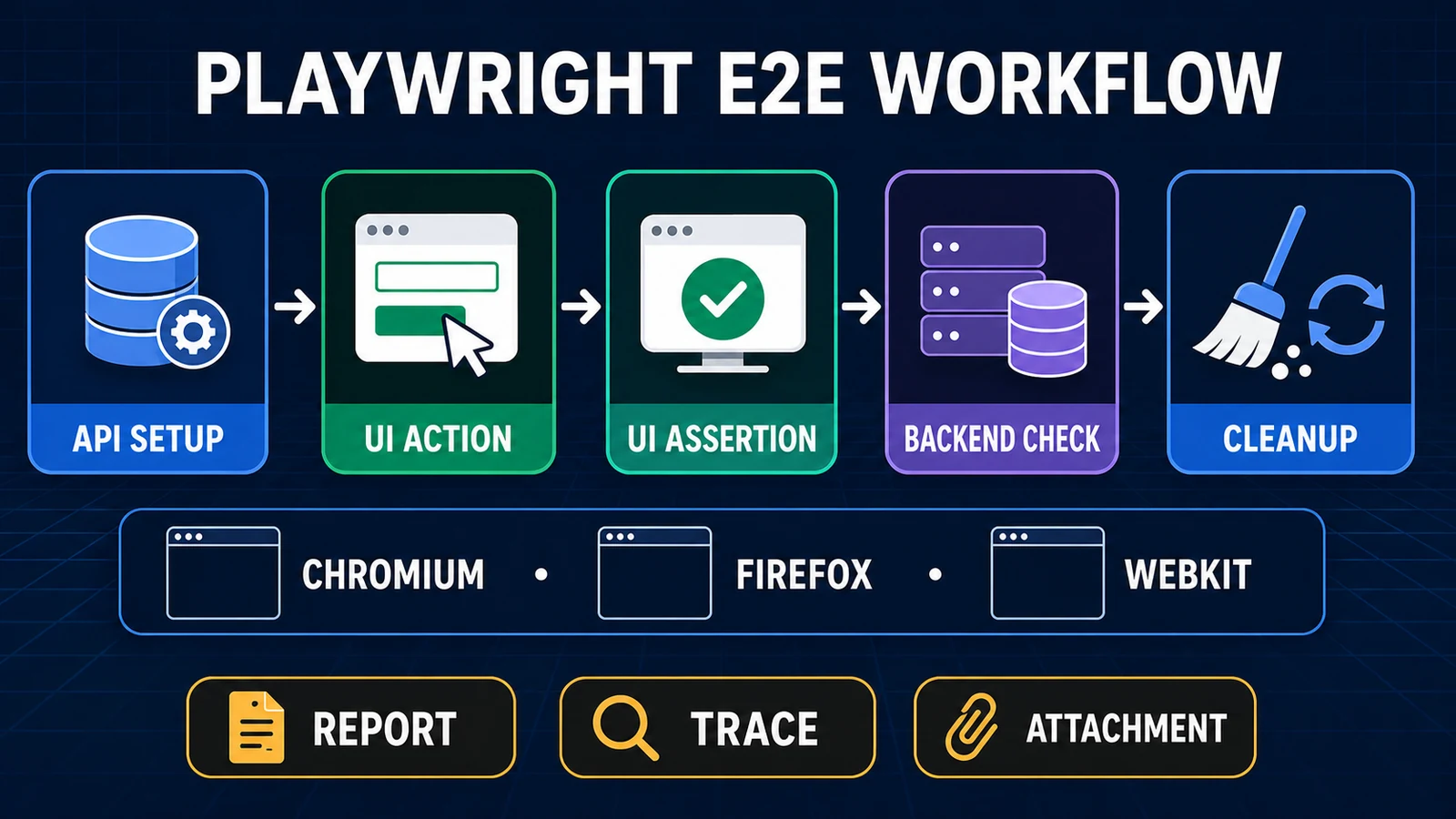
A maintainable E2E test owns one transaction across setup, UI behavior, persisted state, teardown, and evidence.
Start with a small, explicit project
If Playwright is not installed yet, follow the dedicated Playwright installation guide. For this workflow, keep the first project structure visible before introducing page objects or utility layers:
e2e/
├── tests/
│   ├── fixtures.ts
│   └── order.e2e.spec.ts
├── playwright.config.ts
├── package.json
└── tsconfig.json
The runnable validation for this article used @playwright/test 1.62.1, the current registry release during research. Pin an exact version in a shared repository and update it deliberately; do not let every CI run choose a different package.
{
  "scripts": {
    "typecheck": "tsc --noEmit",
    "test:e2e": "playwright test"
  },
  "devDependencies": {
    "@playwright/test": "1.62.1",
    "typescript": "5.9.2"
  }
}
A production Playwright framework may add domain fixtures, page components, environment loaders, and reporters. Add those abstractions only after their ownership is clear. A test should remain readable as a business transaction.
Configure the app, evidence, and browser projects
The config below starts a controlled local service, runs the test in three browser engines, and collects expensive evidence only when it is useful. In CI, two retries can help classify a flaky result, but a retry does not turn the first failure into success.
import { defineConfig, devices } from '@playwright/test';

export default defineConfig({
  testDir: './tests',
  fullyParallel: true,
  retries: process.env.CI ? 2 : 0,
  workers: process.env.CI ? 2 : undefined,
  reporter: [
    ['list'],
    ['html', { outputFolder: 'playwright-report', open: 'never' }],
  ],
  use: {
    baseURL: 'http://127.0.0.1:4173',
    trace: 'on-first-retry',
    screenshot: 'only-on-failure',
    video: 'retain-on-failure',
  },
  projects: [
    { name: 'chromium', use: { ...devices['Desktop Chrome'] } },
    { name: 'firefox', use: { ...devices['Desktop Firefox'] } },
    { name: 'webkit', use: { ...devices['Desktop Safari'] } },
  ],
  webServer: {
    command: 'npm run start:test-app',
    url: 'http://127.0.0.1:4173/health',
    reuseExistingServer: !process.env.CI,
  },
});
The official projects documentation uses projects for browser, device, environment, and authentication variations. Start with one desktop contract on each engine. Expand to mobile or branded channels only when product support and risk justify the runtime.
Define a test-safe API contract
The example assumes the test environment exposes narrow endpoints:
| Endpoint | Purpose | Required safety |
|---|---|---|
POST /api/carts |
Create an isolated cart | Return a unique ID; accept only test-safe products |
POST /api/orders |
Called by the real UI | Use the application’s normal order path |
GET /api/orders/:id |
Validate persisted fields | Authorize the test identity and return stable domain data |
DELETE /api/orders/:id |
Remove test-owned order | Restricted to the test environment and owned IDs |
DELETE /api/carts/:id |
Remove test-owned cart | Idempotent or explicitly status-checked |
Never point destructive defaults at production. Require an explicit environment allowlist, dedicated identities, and test-specific data markers. The API should not provide a generic delete-anything back door.
Create unique data and guarantee cleanup with a fixture
A test-scoped fixture is the lifecycle owner. It creates the cart before the test, gives the test a mutable record for the eventual order ID, and deletes both resources after use() returns or throws. Unique email and cart IDs allow projects to execute in parallel.
import { test as base, expect } from '@playwright/test';

type OrderData = {
  cartId: string;
  email: string;
  sku: string;
  orderId?: string;
};

export const test = base.extend<{ orderData: OrderData }>({
  orderData: async ({ request }, use, testInfo) => {
    const runKey =
      `${testInfo.project.name}-${testInfo.workerIndex}-${Date.now()}`;
    const data: OrderData = {
      cartId: '',
      email: `buyer+${runKey}@example.test`,
      sku: 'HP-1000',
    };

    const created = await request.post('/api/carts', {
      data: {
        sku: data.sku,
        productName: 'Noise-cancelling headphones',
        quantity: 1,
      },
    });
    await expect(created).toBeOK();
    data.cartId = (await created.json()).id;

    try {
      await use(data);
    } finally {
      if (data.orderId) {
        const order = await request.delete(`/api/orders/${data.orderId}`);
        expect(order.status()).toBe(204);
      }
      const cart = await request.delete(`/api/carts/${data.cartId}`);
      expect(cart.status()).toBe(204);
    }
  },
});

export { expect } from '@playwright/test';
Why not put cleanup at the bottom of the test? Because an assertion above it can throw. Fixture teardown runs as part of Playwright’s lifecycle, making ownership independent of the happy path. The full fixtures documentation covers test- and worker-scoped behavior.
Write the complete UI-plus-API E2E test
Import the extended test, not the base fixture. Each test.step() names a business layer in the report. The response wait begins before the click, preventing a race with a fast request.
import { test, expect } from './fixtures.js';

test('customer places an order and the backend persists it', async ({
  page,
  request,
  orderData,
}, testInfo) => {
  await test.step('Open the API-prepared cart', async () => {
    await page.goto(`/checkout?cart=${orderData.cartId}`);
    await expect(page.getByRole('heading', { name: 'Checkout' }))
      .toBeVisible();
    await expect(page.getByText('Noise-cancelling headphones'))
      .toBeVisible();
    await expect(page.getByTestId('quantity')).toHaveText('1');
  });

  await test.step('Complete checkout through the UI', async () => {
    await page.getByLabel('Email').fill(orderData.email);
    await page.getByLabel('Shipping address').fill('17 Test Lane');

    const createdOrder = page.waitForResponse(response =>
      response.url().endsWith('/api/orders') &&
      response.request().method() === 'POST' &&
      response.status() === 201,
    );
    await page.getByRole('button', { name: 'Place order' }).click();
    const order = await (await createdOrder).json();
    orderData.orderId = order.id;

    await expect(page.getByRole('heading', { name: 'Order confirmed' }))
      .toBeVisible();
    await expect(page.getByTestId('order-id')).toHaveText(order.id);
    await expect(page.getByTestId('order-status')).toHaveText('confirmed');
  });

  await test.step('Validate the server-side postcondition', async () => {
    const response = await request.get(
      `/api/orders/${orderData.orderId}`,
    );
    await expect(response).toBeOK();
    const persisted = await response.json();
    expect(persisted).toMatchObject({
      id: orderData.orderId,
      status: 'confirmed',
      email: orderData.email,
      sku: orderData.sku,
      quantity: 1,
    });

    await testInfo.attach('persisted-order.json', {
      body: JSON.stringify({
        id: persisted.id,
        status: persisted.status,
        sku: persisted.sku,
      }, null, 2),
      contentType: 'application/json',
    });
  });
});
The browser interaction uses roles and labels because they reflect the interface a user and assistive technology receive. Reserve test IDs for stable domain outputs such as an order identifier. The Playwright locators guide explains strictness, chaining, filtering, and anti-patterns in depth.
Assert the right thing at each layer
One giant assertion cannot tell you which boundary failed. Build a small evidence chain:
| Assertion | Matcher style | Failure meaning |
|---|---|---|
| Checkout heading is visible | Auto-retrying locator assertion | Page/navigation/rendering contract failed |
| Order POST returns 201 | Response predicate | Submission did not complete as expected |
| Confirmation shows the returned ID | Auto-retrying locator assertion | UI did not present the created transaction |
| GET order returns OK | API response assertion | Record is unavailable or unauthorized |
| Fields match the intended order | Generic object assertion | Persistence or payload mapping is wrong |
Playwright’s web assertions re-resolve a locator until the condition passes or times out. Do not replace them with immediate DOM reads or arbitrary sleeps. When persistence is eventually consistent, poll the business state deliberately:
await expect.poll(async () => {
  const response = await request.get(`/api/orders/${orderId}`);
  if (!response.ok()) return 'unavailable';
  return (await response.json()).status;
}, {
  message: 'order should become confirmed',
  timeout: 10_000,
}).toBe('confirmed');
Polling is justified only when the product contract is asynchronous. It should query the real condition—not repeatedly click, reload without reason, or wait a guessed number of seconds.
Handle authentication without hiding the login contract
If checkout requires a signed-in user, prepare authentication separately and load storage state into the browser project. Keep focused tests that still exercise the real login UI. Do not make every order test prove identity-provider redirects.
const userProject = {
  name: 'chromium-authenticated',
  use: {
    ...devices['Desktop Chrome'],
    storageState: 'playwright/.auth/customer.json',
  },
  dependencies: ['auth-setup'],
};
State files may contain impersonation secrets. Generate them at runtime, ignore them in Git, and scope accounts so parallel tests cannot mutate the same server-side cart or profile. See the complete Playwright authentication guide for setup projects, multiple roles, sessions, and worker ownership.
Run locally, by browser, and in CI
Run type-checking before expensive browsers, then run all configured projects:
npm run typecheck
npx playwright test
During investigation, narrow execution without editing the config:
npx playwright test tests/order.e2e.spec.ts --project=firefox
npx playwright test -g "customer places an order" --headed
CI should upload the HTML report and retained failure artifacts even when the test command exits non-zero. For large suites, use Playwright’s blob reporter and merge reports after sharding. Keep provider-specific YAML in the CI/CD owner article; the E2E contract should not depend on one vendor.
Make reports explain the failed layer
The list reporter gives fast console feedback. The HTML report groups projects, steps, errors, retries, and attachments. A trace can include DOM snapshots, actions, network activity, console output, and source context. Screenshots and video add visual evidence, but they are not substitutes for domain assertions.
Attach only safe, minimal business facts. The example records order ID, status, and SKU—not the customer address, token, request headers, or complete database row. Apply the same retention and access rules to traces and videos, because product pages can expose sensitive data.
npx playwright show-report playwright-report
npx playwright show-trace test-results/path-to/trace.zip
Playwright recommends trace: 'on-first-retry' for CI as a practical default. Recording every trace increases runtime and storage and can retain more data than needed.
Triage failures instead of adding sleeps
| Symptom | First boundary to inspect | Useful evidence |
|---|---|---|
| Cart setup returns 404/500 | Environment and seed API | Response status/body, server log correlation ID |
| Button is not actionable | UI state and locator contract | Trace DOM/action log, accessible name |
| Order POST never appears | Frontend submission | Console errors and trace network panel |
| Confirmation appears, GET is missing | Persistence/event processing | Order ID, backend correlation, bounded poll |
| Passes alone, fails in parallel | Test-data ownership | Worker/project key and resource IDs |
| One browser fails before a step | Browser installation/host | Launch error and browser dependency check |
| Cleanup returns 404/500 | Teardown API and ownership | Created IDs and delete response |
A retry can distinguish passed, flaky, and failed outcomes, but it should trigger investigation. Never weaken an assertion or add waitForTimeout() simply because the second run passed.
Scale the suite without losing the workflow
Once the first contract is stable, extract repeated domain behavior carefully:
- Keep API resource ownership in fixtures, with teardown beside creation.
- Move cohesive page behavior into page or component objects, but leave business assertions visible in the spec.
- Use one generated namespace per test, worker, tenant, or project as the backend requires.
- Tag a small blocking smoke journey; run broader browsers and variations at an intentional cadence.
- Quarantine only with an owner, linked defect, expiry date, and replacement signal.
- Measure runtime, retry rate, browser-specific failure rate, and escaped defects—not just test count.
The test data management guide covers seed design and cleanup beyond this example. If the suite needs a production-ready directory, environment mapping, components, and reporting layer, continue with the framework-from-scratch guide.
Common Playwright E2E anti-patterns
| Anti-pattern | Why it fails | Better design |
|---|---|---|
| Create every prerequisite through UI | Slow and couples the test to unrelated screens | Seed through a controlled API |
| Assert only “Success” text | Can miss wrong or absent persisted state | Check UI outcome and backend postcondition |
| Use a fixed shared cart/account | Parallel projects overwrite one another | Generate or lease isolated resources |
| Put cleanup after the last assertion | Failure skips deletion | Fixture teardown or finally |
| Wait for a guessed duration | Time is not a product condition | Web assertion, response wait, or bounded poll |
| Retry until green | Hides first-attempt defects and flakes | Retain evidence and classify the cause |
| Record every artifact forever | Costs storage and exposes data | Failure-focused capture and retention |
Use AI assistance as a reviewer, not an oracle
A repository-aware coding agent can map test ownership, spot missing teardown, and suggest clearer assertions. Provide redacted code and the business contract. Never paste credentials, cookies, production records, private customer data, or complete traces containing secrets.
Reusable Playwright E2E review prompt
Review this Playwright TypeScript E2E workflow.

Business contract:
- state the precondition, user action, visible outcome,
  backend postcondition, and cleanup obligation.

Review tasks:
1. Map every UI, API, data, and external-system boundary.
2. Find fixed accounts, carts, orders, tenants, or files that can race.
3. Verify setup uses the narrowest test-safe interface.
4. Verify user-facing behavior is exercised through the UI.
5. Verify assertions cover both observable and persisted outcomes.
6. Prove cleanup still runs after any earlier assertion failure.
7. Check locator resilience, response-wait ordering, projects,
   retries, and failure artifacts.
8. Flag production-write risk and sensitive artifact exposure.

Constraints:
- do not weaken assertions, add arbitrary sleeps, or retry until green;
- do not invent endpoints, selectors, secrets, or product behavior;
- do not print or reproduce credentials, tokens, cookies, or private data;
- cite the exact file and line for each finding.

Return:
- lifecycle map;
- findings ordered by defect/flakiness/security impact;
- smallest safe patch for each finding;
- missing tests and human verification checklist.
Human review must confirm that the proposed test represents the actual product and that setup/cleanup endpoints are safe. AI can accelerate inspection; the QA engineer owns the oracle, environment, and release decision.
Playwright E2E testing FAQ
Should Playwright E2E tests use APIs?
Yes, when an API creates preconditions, validates server postconditions, or cleans test-owned data. Keep the user action under test in the browser so the journey remains genuinely end to end.
Should one E2E test cover an entire application?
No. Cover one valuable transaction with clear boundaries. A single enormous scenario is hard to diagnose, owns too much mutable state, and makes unrelated features block each other.
How many Playwright E2E tests should run on every pull request?
Run the smallest set that protects release-critical paths within the team’s feedback budget. Move broad combinations to lower-level tests and schedule wider browser/environment coverage intentionally.
Do I need Chromium, Firefox, and WebKit?
Use projects that reflect the browser support policy. Chromium, Firefox, and WebKit are a strong engine baseline, but risk and real user distribution should determine branded, mobile, and cadence choices.
How do I prevent parallel E2E tests from colliding?
Allocate unique resources per test or worker, include project/worker identity in generated keys, avoid shared mutable accounts, and let fixtures own deletion.
When should I use expect.poll?
Use it for a genuinely asynchronous business postcondition, such as an order moving to confirmed after background processing. Query the state with a bounded timeout; do not use polling to hide an unclear contract.
Are Playwright retries a fix for flaky E2E tests?
No. Retries help classify and capture intermittent failures. Investigate the first-attempt failure, repair data ownership or synchronization, and track flaky outcomes instead of accepting them as green.
Build one owned transaction first
A maintainable Playwright E2E workflow is explicit from beginning to end: the fixture creates unique data, the browser performs the valuable action, web assertions prove what the user sees, an API verifies what the system stored, teardown deletes what the test created, and reports preserve enough safe evidence to identify the failed layer.
Start with one critical journey and make its ownership airtight before multiplying scenarios. For first-test fundamentals, use the Playwright tutorial; for APIRequestContext depth, continue with the Playwright API testing guide; and for the broader automation stack, return to the Playwright automation guide.
Pingback: Playwright CI/CD: GitHub Actions, Jenkins & Sharding