
Playwright MCP is a Model Context Protocol server that gives an AI assistant a controlled set of Playwright-powered browser tools. The assistant can inspect a page through structured accessibility snapshots, request actions such as navigation and form filling, and collect evidence from screenshots, console messages, network requests, traces, or storage state.
That does not make Playwright MCP a replacement for Playwright Test. MCP is excellent for exploration, diagnosis, and assisted test creation. A maintained test suite is still the right place for repeatable assertions, version control, parallel regression, CI gates, and long-term ownership.
Playwright MCP at a glance
| Question | Short answer |
|---|---|
| What is it? | A Microsoft-maintained MCP server that exposes browser automation tools backed by Playwright. |
| Who controls the browser? | An AI model chooses MCP tool calls through a compatible host/client; Playwright executes the browser operation. |
| How does the model read a page? | Mainly through structured accessibility snapshots containing roles, names, states, text, and element references. |
| Which browsers? | Chrome, Firefox, WebKit, and Microsoft Edge are documented options. |
| Best QA use? | Exploration, bug reproduction, diagnostics, locator discovery, and generating a reviewed first test draft. |
| What is the main caution? | An agent is operating a real browser. Its session, permissions, stored authentication, page content, and outputs all require security controls. |
How the Playwright MCP architecture works
MCP uses a host-client-server architecture. The host is the AI application. It creates an MCP client connection for a particular server. The Playwright MCP server advertises browser tools, receives valid tool calls, operates the browser through Playwright, and returns observations. The protocol uses JSON-RPC and negotiates capabilities when a session starts.
For the normal local setup, the client launches Playwright MCP as a subprocess and exchanges messages over standard input and output. A standalone deployment can instead expose an HTTP MCP endpoint. The official MCP architecture specification describes this separation of responsibilities.
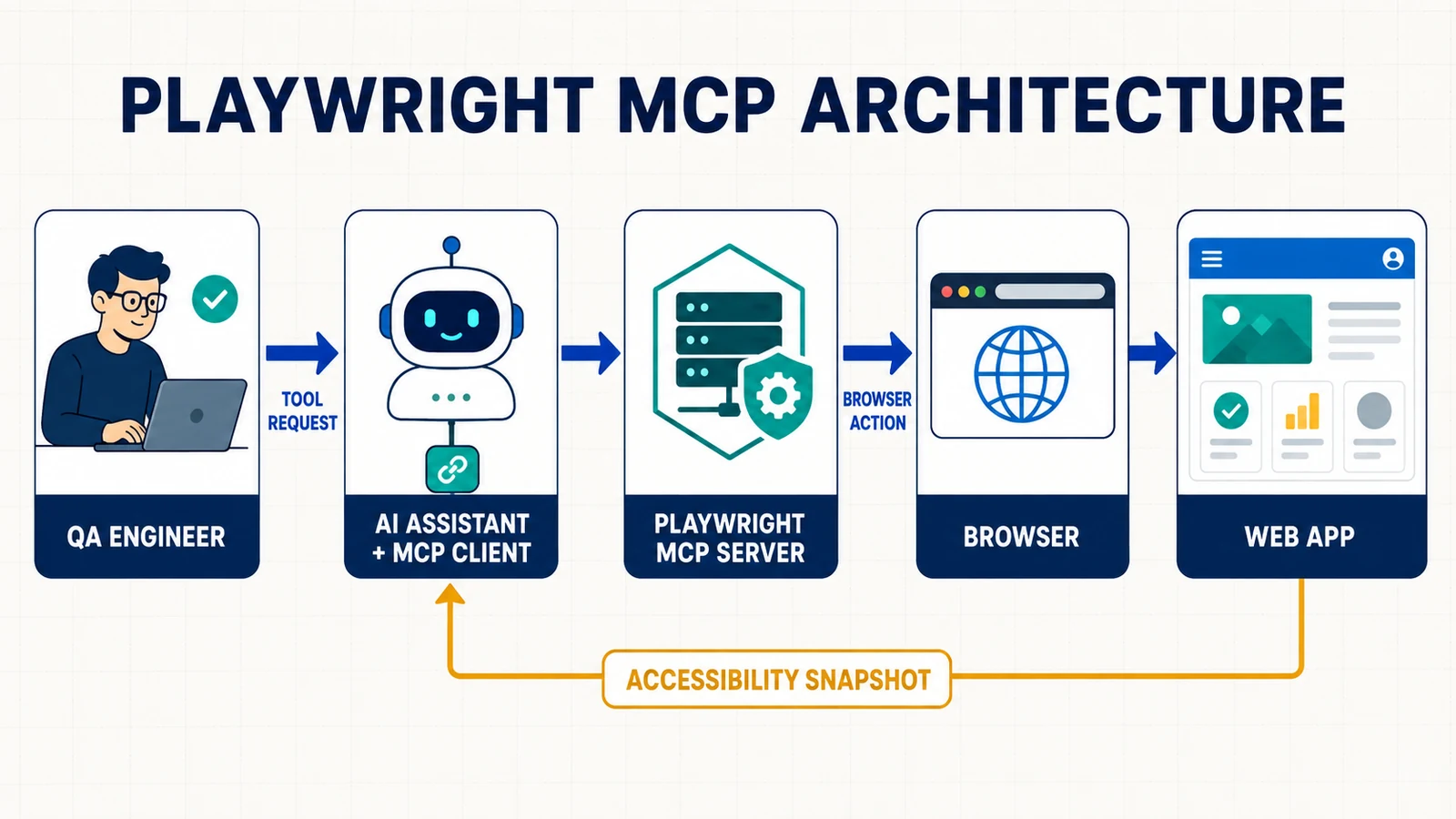
The model decides which approved tool to request; Playwright MCP translates the request into browser automation and returns a fresh page observation.
- Goal: a QA engineer asks the assistant to explore or verify a specific workflow.
- Tool selection: the model selects an available MCP tool, such as navigation, snapshot, click, typing, or network inspection.
- Browser action: the Playwright MCP server uses Playwright to perform that operation in its browser session.
- Observation: the server returns structured output, often an accessibility snapshot with stable references for that moment.
- Next decision: the model interprets the result and proposes or performs the next permitted step.
This loop is why MCP feels different from a test script. The next step is selected at runtime from the current observation. In an ordinary test, the steps and assertions were authored before execution.
Why Playwright MCP uses accessibility snapshots
A raw DOM can be noisy, while a screenshot requires visual interpretation and coordinate targeting. Playwright MCP usually gives the model a compact semantic view of the page: headings, buttons, textboxes, links, checked state, accessible names, and element references. A simplified observation might look like this:
- heading "Checkout" [level=1]
- textbox "Email" [ref=e12]
- button "Place order" [ref=e21]
- status "3 items in cart"
The model can request an action against e12 or e21 without guessing screen coordinates. That is particularly useful when a control has a clear accessible role and name. It also gives QA teams an immediate signal when an important control has a poor accessible contract.
Accessibility snapshots are not visual-regression evidence. Canvas content, charts, color, spacing, overlapping elements, responsive breakpoints, and image differences may require screenshots or optional vision tools. Use the semantic representation for structure and interaction; use pixels when the requirement is visual.
What tools can the Playwright MCP server expose?
The current Playwright MCP documentation groups the server’s tools around browser automation and diagnostics:
- Navigation and interaction: open or reload pages, move through history, click, hover, drag, type, fill forms, select options, press keys, and handle dialogs.
- Observation: accessibility snapshots, screenshots, tabs, console messages, and network requests.
- Testing assistance: visible-element or text checks and locator generation when the testing capability is enabled.
- State: cookies, local storage, session storage, and saved authentication state when storage tools are enabled.
- Debugging: tracing, video, PDF, developer tools, network mocking, and browser code/evaluation tools depending on enabled capabilities and server version.
Capabilities matter because every exposed tool adds authority and consumes client/model context. Start with the smallest tool set that completes the job. Add storage, network, testing, vision, PDF, or developer capabilities only when the scenario needs them.
Playwright MCP vs ordinary Playwright tests
The most important engineering decision is not “MCP or Playwright?” Playwright powers both. The decision is whether an LLM should choose the next action during the run or whether reviewed test code should define the run.
| Dimension | Playwright MCP session | Ordinary Playwright test |
|---|---|---|
| Runtime controller | An LLM selects tool calls from observations. | Playwright Test executes authored code. |
| Primary artifact | Conversation, actions, observations, and optional evidence. | Version-controlled tests, fixtures, config, and reports. |
| Repeatability | Affected by prompt, model, context, client, and current page state. | Designed for repeatable execution within controlled test boundaries. |
| Assertions | Goal-dependent checks selected during the session. | Explicit, reviewable expectations that run every time. |
| CI and release gates | Possible with extra agent infrastructure, policy, cost, and variance. | Native fit for deterministic regression, sharding, retries, and reporting. |
| Best fit | Exploration, debugging, discovery, and assisted generation. | Regression, contracts, release confidence, and long-term maintenance. |
| Failure diagnosis | The failure may belong to the app, model, prompt, MCP client/server, session, or environment. | The app/test/environment boundary is usually narrower and easier to replay. |
A productive pattern is discover with MCP, codify with Playwright Test, review, then run in CI. The MCP session can find the path and collect evidence. The durable test should use intentional locators, meaningful assertions, owned data, teardown, and reporting. The Playwright framework guide covers that maintained structure.
Playwright MCP vs Playwright CLI and test agents
Playwright now has several agent-facing surfaces, and their names are easy to blur:
- Playwright MCP exposes structured tools through MCP. It suits specialized, stateful, interactive agent loops.
- Playwright CLI with skills lets a coding agent run concise shell commands. Microsoft’s current guidance positions it as the more token-efficient choice for agents balancing browser work with a large codebase.
- Playwright Test Agents provide planner, generator, and healer workflows for producing or repairing Playwright tests. Their definitions combine instructions and Playwright tooling.
- Playwright Test is the test runner that executes the final, reviewable suite.
Choose from the job, not the novelty. MCP is valuable when iterative reasoning over live page structure matters. A CLI may fit a code-heavy agent with a tight context budget. Test agents help formalize generation and healing. None removes the need for a test oracle and human ownership.
How to install Playwright MCP
Microsoft’s current installation page recommends Node.js 20 or newer and an MCP-compatible client. This guide’s validation on 2026-09-03 used @playwright/mcp 0.0.80. The package metadata accepts Node.js 18 or newer, but following the current product documentation avoids depending on a lower baseline that may not receive the same testing.
The standard local configuration is:
{
  "mcpServers": {
    "playwright": {
      "command": "npx",
      "args": ["@playwright/mcp@latest"]
    }
  }
}
This asks the MCP client to launch the server over stdio. Official quick starts use @latest. For a team environment, validate a release and pin that exact version in shared configuration so an upstream change does not silently alter every engineer’s tool surface.
After the client reconnects, start on a public demo or a controlled test environment:
Navigate to https://demo.playwright.dev/todomvc.
Add "Review MCP safety checklist".
Verify the item is visible.
Report every tool call and do not perform any action outside that site.
A bounded prompt names the environment, action, expected outcome, and scope. That makes the result easier to review than “test this website.” For Playwright and browser prerequisites beyond MCP, use the Playwright installation guide.
Compatible Playwright MCP clients
An MCP server is useful only when the host can connect to it. Microsoft documents the following common clients, but configuration paths and approval interfaces differ by product.
| Client | Typical setup | QA note |
|---|---|---|
| VS Code with GitHub Copilot | Add the server through VS Code MCP configuration or the documented CLI command. | Useful when application and test changes are reviewed in the same workspace. |
| Cursor | Add a command-type MCP server using npx @playwright/mcp@latest. |
Confirm which project roots and tools the agent can access. |
| Claude Code | claude mcp add playwright npx @playwright/mcp@latest |
Use project scope where appropriate and review permission prompts. |
| Claude Desktop | Add the standard JSON server block to its MCP configuration. | A desktop session may be broader than one repository; isolate the browser identity. |
| Codex | Use codex mcp add or an [mcp_servers.playwright] TOML entry. |
Official Codex clients can share host configuration; project-local config should be trusted deliberately. |
| Windsurf and other MCP clients | Use the client’s documented stdio server configuration. | Verify transport, root, approval, timeout, and tool-display behavior rather than assuming parity. |
For Codex, the official command is:
codex mcp add playwright npx "@playwright/mcp@latest"The equivalent TOML is:
[mcp_servers.playwright]
command = "npx"
args = ["@playwright/mcp@latest"]
These Codex details come from the official OpenAI MCP documentation. Always follow your client’s current documentation because MCP support evolves independently from the Playwright server.
Choose the right browser session mode
| Mode | What persists? | When to use it | Main risk |
|---|---|---|---|
| Persistent profile (default) | Cookies, local storage, and login state between sessions. | A dedicated test identity used repeatedly in one project. | Old state can influence later runs; one profile can conflict across concurrent clients. |
| Isolated | Nothing after the session closes unless state is explicitly saved. | Exploration, untrusted pages, CI-like checks, and reproducible fresh sessions. | Authentication setup must be repeated or deliberately seeded. |
| Isolated with storage state | A controlled snapshot seeds the session. | Testing a known role without sharing an everyday browser profile. | The state file can impersonate the account and must be protected. |
| Existing browser/extension or CDP | The attached browser’s current tabs and signed-in state. | SSO, 2FA, or extension-dependent workflows that cannot use a separate profile. | The agent may see or act through a powerful real-world session. |
For most QA evaluation, start isolated:
{
  "mcpServers": {
    "playwright": {
      "command": "npx",
      "args": [
        "@playwright/mcp@latest",
        "--isolated",
        "--browser=chrome"
      ]
    }
  }
}
If authentication must be reused, create a least-privilege test account and protect the storage-state file like a credential. The Playwright authentication guide explains why state files must stay out of source control and how multi-role isolation works.
A real-world QA workflow with Playwright MCP
Suppose a bug report says: “After editing the shipping address, checkout still shows the old tax.” A useful MCP session has a narrow objective and evidence requirements.
- Define scope: name the test environment, test account, order fixture, allowed actions, and forbidden production operations.
- Reproduce visibly: navigate through cart and checkout while recording the exact observed totals and accessible page states.
- Inspect boundaries: review the address-update request, tax calculation response, console errors, and the visible order summary.
- State the oracle: compare the result with the requirement or API contract. Do not accept the current UI as proof of correctness.
- Capture evidence: preserve a screenshot and trace or a redacted request summary tied to the exact test-data identifier.
- Generate a test draft: ask for a Playwright Test that creates owned data, uses semantic locators, asserts both UI and backend state, and cleans up.
- Review and run: a QA engineer checks locators, waits, assertions, secrets, data ownership, and cleanup before the test enters CI.
This is stronger than telling an agent to “test checkout.” It separates exploration from the business oracle and finishes with a maintainable artifact. See the real-world Playwright E2E workflow for the complete UI-plus-API pattern.
High-value Playwright MCP use cases for QA engineers
1. Guided exploratory testing
Give the agent a charter, risk area, test data, and time boundary. It can traverse states, summarize observations, and capture unexpected behavior. A human still evaluates product risk and decides which findings deserve defects or regression tests.
2. Reproducing and enriching bug reports
An MCP session can repeat reported steps and add browser evidence: current accessible state, URL, console errors, requests, response status, screenshots, and traces. Keep personally identifiable data, cookies, tokens, and full request bodies out of shared reports.
3. Discovering maintainable locators
Because snapshots expose roles and accessible names, the agent can identify candidates for getByRole(), getByLabel(), or an agreed test ID. Generated locators are suggestions, not contracts. Review their uniqueness and stability using the Playwright locators guide.
4. Debugging a failing automated test
Let the agent open the failing state in a controlled environment, inspect the trace and current page, and test a hypothesis. The fix should address the failed boundary—locator, data, synchronization, application behavior, or environment—not merely add retries.
5. Testing difficult states quickly
Optional network and storage capabilities can help create an offline state, mock a narrow response, clear cookies, or load a specific role. A mocked UI check proves behavior against the mock, not compatibility with the real service, so retain contract or integration coverage.
6. Turning requirements into a first test draft
The agent can explore the product, outline scenarios, and generate starter code. The engineer must add the missing judgment: meaningful assertions, negative cases, test-data ownership, parallel safety, teardown, project coverage, and artifact policy.
Playwright MCP limitations
- It is probabilistic. Different models, prompts, context, or page timing can lead to different action sequences.
- It consumes context. Tool schemas and repeated snapshots accumulate. Long exploratory loops can become slower or more expensive than concise scripts or CLI commands.
- It does not know the requirement automatically. An agent can observe what the product does and still miss what it should do.
- Semantic snapshots are incomplete visual evidence. Layout, animation, canvas, color, and responsive defects need visual checks.
- Session state can mislead results. Cached cookies, feature flags, local storage, or a stale login can hide the clean-user experience.
- Parallel sessions need ownership. Persistent profiles can conflict, while backend accounts and records can still collide even in isolated browsers.
- Client behavior varies. Approval prompts, supported transports, root handling, and exposed-tool UX are not standardized by the Playwright server.
- Agent success is not regression coverage. A one-time path completed by a model is not a durable release gate.
Playwright MCP security best practices
The Playwright repository states that Playwright MCP is not a security boundary. Treat the model, client, server, browser identity, visited page, and stored artifacts as one risk-bearing workflow. Accessibility text and website content are untrusted data: a page can contain instructions aimed at the model, but those instructions do not have user authority.
- Use a dedicated environment. Prefer non-production systems and disposable, least-privilege accounts with limited data.
- Start isolated. Use
--isolatedunless persistence is a deliberate requirement. Avoid attaching to a personal signed-in browser. - Minimize tools. Enable only the capability groups needed for the charter. Treat any arbitrary server-side code-execution surface as equivalent to running code under the server’s account.
- Keep local endpoints local. The MCP transport specification recommends binding local HTTP servers to
127.0.0.1, validatingOrigin, and implementing authentication. - Do not mistake URL filters for a sandbox. The Playwright MCP CLI warns that allowed- and blocked-origin rules are not a complete security boundary and do not govern redirects.
- Preserve filesystem restrictions. Avoid
--allow-unrestricted-file-access. Do not disable the browser sandbox or ignore HTTPS errors merely to make a demo work. - Protect authentication and evidence. Storage-state JSON, cookies, screenshots, traces, videos, downloads, console output, and request logs may contain sensitive information.
- Keep a human approval boundary. Require explicit review before deletes, purchases, messages, uploads, permission changes, production mutations, or any action with external impact.
- Pin and review versions. Test upgrades in a controlled environment, examine changed tools/options, and update policy before team-wide rollout.
Should your QA team adopt Playwright MCP?
Adopt it when a browser-capable assistant can shorten exploration or diagnosis without weakening controls. A small evaluation should answer these questions:
- Does the team have a non-production environment and dedicated test identities?
- Can the MCP client show tool calls and require approval for risky actions?
- Who owns the server configuration, version updates, logs, and incident response?
- Which capabilities are genuinely needed?
- How will discoveries become reviewed requirements, defects, or Playwright tests?
- How will the team measure time saved, escaped errors, false conclusions, context cost, and maintenance work?
Do not begin by granting an agent a production browser and asking it to explore freely. Begin with one read-heavy workflow on a demo or test environment. Add permissions only after evidence shows the value and the controls are understood.
Frequently asked questions
Is Playwright MCP an official Microsoft project?
Yes. Microsoft maintains the Playwright MCP server and its documentation as part of the Playwright ecosystem. The current source points into the Playwright monorepo, while the microsoft/playwright-mcp repository remains the public package repository and documentation surface.
Does Playwright MCP require a vision model?
No for its normal semantic interactions. It primarily uses structured accessibility snapshots. Visual requirements may still need screenshots or an optional vision capability.
Can Playwright MCP generate tests?
It can inspect a live application, generate locators, assist with checks, and help draft test code. Treat generated code as a starting point. Review the oracle, locators, waits, test data, cleanup, and security before committing it.
Can Playwright MCP run in CI?
Technically, an MCP server and agent can run in automated infrastructure, but that adds model variance, context cost, tool permissions, and a wider failure surface. For release-blocking regression, reviewed Playwright Test code is usually the clearer default.
Is Playwright MCP only for TypeScript teams?
No. The server is started as a Node.js package, but the QA workflow can support teams whose application or maintained tests use TypeScript, Python, Java, or .NET. Current CLI help also exposes code-generation language options. Client and generated-code quality still need validation.
What is the safest way to reuse login state?
Use a dedicated low-privilege test account, save only the required state, keep the file out of version control, limit its lifetime and access, and load it into an isolated session. Reusing a personal browser through an extension should be an exception, not the baseline.
Does Playwright MCP replace manual exploratory testing?
No. It can accelerate navigation, evidence collection, and systematic variation, but it does not replace product knowledge, curiosity, risk judgment, or interpretation of ambiguous behavior. Think of it as an instrumented collaborator whose work must be scoped and reviewed.
What should happen after a successful MCP exploration?
Record the finding, confirm it against the requirement, and convert high-value repeatable behavior into a reviewed test or monitoring check. A useful session produces durable evidence or code—not merely a statement that the agent completed the path.
Final takeaway
Playwright MCP connects an MCP-compatible AI client to a real Playwright-controlled browser. Its accessibility snapshots and browser tools make it powerful for QA exploration, reproduction, debugging, and assisted test creation. Its limitations are equally important: model decisions vary, page content is untrusted, persistent sessions hold authority, and a completed agent flow is not a regression suite.
Use Playwright MCP to discover and diagnose. Use explicit requirements to decide what is correct. Then move repeatable behavior into secure, version-controlled Playwright automation that your team can review, run, and maintain.