
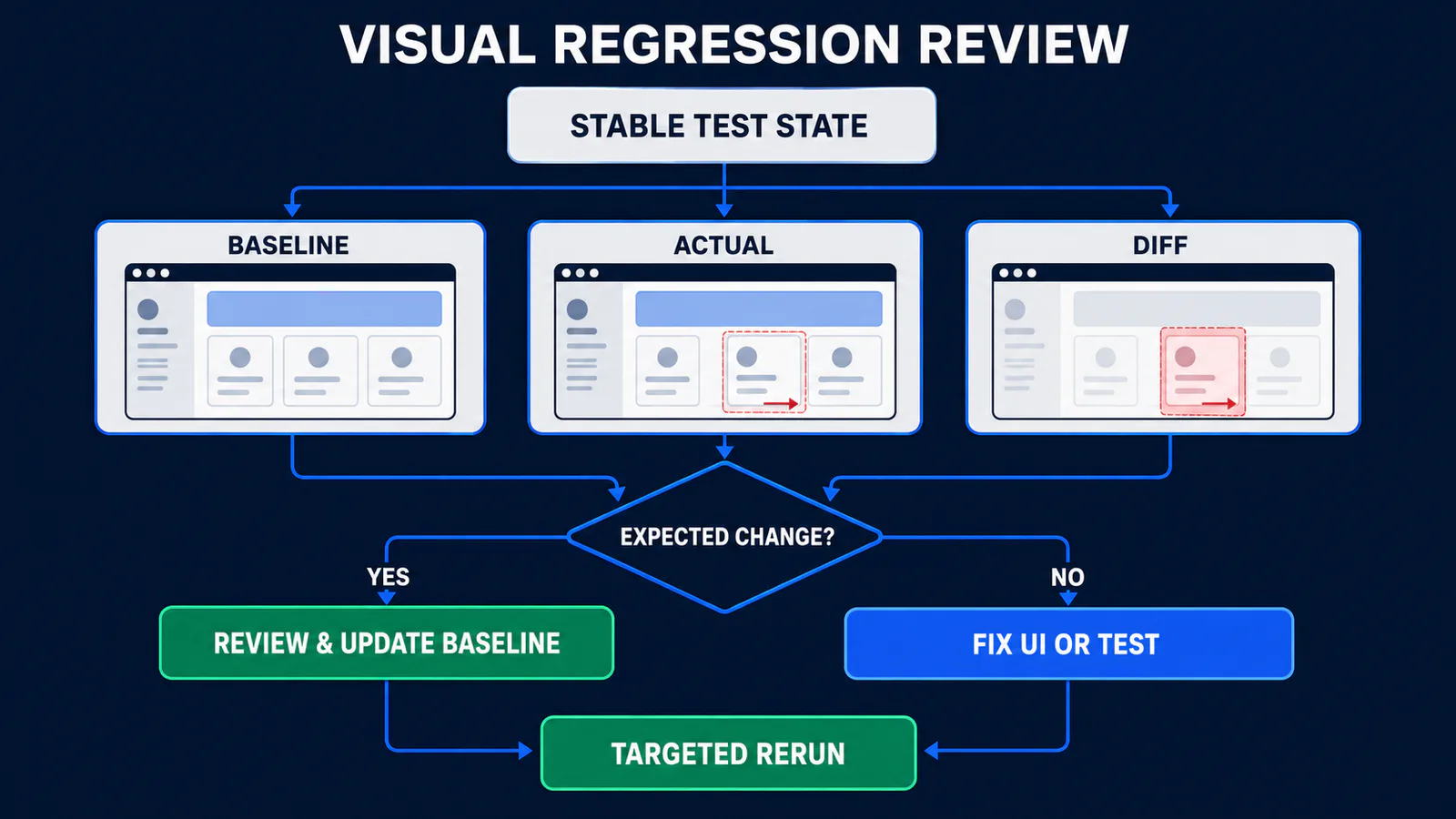
Playwright visual testing compares the UI rendered by a current test run with an approved baseline image. A screenshot assertion fails when the difference exceeds the policy you define, giving reviewers expected, actual and diff images to investigate. The assertion is easy; the engineering work is controlling the state, owning the baseline and deciding whether a difference is a defect.
This guide uses Playwright Test with TypeScript. It shows focused element checks and full-page comparisons, then builds a maintainable workflow for baselines, tolerances and CI evidence. If you need the wider tool context first, start with the Playwright automation guide. For TypeScript runner fundamentals, use the Playwright TypeScript guide.
Playwright visual testing at a glance
| Part | What it means | QA decision |
|---|---|---|
| Baseline | The approved reference image | Who reviews it and which environment owns it? |
| Actual | The screenshot from the current run | Was the application in the intended state? |
| Diff | Pixels that differ between baseline and actual | Is the change expected, defective or environmental noise? |
| Tolerance | The amount or degree of difference allowed | What harmless variance is documented and justified? |
| Update | Replacing the baseline with a new approved image | Does the product change explain every affected pixel? |
The official Playwright visual comparisons guide describes the core loop: the first run creates a missing reference image, and later runs compare new output against it. Playwright waits until two consecutive screenshots match before making the baseline comparison. That capture-time stabilization helps with motion, but it cannot correct the wrong test data, missing fonts or a different rendering environment.
Screenshot capture is not a screenshot assertion
page.screenshot() captures an image. It is useful for diagnostics, documentation or custom processing, but it does not compare the image or fail the test by itself.
await page.screenshot({
  path: 'test-results/checkout.png',
  fullPage: true,
});
expect(page).toHaveScreenshot() is a Playwright Test assertion. It captures, compares and reports a failure when the result exceeds the configured comparison rules.
await expect(page).toHaveScreenshot('checkout.png');Screenshot assertions work with the Playwright test runner. Both named .png and lossless .webp snapshots are supported. Use an explicit, stable name rather than relying on an auto-generated sequence when a baseline will be reviewed for months.
Page or locator screenshot?
A page assertion protects a viewport or full page. It can catch relationships across regions—header overlap, a shifted grid or a footer appearing mid-page—but it also absorbs every volatile pixel on that surface.
A locator assertion protects one component. It usually produces smaller, faster and more actionable diffs. This is a strong default for a pricing card, chart shell, order summary or navigation component. Use stable, user-facing or test-contract locators; the Playwright locators guide owns that strategy in depth.
| Scope | Good for | Main risk |
|---|---|---|
| Locator | Components, cards, dialogs, widgets | May miss a layout problem outside the component |
| Viewport | Above-the-fold layout and responsive composition | Dynamic banners or peripheral content add noise |
| Full page | Long-form layout and page-wide regressions | Large surface makes tiny unrelated changes expensive |
Write a focused visual regression test
Give the screenshot a business state, not just a URL. The test below assumes the application supports a deterministic fixture scenario. It proves the order summary is ready before capturing the pixels.
import { test, expect } from '@playwright/test';

test('order summary keeps its approved layout', async ({ page }) => {
  await page.goto('/checkout?scenario=visual-stable');

  const summary = page.getByTestId('order-summary');
  await expect(summary).toContainText('Total');
  await expect(summary).toHaveScreenshot('order-summary.png');
});
The text assertion matters. A matching image does not reliably express every business condition, while a functional assertion alone may miss clipping or a broken layout. Pairing them makes the test’s intent legible: the expected component is present, and its approved appearance is preserved.
On the first run, Playwright reports that the snapshot is missing and writes the candidate image. Inspect it before committing. If it caught a skeleton, consent banner, personal account value or broken font, it is not a trustworthy baseline just because the runner created it.
Run the specific test in the environment that will own the baseline:
npx playwright test tests/checkout.visual.spec.ts --project=chromiumCommit the approved snapshot directory with the test. Playwright’s default naming includes the project or browser/platform context because rendering can legitimately differ between environments. Do not rename those files manually to collapse distinct environments into one baseline.
Add a page-level check only where it buys coverage
A full-page comparison is useful when page composition is the contract. Control the visible date and other changing data first, then mask only information deliberately excluded from the test.
test('dashboard layout remains stable', async ({ page }) => {
  await page.clock.setFixedTime(
    new Date('2026-01-15T10:00:00Z')
  );

  await page.goto('/dashboard?fixture=visual');
  await expect(
    page.getByRole('heading', { name: 'Dashboard' })
  ).toBeVisible();

  await expect(page).toHaveScreenshot('dashboard.png', {
    fullPage: true,
    mask: [page.getByTestId('build-id')],
    maxDiffPixelRatio: 0.001,
  });
});
The ratio here is an example team policy, not an official universal default. The build identifier is masked because its value changes and exact text is outside this visual contract. If the account name or order total changes unexpectedly, masking it would conceal the wrong state. Control that data instead.
Build baselines as reviewed test assets
A baseline is not “whatever the application looked like first.” It is a versioned expectation with an owner, environment and reason to change. Treat it with the same discipline as assertion code.
- Name the state. Record the route, data fixture, role, viewport, color scheme and browser project represented.
- Generate in the comparison environment. Avoid making macOS baselines that ordinary CI compares on Linux.
- Inspect the whole image. Look for loading UI, personalized content, cookie banners, missing assets, unexpected scrollbars and font fallback.
- Commit the approved baseline. Keep it adjacent to the test or in a configured snapshot path that remains easy to review.
- Require a reason for change. A baseline diff should travel with the product or design change that explains it.
- Review, then update. Never reverse that sequence simply because updating is faster.
--update-snapshots against the whole suite after an unexplained failure. This can convert a real regression, wrong environment or broken test state into the new expected output.
Give snapshot paths a predictable contract
For a larger repository, use snapshotPathTemplate so reviewers can locate assets by project and test file. The supported template tokens are documented in the Playwright TestProject reference.
import { defineConfig } from '@playwright/test';

export default defineConfig({
  snapshotPathTemplate:
    '{testDir}/__screenshots__/{projectName}/{testFilePath}/{arg}{ext}',
});
This keeps project-specific images separate while preserving test-file ownership. Define the path once in the Playwright framework, then prevent individual specs from inventing competing folder conventions.
Update only what you reviewed
The current CLI accepts all, changed, missing and none update modes. A scoped, reviewable command is safer than regenerating the entire repository:
npx playwright test tests/checkout.visual.spec.ts \
  --project=chromium \
  --update-snapshots=changed
Review the resulting image diff in version control. Confirm that the product requirement explains the change, the page was in the correct state, and no unrelated baseline moved. Then run the test again without the update flag. That final comparison proves the new candidate baseline and current output agree in the normal execution path.
Make screenshot assertions deterministic
Playwright warns that browser rendering can vary with the operating system, browser and Playwright versions, settings, hardware, power source and headless mode. Fonts, GPU paths, device scale and locale add more opportunities for drift. The most effective response is environment control—not a larger tolerance.
| Source of variance | Control it with | Avoid |
|---|---|---|
| OS, browser and dependencies | Pinned lockfile and repeatable CI/container image | Baselines from whichever laptop ran last |
| Viewport and scale | Named projects with fixed viewport and scale | One baseline for unrelated device profiles |
| Fonts | Install required fonts and wait for the intended UI state | Accepting fallback-font diffs with a broad threshold |
| Dates and timers | Playwright Clock or test-controlled data | Masking every date regardless of its test value |
| API content | Deterministic fixtures or request mocking | Capturing live feeds and ads in core baselines |
| Animations and carets | Assertion defaults or explicit documented options | Arbitrary sleeps that merely move the capture time |
| Personalized state | Dedicated test identities and seeded data | Personal profiles or production customer content |
The screenshot assertion disables animations by default. Finite animations are fast-forwarded to completion; infinite animations are canceled to their initial state for the screenshot. The caret is hidden by default. Writing those values in configuration can still make a team policy obvious:
export default defineConfig({
  expect: {
    toHaveScreenshot: {
      animations: 'disabled',
      caret: 'hide',
      maxDiffPixelRatio: 0.001,
    },
  },
});
Do not interpret “animations disabled” as “the page is ready.” Data fetching, web-font loading and application transitions may still produce the wrong business state. Wait for an observable product condition such as a status, row count or heading—not waitForTimeout().
Mask and style only approved exclusions
mask covers selected locator boxes, using pink by default; maskColor can change that overlay. A screenshot stylesheet supplied through stylePath can hide or normalize volatile elements, including content inside shadow DOM and inner frames. These are precise tools, but they can also erase evidence.
Use a mask when a changing value is deliberately outside the visual contract: a build identifier, a generated avatar or an ad slot owned by another system. Use stylePath when the exclusion is a reusable presentation rule. Keep the exclusion small, named and reviewable. If the dynamic content matters to the user journey, make the source deterministic instead.
Choose tolerances without hiding regressions
Playwright uses three related controls. They answer different questions, so setting all of them to generous values is not a strategy.
| Control | What it permits | Good fit | Failure mode |
|---|---|---|---|
maxDiffPixels |
A fixed count of differing pixels | Stable, fixed-size component | The same count has different meaning on a small card and a full page |
maxDiffPixelRatio |
A fraction of all image pixels | Surfaces whose dimensions vary predictably | A large image may allow many changed pixels |
threshold |
How different each compared pixel may be in YIQ color space | Small antialiasing/color noise after environment control | A lax value can hide meaningful edge or color changes |
The documented default per-pixel threshold is 0.2, from 0 (strict) to 1 (lax). maxDiffPixels and maxDiffPixelRatio are unset unless you configure them. This does not mean 0.2 is an organizational quality target. It describes the comparator’s default sensitivity at each pixel.
A defensible tuning sequence is:
- Run in the baseline environment.
- Inspect expected, actual and diff images.
- Fix state, fonts, data, viewport or application timing.
- Narrow the screenshot surface where broad coverage is not required.
- Exclude only pixels outside the stated contract.
- Add the smallest tolerance that covers a known harmless residual.
- Document the reason and test it against a deliberate small regression.
A tolerance should have a failure experiment. Move the component by two pixels, change the approved color, or clip a label in a temporary local change and prove the assertion still fails. If the test cannot detect a defect the team cares about, the policy is too permissive even when its number looks small.
Design a maintainable visual regression strategy
Do not screenshot every page at every step. Broad visual coverage creates baseline volume, review fatigue and false confidence. Select surfaces by visual risk.
- High value: design-system components, responsive navigation, checkout summaries, dense tables, overlays, charts and critical brand layouts.
- Lower value: pages dominated by live feeds, third-party advertising, constantly changing user data or content already covered by a dedicated visual owner.
- Separate contracts: component appearance, viewport composition and full-page layout should not become one unexplained baseline.
Run a small visual smoke set on pull requests when it gives fast feedback. Move broader browser, viewport or theme matrices to scheduled or pre-release lanes if their cost and review volume would slow ordinary changes. Multiple browser baselines are justified when rendering differences or supported-browser risk matter—not simply because projects exist.
Keep the test name, snapshot name and product surface aligned. A reviewer should understand checkout/order-summary/default.png without opening six files. The complete folder and fixture architecture belongs in the production framework guide; the visual layer needs only a clear public convention.
Keep useful visual artifacts in CI
A visual failure without its images is difficult to review. Retain the Playwright HTML report and test-result attachments when a screenshot assertion fails. The reviewer needs the expected, actual and diff images plus the test, project/browser, viewport, commit and run that produced them.
The official UI Mode guide describes expected, actual and diff views, including an overlay slider. The HTML reporter preserves failure information for CI review. Open a downloaded report with:
npx playwright show-reportYour CI system must upload the report/result folders even when the test command exits non-zero. Keep the upload condition and retention policy in the CI configuration, but leave provider-specific GitHub Actions, Jenkins, sharding and parallel-execution setup to the planned PW-20 CI/CD guide.
Treat artifacts as potentially sensitive
Screenshots can expose customer data, internal dashboards, private URLs and account identities. Reports and traces may also contain requests, source or credentials. The official Playwright CI guidance recommends trusted artifact stores or encryption when reports and traces are uploaded.
- Use dedicated test accounts and synthetic data.
- Restrict artifact access to the people who need it.
- Choose the shortest useful retention period.
- Do not upload authentication state, cookies or tokens.
- Redact or avoid personal content before it reaches a screenshot.
Diagnose a failed screenshot comparison
Start with the three images. Do not change code while looking only at a red test name.
| Classification | Evidence | Correct response |
|---|---|---|
| Expected product change | Approved design/code change explains the pixels | Review and update only affected baselines |
| Real regression | Layout, typography, color or content changed unintentionally | Fix the product and keep the baseline |
| Unstable test state | Skeleton, late data, wrong role or incomplete navigation | Assert readiness and control the state |
| Environment drift | Font, OS, browser, scale or rendering mismatch | Restore parity and rerun |
| Too-broad screenshot | Unrelated banner or peripheral content dominates the diff | Narrow to a locator or document an exclusion |
| Obsolete baseline | Approved change was never reflected in snapshots | Reconstruct intent and update through review |
When the pixels show the symptom but not the cause, inspect runtime evidence. The Playwright Trace Viewer guide explains how to correlate the failed action with DOM snapshots, network activity, console messages and source. Change one relevant variable, rerun the smallest failing test, and preserve the assertion that represents the user-visible risk.
Know what visual testing cannot prove
Visual comparisons are powerful but narrow. They detect image differences. They do not automatically understand product intent.
- A button can look correct while click behavior is broken.
- A form can match its baseline while its accessible name is missing.
- A chart can render identical pixels while using the wrong underlying data.
- A one-pixel antialiasing change can fail without affecting a user.
- A masked area can hide a regression the team forgot it owned.
- One browser/project baseline does not prove every supported browser.
- Pixel matching does not replace usability or exploratory review.
Use functional web assertions for behavior, accessibility checks for programmatic semantics, API/backend validation for persisted state, and human review for design intent. The real-world Playwright E2E workflow shows how UI actions, assertions, backend evidence and cleanup fit together.
Playwright’s built-in matcher is a strong repository-local starting point. Dedicated visual-testing services may add hosted approval, branch baselines, collaboration dashboards and large-scale governance. Those capabilities are not automatically provided by toHaveScreenshot(), and a team should evaluate them only when its review and scaling needs justify another system.
Use AI to classify a visual diff, not approve it
A repository-aware coding agent can compare redacted failure metadata with the test, component and stylesheet, then propose a likely classification and the smallest diagnostic step. It should not update snapshots or raise tolerance autonomously.
📋 Copy this visual-failure review prompt
Review this Playwright visual-test failure.

Inputs I will provide:
- redacted expected/actual/diff image descriptions or approved images;
- test name, project, viewport and environment metadata;
- the relevant Playwright test, component and stylesheet snippets;
- the product change that was expected, if any.

Tasks:
1. Classify the failure as likely product regression, expected change,
   unstable test state, environment drift, overly broad screenshot,
   or obsolete baseline.
2. Cite the evidence for and against each plausible class.
3. Propose the smallest diagnostic action before any code change.
4. If a fix is justified, separate product fixes from test-harness fixes.
5. Do not update snapshots, increase tolerance, add fixed sleeps,
   hide content or invent Playwright APIs merely to make the test pass.
6. Flag every claim that requires current official Playwright verification.

Output:
- classification and confidence;
- evidence table;
- minimal reproduction/diagnostic plan;
- proposed change, if justified;
- human review checklist.
Before sharing material with an external AI service, remove credentials, cookies, tokens, private URLs, customer data, proprietary screenshots and confidential source code unless your organization explicitly approves that data flow. A QA engineer must inspect the images, validate the requirement, verify proposed APIs against current documentation and rerun the focused test in the baseline environment.
Playwright visual testing FAQ
What is a baseline screenshot in Playwright?
A baseline is the approved reference image used by a named screenshot assertion. Playwright can generate a missing candidate on the first run, but the team must inspect and approve it before treating it as expected behavior.
Should I use maxDiffPixels or maxDiffPixelRatio?
Use a pixel count for a stable, fixed-size component and a ratio when total image size can differ predictably. Control the environment first, then choose the narrowest value supported by classified harmless variance.
Why do Playwright screenshots differ between local and CI?
Operating system, browser build, fonts, rendering settings, scale, headless mode and other host factors can change pixels. Generate and compare baselines in the same repeatable environment instead of compensating immediately with tolerance.
Does Playwright disable animations for screenshot assertions?
Yes, toHaveScreenshot() defaults animations to disabled and the text caret to hidden. You still need to control application state, data, fonts and other asynchronous content.
When should I update Playwright snapshots?
Update a snapshot only after confirming the product change is intended, the actual image represents the correct state and no unrelated pixels changed. Review the new baseline, then rerun normally without the update flag.
Can visual regression tests replace functional tests?
No. A screenshot comparison evaluates rendered pixels, not business behavior, accessibility semantics, backend persistence or usability. Pair visual checks with targeted assertions and other testing layers.
Make the review decision explicit
A reliable visual suite is not defined by its screenshot count. It is defined by controlled state, narrow ownership, reviewable evidence and a baseline-update process that preserves trust.
Start with one critical component. Stabilize its data and environment, add a functional assertion, capture a named baseline, inspect a deliberate failure and document who may approve an update. Then expand only where the next visual check protects a real user-facing risk. Return to the Playwright automation hub for the broader learning path.