
Playwright TypeScript is the Playwright Test workflow in which your tests, configuration, fixtures, and supporting abstractions are written in TypeScript. It is a strong default for QA teams that want Playwright’s native runner and tooling plus editor feedback, typed fixtures, safer refactoring, and a shared language with modern web applications.
The real advantage is not simply changing a file extension from .js to .ts. A reliable suite combines Playwright’s locators, web-first assertions, browser-context isolation, projects, traces, and parallel workers with TypeScript checks that run separately from the test runner.
This guide builds that complete workflow. You will see how to scaffold the project, configure the runner, write a realistic test, add typed page objects and fixtures, handle authentication safely, debug failures, and put the right quality gates into CI.
If you first need the product-level overview, start with the Playwright automation guide. If your local browser installation is failing, use the dedicated Playwright installation guide.
Compatibility note — reviewed 31 August 2026: the current stable
@playwright/testpackage is 1.62.1, and the official installation page lists the latest Node.js 22.x, 24.x, or 26.x lines. Check the current Playwright installation documentation and your installed version before adopting version-specific behavior.
What Playwright TypeScript Gives a QA Team
Playwright Test already provides the runner, assertions, fixtures, isolation, projects, parallel execution, retries, reports, and debugging tools. TypeScript adds a compile-time feedback layer around that workflow.
| Layer | What it catches or provides | What it does not guarantee |
|---|---|---|
| Playwright Test | Test discovery, browser lifecycle, actions, assertions, isolation, retries, reports | Correct business coverage or safe test data |
| TypeScript | Type mismatches, invalid method signatures, refactoring feedback, typed fixtures | That a UI behavior is correct at runtime |
| Linting | Missing awaits, risky patterns, style and maintainability rules | That the tested workflow matches product risk |
| Human QA judgment | Scenario value, assertion quality, data risk, meaningful coverage | Fast repeatable execution without automation |
These layers complement each other. A test can compile and still assert the wrong thing. It can pass in Chromium and still corrupt shared backend data. It can use perfect locators and still cover a low-value scenario.
Set Up Playwright With TypeScript
The official scaffold defaults to TypeScript. From a new or existing Node project, run:
npm init playwright@latest
npm install -D typescript @types/node
npx playwright --version
npx playwright test --list
During the scaffold, choose TypeScript, select a test directory, decide whether to add the GitHub Actions workflow, and install the browser binaries you need. The generated project includes playwright.config.ts and a starter spec.
Use --list before the first real run. It proves that the runner can load the configuration and discover tests without confusing discovery problems with browser or application failures.
For detailed proxy, browser-cache, operating-system dependency, and download troubleshooting, keep this article’s scope clean and follow the complete setup guide.
The TypeScript Detail Many Guides Miss
Playwright can read and transform TypeScript, but running Playwright tests is not the same as type-checking the suite. The official TypeScript guide explicitly recommends running the TypeScript compiler alongside Playwright.
Create a strict test configuration:
{
  "compilerOptions": {
    "target": "ES2022",
    "module": "NodeNext",
    "moduleResolution": "NodeNext",
    "strict": true,
    "noEmit": true,
    "types": ["node"]
  },
  "include": ["playwright.config.ts", "tests/**/*.ts"]
}
Then make these separate checks:
npx tsc --noEmit
npx playwright test
The first command checks types. The second discovers and executes tests. Keep both in local development and CI; neither replaces the other.
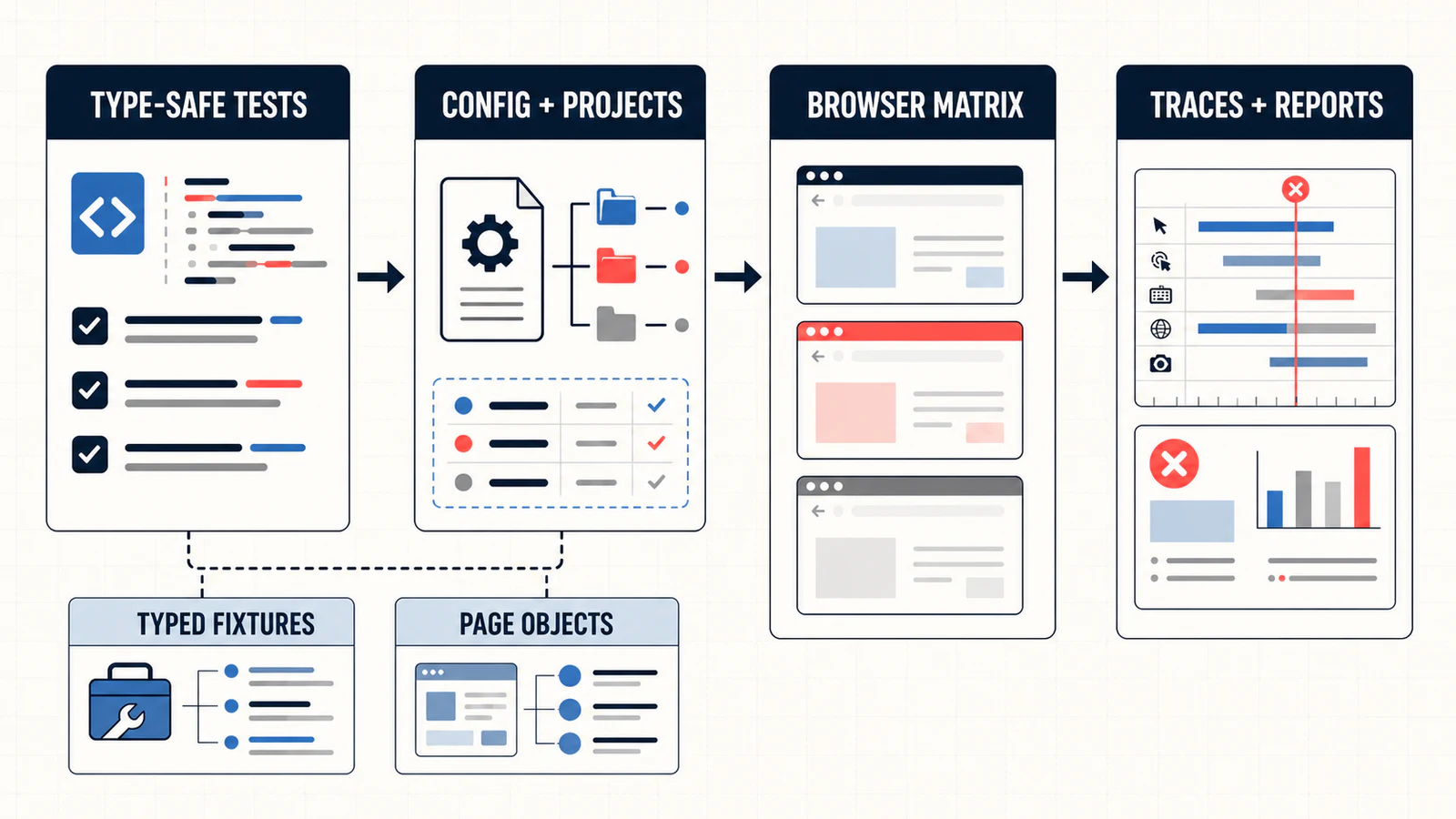
Configure the Runner for Useful Failure Evidence
A practical configuration should answer five questions: where tests live, how they run locally and in CI, which environments or browsers are projects, what evidence is retained, and which mistakes should fail the build.
import { defineConfig, devices } from '@playwright/test';

export default defineConfig({
  testDir: './tests',
  fullyParallel: true,
  forbidOnly: !!process.env.CI,
  retries: process.env.CI ? 2 : 0,
  workers: process.env.CI ? 2 : undefined,
  reporter: [['html', { open: 'never' }], ['list']],

  use: {
    baseURL: process.env.BASE_URL ?? 'https://example.test',
    trace: 'on-first-retry',
    screenshot: 'only-on-failure',
    video: 'retain-on-failure'
  },

  projects: [
    { name: 'chromium', use: { ...devices['Desktop Chrome'] } },
    { name: 'firefox', use: { ...devices['Desktop Firefox'] } },
    { name: 'webkit', use: { ...devices['Desktop Safari'] } }
  ]
});
This is a starting point, not a universal policy. Two CI workers may be too many for a shared environment and too few for an isolated one. Three browser projects may be appropriate for release coverage but wasteful for every pull request. Align the matrix with product risk and infrastructure capacity.
The configuration reference distinguishes top-level runner options from browser-context options under use. Keeping that distinction clear prevents configuration that looks valid but does not affect the intended layer.
Write a Test Around User-Visible Behavior
A maintainable test names the behavior, locates the interface as a user perceives it, performs a small workflow, and makes an observable assertion.
import { test, expect } from '@playwright/test';

test('signed-in user can open checkout', async ({ page }) => {
  const email = process.env.E2E_USER_EMAIL;
  const password = process.env.E2E_USER_PASSWORD;

  if (!email || !password) {
    throw new Error('E2E test credentials are missing');
  }

  await page.goto('/login');
  await page.getByLabel('Email').fill(email);
  await page.getByLabel('Password').fill(password);
  await page.getByRole('button', { name: 'Sign in' }).click();

  await page.goto('/checkout');
  await expect(
    page.getByRole('heading', { name: 'Checkout' })
  ).toBeVisible();
});
The example is intentionally small, but three choices matter:
- Every asynchronous Playwright call is awaited. A missing
awaitcan create timing bugs that type checking alone may not catch; add an ESLint rule such as@typescript-eslint/no-floating-promises. - Locators use labels and roles. The official locator guidance favors user-facing semantics or an explicit test-id contract over brittle CSS/XPath chains.
- The test asserts an outcome. Clicking is an action, not proof. Playwright’s web-first assertions retry until the expected condition passes or times out.
Auto-waiting is not a license to ignore state
Before a click, Playwright checks conditions such as uniqueness, visibility, stability, event reception, and enabled state. That removes many mechanical sleeps. It does not know whether an API job finished, an email arrived, or the correct account balance was created.
Wait for an observable product condition instead of inserting waitForTimeout(). If no observable condition exists, improve the application’s testing contract or create state through an API or fixture.
Use a Structure That Can Grow Without Hiding the Test
A useful early structure is deliberately boring:
playwright.config.ts
tsconfig.json
tests/
  fixtures.ts
  pages/
    login-page.ts
  checkout.spec.ts
playwright/.auth/
Start with specs and small helpers. Introduce page objects or fixtures when duplication and ownership are visible—not because a framework diagram says every page needs a class.
A small typed page object
import type { Locator, Page } from '@playwright/test';

export class LoginPage {
  readonly email: Locator;
  readonly password: Locator;
  readonly signIn: Locator;

  constructor(private readonly page: Page) {
    this.email = page.getByLabel('Email');
    this.password = page.getByLabel('Password');
    this.signIn = page.getByRole('button', { name: 'Sign in' });
  }

  async open(): Promise<void> {
    await this.page.goto('/login');
  }

  async submit(email: string, password: string): Promise<void> {
    await this.email.fill(email);
    await this.password.fill(password);
    await this.signIn.click();
  }
}
This class owns login-page interactions without swallowing the business assertion. The spec should still reveal why the user is signing in and what outcome matters.
A typed fixture that composes the page object
import { test as base } from '@playwright/test';
import { LoginPage } from './pages/login-page.js';

type TestUser = { email: string; password: string };
type Fixtures = { loginPage: LoginPage; testUser: TestUser };

export const test = base.extend<Fixtures>({
  loginPage: async ({ page }, use) => {
    await use(new LoginPage(page));
  },

  testUser: async ({}, use) => {
    const email = process.env.E2E_USER_EMAIL;
    const password = process.env.E2E_USER_PASSWORD;

    if (!email || !password) {
      throw new Error('E2E test credentials are missing');
    }

    await use({ email, password });
  }
});

export { expect } from '@playwright/test';
Fixtures are on-demand and composable. TypeScript makes their contract visible to the editor and prevents consumers from guessing what a fixture returns. The official fixtures guide is the source of truth for test- and worker-scoped lifecycles.
Projects Are More Than a Browser Matrix
A Playwright project is a named group of tests with shared configuration. Browsers are the common example, but projects can also represent:
- desktop and mobile device profiles;
- authenticated and anonymous states;
- staging and preview environments;
- different feature flags, locales, or permissions;
- setup dependencies that must complete before test projects run;
- a smaller pull-request matrix and a broader release matrix.
Use npx playwright test --project=chromium to select one project. If setup needs fixtures, traces, and report visibility, the official guidance recommends a setup project with dependencies over an opaque global setup function.
See the projects documentation before creating a large matrix. Every project multiplies execution, so each one should represent a real compatibility or risk decision.
Understand Isolation Before You Enable More Workers
Playwright gives each test an isolated browser context by default. That isolates cookies, local storage, and session storage. It does not isolate the backend customer, order, subscription, inbox, or database row your tests use.
| Shared resource | Typical failure | Safer pattern |
|---|---|---|
| One test account | Parallel tests change the same preferences or permissions | Account pool, worker-specific accounts, or immutable read-only scenarios |
| One order/cart | One test completes or deletes state another needs | Create unique data per test through an API and clean it up |
| One email inbox | Tests consume each other’s messages | Unique aliases or message correlation IDs |
| One staging environment | Load and deployment changes make failures non-deterministic | Capacity-aware workers and environment health checks |
Before increasing workers or enabling fullyParallel, prove that tests own their mutable data. For the broader strategy, use Testheon’s test data management guide.
Handle Authentication State as a Secret
Reusing authenticated storage state can speed up a suite, but the file may contain cookies and headers capable of impersonating the test user. The official authentication guide recommends storing it under playwright/.auth and excluding that directory from version control.
playwright/.auth/
test-results/
playwright-report/
Use dedicated non-production accounts with the minimum permissions required. Do not commit credentials, copied production cookies, traces containing sensitive values, or screenshots of personal data. A shared authenticated account is suitable only when parallel tests cannot mutate server-side state.
Run and Debug at the Smallest Useful Scope
| Goal | Command |
|---|---|
| List discovered tests | npx playwright test --list |
| Run the full configured matrix | npx playwright test |
| Run one project | npx playwright test --project=chromium |
| Run one file | npx playwright test tests/checkout.spec.ts |
| Use time-travel UI | npx playwright test --ui |
| Step through one test | npx playwright test tests/checkout.spec.ts --debug |
| Open the HTML report | npx playwright show-report |
| Open a retained trace | npx playwright show-trace path/to/trace.zip |
Use UI Mode while developing, Inspector for step-by-step locator investigation, the HTML report for suite-level results, and Trace Viewer for CI failure evidence. The official running and debugging guide covers these tools.
Do not set traces to on for every test without measuring the storage and runtime cost. on-first-retry is a practical default because it captures the repeated failure while keeping successful runs lighter.
Build a CI Gate, Not Just a Browser Job
A browser run should not be the first time the pipeline discovers a type error or an accidentally committed test.only. A useful CI sequence is:
- Install locked dependencies with
npm ci. - Run linting, especially missing-promise checks.
- Run
npx tsc --noEmit. - Install only the browser projects required by this pipeline.
- Run Playwright with
forbidOnly, controlled workers, and failure artifacts. - Upload the HTML report and traces according to a defined retention policy.
name: Playwright checks

on:
  pull_request:

jobs:
  test:
    runs-on: ubuntu-latest
    steps:
      - uses: actions/checkout@v4
      - uses: actions/setup-node@v4
        with:
          node-version: 24
          cache: npm
      - run: npm ci
      - run: npm run lint
      - run: npx tsc --noEmit
      - run: npx playwright install --with-deps chromium
      - run: npx playwright test --project=chromium
The official CI guide recommends installing only needed browsers and does not generally recommend caching browser binaries. Expand to Firefox/WebKit or shards when risk and suite duration justify the cost.
Scale With Evidence, Not Framework Ceremony
Retries classify; they do not repair
A retry can distinguish a repeatable failure from a flaky one and capture a trace. It should create investigation work, not make an unstable test acceptable. Track retry rate and remove the root cause.
Workers expose state assumptions
Increasing workers improves throughput only when the application, test accounts, and data can handle concurrency. If failures rise with worker count, that is evidence about shared state or capacity—not a reason to add sleeps.
Shard only after the suite is independently runnable
Playwright can split a suite with --shard=x/y. With fullyParallel, sharding can distribute individual tests more evenly; without it, distribution is mainly file-level. Measure durations and keep files reasonably balanced.
Do not make page objects the architecture
A test system also needs data creation, environment contracts, observability, reporting, ownership, and cleanup. A folder full of page classes solves only UI interaction reuse.
Common Playwright TypeScript Mistakes
| Mistake | Why it fails | Better decision |
|---|---|---|
| Assuming Playwright type-checks tests | Tests may execute despite non-critical TypeScript errors | Run tsc --noEmit separately |
Missing await |
Actions and assertions can race or finish after the test | Lint floating promises and review async calls |
| Long CSS/XPath selectors | Tests couple to implementation structure | Use role/label/text or an explicit test-id contract |
Using waitForTimeout() as synchronization |
Fixed delays are slow and environment-sensitive | Wait for an observable product condition |
| One shared mutable account | Parallel tests create data collisions | Use worker/test-owned data and accounts |
| Retries everywhere | Flakiness becomes hidden technical debt | Use retries to capture evidence, then fix causes |
| Tracing every passing test | High storage and runtime cost | Retain traces for first retry or targeted debugging |
Checking in playwright/.auth |
Session material can impersonate test users | Git-ignore auth state and rotate exposed sessions |
| A huge framework before useful coverage | Abstractions hide behavior and slow change | Let repeated patterns earn an abstraction |
⚡ AI Shortcut: Review a Playwright TypeScript Test
AI can help spot missing awaits, brittle locators, weak assertions, fixture misuse, and shared-state risks. It cannot decide whether a scenario covers the right product risk.
Use this reusable prompt:
Review this Playwright TypeScript test as a senior QA automation engineer.

Context:
- Product behavior and risk: [describe]
- Test environment: [local/CI, browser projects, workers]
- Data ownership: [how accounts and records are created/reset]

Check for:
1. missing awaits and TypeScript contract problems;
2. locators coupled to implementation details;
3. actions without meaningful web-first assertions;
4. fixed sleeps or force actions that hide state problems;
5. shared mutable data or account collisions;
6. fixture/page-object abstractions that hide intent;
7. retry, trace, screenshot, and cleanup gaps;
8. secrets or personal data in code and artifacts.

Return:
- BLOCKER, MAJOR, MINOR, and SUGGESTION findings;
- a minimal corrected example;
- assumptions that a human must verify.

Do not invent selectors, endpoints, credentials, or expected behavior.
Human verification checklist
- Does the assertion prove the business outcome, not just element visibility?
- Can the test run alone, in any order, and in parallel?
- Are test data and cleanup owned by this test or worker?
- Do locators reflect the accessible interface or an agreed testing contract?
- Will failure evidence explain what happened without exposing secrets?
- Did a person confirm every AI-suggested selector, route, and expected result?
Privacy checklist
Before pasting code, logs, traces, screenshots, network payloads, or storage state into an AI tool, remove credentials, tokens, cookies, customer identifiers, personal data, private URLs, and proprietary business rules. Follow your organisation’s approved AI and data-handling policy.
What to Learn Next
If this is your first Playwright test, use the beginner Playwright tutorial to slow down the write-run-debug loop. If you are choosing between ecosystems, compare this workflow with the dedicated Playwright Python guide rather than assuming one language is universally better.
For a broader learning sequence covering testing fundamentals, automation, API skills, CI, and AI-assisted QA, follow the QA roadmap.
Playwright TypeScript FAQ
Does Playwright support TypeScript directly?
Yes. Playwright can load and transform TypeScript tests without a separate build step. However, it does not replace full TypeScript checking, so run tsc --noEmit separately.
Is TypeScript required for Playwright?
No. Playwright supports JavaScript as well as Python, Java, and .NET APIs. TypeScript is the default in the Node/Playwright Test scaffold and is useful when your team values typed contracts and refactoring feedback.
What is the difference between Playwright and Playwright Test?
The Playwright Library provides browser automation APIs. Playwright Test is the Node.js test framework that adds a runner, assertions, fixtures, projects, retries, parallelism, and reports. This guide uses Playwright Test.
Do Playwright tests run in parallel?
Test files run in parallel by default through worker processes. Tests in one file run in order unless you opt into parallel mode. Parallel browser contexts do not isolate shared backend data.
Should I use Page Objects with Playwright TypeScript?
Use small page or component objects when interactions repeat and have clear ownership. Do not move business assertions into a large abstraction layer or create a class for every page before duplication exists.
How should I debug a Playwright TypeScript test?
Start with one failing test. Use UI Mode for time-travel development, Inspector for step-by-step locator work, the HTML report for suite results, and Trace Viewer for CI evidence.
Should I use retries for flaky tests?
Retries are useful for classification and evidence capture. A test that passes only on retry remains flaky and should be investigated rather than accepted as healthy.
Is a saved Playwright authentication state safe to commit?
No. It may contain cookies and headers that can impersonate the test account. Store it in a git-ignored directory, use least-privilege accounts, and rotate the session if it is exposed.
Final Takeaway
A strong Playwright TypeScript suite is not defined by the number of page objects or configuration options it contains. It is defined by readable behavior, meaningful assertions, typed contracts, independent data, deliberate projects, useful failure evidence, and fast feedback at the right scope.
Start with a small test that proves value. Add strict type checking. Let fixtures and abstractions emerge from repeated needs. Scale workers and projects only when data and infrastructure are ready. That is the path from “a test that runs” to automation a QA team can trust.