
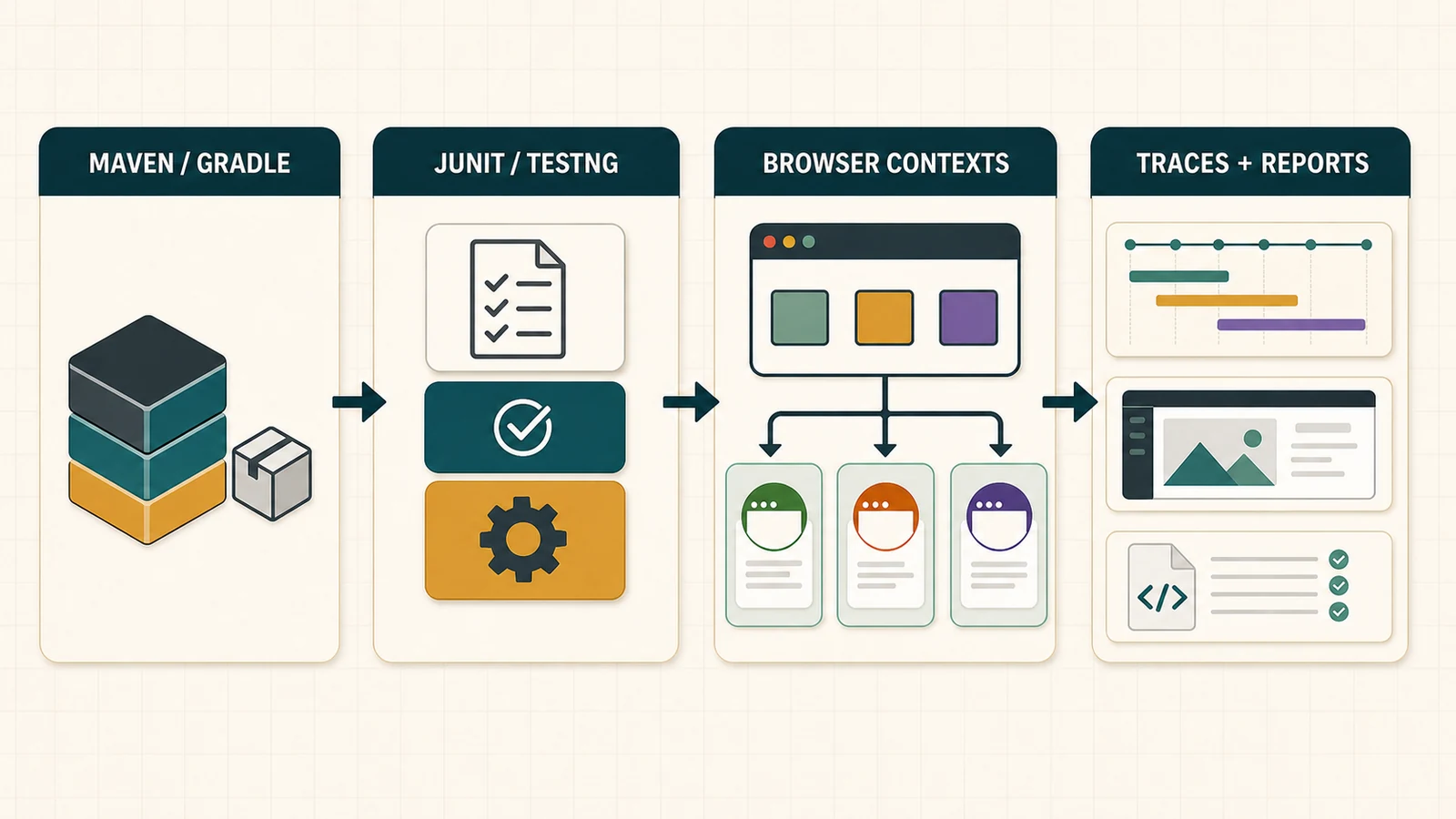
Playwright Java is the Java client for automating Chromium, Firefox, and WebKit with the Playwright API. In a Java codebase, Playwright supplies browser automation, locators, auto-waiting, isolated browser contexts, assertions, and traces; JUnit or TestNG supplies test discovery and lifecycle, while Maven or Gradle supplies dependency and build orchestration.
That distinction shapes the entire framework. Java teams should not copy a TypeScript Playwright Test configuration and translate the syntax. They need an explicit runner lifecycle, a thread-ownership model, a build lifecycle, and an evidence strategy that fits the rest of the JVM estate.
This guide covers that complete path: Maven and Gradle setup, JUnit and TestNG integration, a maintainable project structure, reliable locators and assertions, parallel execution, traces, CI, and enterprise controls. For the product-level comparison first, use the Playwright automation guide. For browser-download, proxy, or OS troubleshooting, keep this guide focused and follow the Playwright installation guide.
Compatibility note — reviewed 31 August 2026: Sonatype Central lists
com.microsoft.playwright:playwright:1.62.0, while Microsoft’s current Java documentation examples still show 1.61.0. The examples below pin 1.62.0. Before upgrading, confirm the current Maven artifact and keep the Java dependency, installed browser revision, and any Playwright container image compatible.
How Playwright Fits a Java Test Stack
| Layer | Owns | Does not own |
|---|---|---|
| Playwright Java | Browser processes, contexts, pages, locators, actions, web-first assertions, tracing | Test discovery, tags/groups, suite lifecycle, generic reports |
| JUnit or TestNG | Test methods, setup/teardown, selection, grouping, runner parallelism | Browser isolation or Playwright object safety |
| Maven or Gradle | Dependency resolution, compilation, tasks/phases, test plugins, CI entry points | Business coverage and test-data safety |
| Your framework code | Environment contracts, data ownership, reusable interactions, evidence and cleanup policy | Product truth without human QA judgment |
The most important consequence is simple: Playwright Java is a library, not the Node.js Playwright Test runner. Features such as retries, tags, XML results, suite selection, and class-level parallelism come from the Java runner and build. If your team specifically wants the Playwright Test projects/fixtures/reporter model, that belongs to the Playwright TypeScript workflow.
Choose a Practical Java Baseline
Microsoft documents Java 8 or newer as the library minimum. A greenfield enterprise suite should normally use the organisation’s supported LTS JDK rather than the lowest library floor. The runnable reference for this article targets Java 17 and was compiled and executed with JDK 21, Maven 3.9.12, Playwright Java 1.62.0, and JUnit 6.0.3.
Standardise these choices before the suite spreads across repositories:
- approved JDK distribution and version;
- Playwright Java and runner versions;
- Maven parent POM or Gradle platform/version catalog;
- browser installation and cache location;
- proxy, certificate, and artifact-mirror policy;
- local, pull-request, nightly, and release test matrices.
A reproducible build is more valuable than a developer machine that works through undocumented global state.
Set Up Playwright Java With Maven
Place Playwright and the test runner on the test classpath. This keeps browser automation out of the production artifact:
<properties>
  <maven.compiler.release>17</maven.compiler.release>
  <playwright.version>1.62.0</playwright.version>
  <junit.version>6.0.3</junit.version>
</properties>

<dependencies>
  <dependency>
    <groupId>com.microsoft.playwright</groupId>
    <artifactId>playwright</artifactId>
    <version>${playwright.version}</version>
    <scope>test</scope>
  </dependency>

  <dependency>
    <groupId>org.junit.jupiter</groupId>
    <artifactId>junit-jupiter</artifactId>
    <version>${junit.version}</version>
    <scope>test</scope>
  </dependency>
</dependencies>

<build>
  <plugins>
    <plugin>
      <groupId>org.apache.maven.plugins</groupId>
      <artifactId>maven-surefire-plugin</artifactId>
      <version>3.6.0-M1</version>
      <configuration>
        <failIfNoTests>true</failIfNoTests>
      </configuration>
    </plugin>
  </plugins>
</build>
Compile test sources, provision the browser needed by the job, and run the suite:
mvn -B -ntp -DskipTests test
mvn -B -ntp exec:java -Dexec.classpathScope=test \
  -Dexec.mainClass=com.microsoft.playwright.CLI \
  -Dexec.args="install chromium"
mvn -B -ntp test
The explicit installation step makes CI intent visible and lets you install only the browser matrix that a job needs. The official Java installation guide remains the source of truth for current commands and operating-system support.
Surefire or Failsafe?
Playwright does not require one Maven plugin. Use lifecycle semantics to choose:
- Surefire runs during
test. Use it when browser checks are part of the normal test gate and do not require a deployed system lifecycle. - Failsafe runs checks during
integration-testand verifies the result duringverify. Use it when the build must start an environment before the suite and guarantee post-integration cleanup before failing.
<plugin>
  <groupId>org.apache.maven.plugins</groupId>
  <artifactId>maven-failsafe-plugin</artifactId>
  <version>3.6.0-M1</version>
  <executions>
    <execution>
      <goals>
        <goal>integration-test</goal>
        <goal>verify</goal>
      </goals>
    </execution>
  </executions>
  <configuration>
    <failIfNoTests>true</failIfNoTests>
  </configuration>
</plugin>
Name integration checks consistently, such as *IT.java, and execute mvn verify. Pin approved plugin versions in the parent build. Apache’s Failsafe usage guide explains the lifecycle binding.
Set Up Playwright Java With Gradle
The equivalent Kotlin DSL build keeps the dependencies on the test runtime and exposes the Playwright CLI through a JavaExec task:
plugins {
    java
}

repositories {
    mavenCentral()
}

val playwrightVersion = "1.62.0"
val junitVersion = "6.0.3"

dependencies {
    testImplementation("com.microsoft.playwright:playwright:$playwrightVersion")
    testImplementation(platform("org.junit:junit-bom:$junitVersion"))
    testImplementation("org.junit.jupiter:junit-jupiter")
    testRuntimeOnly("org.junit.platform:junit-platform-launcher")
}

java {
    toolchain {
        languageVersion = JavaLanguageVersion.of(17)
    }
}

tasks.test {
    useJUnitPlatform()
}

tasks.register<JavaExec>("playwright") {
    classpath(sourceSets["test"].runtimeClasspath)
    mainClass.set("com.microsoft.playwright.CLI")
}
Then run ./gradlew playwright --args="install chromium" and ./gradlew test. Use a separate source set or JVM test suite when browser checks need an independent classpath, task, environment, or release cadence. Gradle’s JVM testing guide covers custom test tasks, filtering, reports, and maxParallelForks.
In a multi-module estate, move versions into a version catalog or platform and put shared task policy in a convention plugin. Do not copy slightly different Playwright versions and JVM flags into every service.
Integrate Playwright With JUnit Jupiter
A useful default reuses the expensive Playwright and Browser objects within one test class, but creates a new BrowserContext and Page for every test method. The context is an in-memory browser profile, so cookies, local storage, and session storage do not leak between tests.
import com.microsoft.playwright.*;
import com.microsoft.playwright.options.AriaRole;
import org.junit.jupiter.api.*;

import static com.microsoft.playwright.assertions.PlaywrightAssertions.assertThat;

@TestInstance(TestInstance.Lifecycle.PER_CLASS)
class AccountTest {
  private Playwright playwright;
  private Browser browser;
  private BrowserContext context;
  private Page page;

  @BeforeAll
  void launchBrowser() {
    playwright = Playwright.create();
    browser = playwright.chromium().launch();
  }

  @AfterAll
  void closePlaywright() {
    if (playwright != null) playwright.close();
  }

  @BeforeEach
  void createIsolatedPage() {
    context = browser.newContext();
    page = context.newPage();
  }

  @AfterEach
  void closeContext() {
    if (context != null) context.close();
  }

  @Test
  void savesProfile() {
    page.navigate(System.getenv("BASE_URL") + "/account");
    page.getByRole(AriaRole.BUTTON,
        new Page.GetByRoleOptions().setName("Save")).click();

    assertThat(page.getByRole(AriaRole.STATUS)).hasText("Saved");
  }
}
In production code, validate BASE_URL once in a typed configuration object rather than allowing the string null/account. The lifecycle is the important part: browser at class scope, context at method scope, cleanup in teardown.
The official runner examples use this same isolation pattern. Avoid a global static browser hidden in a shared base class if multiple test classes may call it from different threads.
Integrate Playwright With TestNG
TestNG maps to the same lifecycle using class- and method-level annotations:
import com.microsoft.playwright.*;
import org.testng.annotations.*;

public final class CheckoutTest {
  private Playwright playwright;
  private Browser browser;
  private BrowserContext context;
  private Page page;

  @BeforeClass(alwaysRun = true)
  public void launchBrowser() {
    playwright = Playwright.create();
    browser = playwright.chromium().launch();
  }

  @AfterClass(alwaysRun = true)
  public void closePlaywright() {
    if (playwright != null) playwright.close();
  }

  @BeforeMethod(alwaysRun = true)
  public void createIsolatedPage() {
    context = browser.newContext();
    page = context.newPage();
  }

  @AfterMethod(alwaysRun = true)
  public void closeContext() {
    if (context != null) context.close();
  }

  @Test(groups = "smoke")
  public void opensCheckout() {
    page.navigate(System.getenv("BASE_URL") + "/checkout");
    com.microsoft.playwright.assertions.PlaywrightAssertions
        .assertThat(page)
        .hasTitle(java.util.regex.Pattern.compile("Checkout"));
  }
}
If testng.xml uses parallel="classes", every class can own its Playwright instance on its runner thread. Be cautious with parallel="methods" or parallel data providers: they may concurrently call fields owned by one class instance. TestNG supports suites, tests, classes, instances, and methods as parallel units; choose the unit that preserves Playwright thread confinement. The TestNG documentation describes those modes.
Use Locators and Assertions Built for Dynamic Pages
Playwright locators resolve the current element each time an action runs and wait for actionability. Prefer user-facing semantics and explicit testing contracts:
getByRole()with an accessible name;getByLabel()for form controls;getByText()when visible copy is the contract;getByTestId()when the team owns a stable test-id contract;- CSS only for a deliberate implementation-level target.
Use Playwright assertions for asynchronous UI outcomes:
page.getByLabel("Email").fill("qa.user@example.test");
page.getByRole(
    AriaRole.BUTTON,
    new Page.GetByRoleOptions().setName("Send reset link")
).click();

assertThat(page.getByRole(AriaRole.STATUS))
    .hasText("Check your email");
assertThat(locator).hasText() retries until the condition passes or times out. A one-time assertTrue(locator.isVisible()) samples the page immediately and is easier to make flaky. See Microsoft’s locator guidance and Java assertion reference.
Use a Project Structure That Shows Ownership
src/test/java/com/acme/e2e/
├── config/        # validated environment and browser policy
├── fixtures/      # JUnit/TestNG lifecycle and context creation
├── pages/         # small page/component interaction objects
├── tests/         # behavior-focused test classes
├── data/          # builders and API-backed data clients
└── support/       # tracing, screenshots, redaction, cleanup

src/test/resources/
├── junit-platform.properties
└── testng.xml
This is a boundary map, not a demand to create empty framework layers. Let repeated needs earn an abstraction.
- Tests should reveal the scenario, business outcome, and risk.
- Page or component objects should own repeated interaction details, not hide all assertions.
- Fixtures should make lifecycle and ownership visible.
- Data clients should create unique records through supported APIs and clean them deterministically.
- Support code should implement evidence names, redaction, and retention without swallowing failures.
A framework is not mature because it has many classes. It is mature when failures are diagnosable, data is independent, ownership is obvious, and a new test does not require editing global state.
Parallel Execution: Respect Playwright’s Thread Rule
Microsoft states that Playwright Java is not thread safe. A Playwright object and every Browser, BrowserContext, Page, and Locator created from it should be called on the same thread unless access is explicitly synchronized. Multiple Playwright instances are safe when each belongs to its own thread.
For JUnit, a conservative starting point is sequential methods inside a class and concurrent test classes:
junit.jupiter.execution.parallel.enabled = true
junit.jupiter.execution.parallel.mode.default = same_thread
junit.jupiter.execution.parallel.mode.classes.default = concurrent
junit.jupiter.execution.parallel.config.strategy = dynamic
junit.jupiter.execution.parallel.config.dynamic.factor = 0.5
Each class instance must own its Playwright/Browser pair. TestNG can apply the same idea with parallel="classes". Gradle’s maxParallelForks creates separate worker JVMs, which is a stronger process boundary but consumes more memory and browsers.
BrowserContext isolation does not isolate the backend. Two tests can still edit the same user, order, tenant, inbox, or feature flag. Before increasing threads or forks, allocate mutable records by test or worker and follow a defined test data management strategy.
Capture Traces and Screenshots Without Leaking Data
Playwright Java tracing is a BrowserContext API. Start it before the important actions and stop it to a unique path:
import java.nio.file.Files;
import java.nio.file.Path;
import java.nio.file.Paths;

Path tracePath = Paths.get(
    "target", "playwright-traces", testId + ".zip"
);

context.tracing().start(new Tracing.StartOptions()
    .setScreenshots(true)
    .setSnapshots(true));

try {
  // Execute test actions and assertions.
} finally {
  Files.createDirectories(tracePath.getParent());
  context.tracing().stop(new Tracing.StopOptions().setPath(tracePath));
}
Open it with the Java CLI:
mvn exec:java -Dexec.classpathScope=test \
  -Dexec.mainClass=com.microsoft.playwright.CLI \
  -Dexec.args="show-trace target/playwright-traces/test-id.zip"
Context-level Java traces capture browser operations and network activity but do not automatically include runner assertion steps in the way Playwright Test traces can. Add useful test identifiers to filenames and runner reports. Retain traces and screenshots for failed or retried checks, not blindly for every passing test.
Traces can contain DOM snapshots, URLs, request data, and user-visible content. Credentials, storage state, cookies, screenshots, and traces belong under the same least-privilege and retention policy as other sensitive test artifacts. The Java Trace Viewer guide explains recording and opening traces.
Build an Enterprise CI Gate
A useful pull-request job separates dependency/build failures from browser failures and uploads evidence even when tests fail:
name: Playwright Java checks

on:
  pull_request:

jobs:
  test:
    runs-on: ubuntu-latest
    timeout-minutes: 45

    steps:
      - uses: actions/checkout@v6

      - uses: actions/setup-java@v5
        with:
          distribution: temurin
          java-version: '21'
          cache: maven

      - name: Compile test sources
        run: mvn -B -ntp -DskipTests test

      - name: Install Chromium and OS dependencies
        run: >-
          mvn -B -ntp exec:java
          -Dexec.classpathScope=test
          -Dexec.mainClass=com.microsoft.playwright.CLI
          -Dexec.args="install --with-deps chromium"

      - name: Run browser tests
        run: mvn -B -ntp test

      - name: Upload test evidence
        if: always()
        uses: actions/upload-artifact@v4
        with:
          name: playwright-java-evidence
          path: |
            target/surefire-reports/
            target/playwright-traces/
          retention-days: 7
This job intentionally runs one browser. Expand to Firefox/WebKit in a nightly or release matrix when product risk justifies it. If you use Microsoft’s Java container, match its Playwright version to the Java dependency rather than selecting an arbitrary latest tag. The official Java CI guide provides current CLI and container examples.
Enterprise controls that belong outside test methods
- Dependency and plugin versions in a parent POM, Gradle platform, or version catalog.
- Artifact repositories, proxy certificates, and download hosts in centrally managed build settings.
- Pre-baked, versioned CI images when build agents cannot download browsers at runtime.
- Environment URLs and non-production credentials in the secret manager, never source code.
- JUnit XML plus targeted Playwright evidence with an explicit retention period.
- A zero-tests failure for jobs expected to execute browser checks.
- Owned quarantine expiry and flake metrics; a retry never turns instability into success.
Common Playwright Java Mistakes
| Mistake | Why it fails | Better decision |
|---|---|---|
| Translating a TypeScript config directly | Java relies on JUnit/TestNG and Maven/Gradle for runner behavior | Design lifecycle and build ownership explicitly |
| One global static Playwright instance | Parallel classes can call non-thread-safe objects from different threads | One instance per runner thread/class/process |
| Reusing one BrowserContext | Cookies and storage leak across tests | Create and close a context per test |
| Assuming contexts isolate backend data | Tests still collide on shared users and records | Allocate mutable data per test or worker |
| Immediate boolean assertions | Dynamic UI is sampled before it reaches the expected state | Use Playwright’s retrying assertions |
| Long CSS/XPath selectors | Tests couple to implementation structure | Use roles, labels, text, or a test-id contract |
| Fixed sleeps | They are slow and environment-sensitive | Wait for an observable product condition |
| Unpinned browser/container versions | Client and executable compatibility drifts | Upgrade Java package and browser environment together |
| Traces for every passing check forever | Storage grows and sensitive data spreads | Retain targeted failure evidence briefly |
| Framework layers before useful tests | Ceremony hides behavior and slows change | Let duplication and ownership earn abstractions |
⚡ AI Shortcut: Review a Playwright Java Test
AI can help identify lifecycle leaks, brittle locators, unsafe parallelism, weak assertions, and Maven/Gradle configuration gaps. It cannot decide whether the scenario represents the right product risk.
Review this Playwright Java test as a senior automation engineer.

Context:
- Runner and lifecycle: [JUnit/TestNG, annotations/extensions/listeners]
- Build: [Maven/Gradle, relevant plugins/tasks]
- Parallel mode: [threads, classes, forks]
- Product behavior and risk: [describe]
- Test-data ownership: [how users/records are allocated and cleaned]

Check for:
1. Playwright, Browser, BrowserContext, and Page lifecycle leaks;
2. cross-thread access to Playwright objects;
3. missing context-per-test isolation;
4. brittle selectors, fixed sleeps, or force actions;
5. immediate checks where retrying Playwright assertions are needed;
6. shared mutable accounts, files, or backend records;
7. traces/screenshots with collisions or sensitive data;
8. dependency, browser, container, and CI version mismatches;
9. page objects or fixtures that hide business intent.

Return BLOCKER, MAJOR, MINOR, and SUGGESTION findings,
then a minimal corrected example and assumptions for human verification.

Do not invent selectors, endpoints, credentials, expected behavior,
or claims about thread safety.
Human verification checklist
- Does the assertion prove the business outcome rather than mere visibility?
- Can the test run alone, in any order, and under the configured parallel mode?
- Does each test close its context even when setup or an assertion fails?
- Is every Playwright object confined to its owning runner thread?
- Are accounts and mutable records unique or safely read-only?
- Will retained evidence explain the failure without exposing secrets or personal data?
- Did a person verify every AI-suggested locator, route, and expected result?
Privacy checklist
Before sharing Java code, logs, traces, screenshots, network payloads, or storage state with an AI system, remove credentials, tokens, cookies, customer identifiers, personal data, private URLs, and proprietary rules. Follow the organisation’s approved AI and data-handling policy.
What to Learn Next
If this is your first browser test, use the beginner Playwright tutorial for a slower write-run-debug loop. If your team is choosing a language rather than integrating with an existing JVM estate, compare the Java lifecycle with the dedicated Playwright Python guide and TypeScript owner instead of assuming one stack is universally best.
For a wider learning plan that connects testing fundamentals, API work, CI, automation, and AI-assisted QA, follow the QA roadmap.
Playwright Java FAQ
Does Playwright support Java?
Yes. Microsoft publishes the com.microsoft.playwright:playwright artifact for Java. It exposes Chromium, Firefox, and WebKit automation APIs, locators, assertions, browser contexts, and tracing.
Is Playwright Java the same as Playwright Test?
No. Playwright Java is a library. Java teams normally use JUnit or TestNG for test discovery and lifecycle, plus Maven or Gradle for execution. Playwright Test is the Node.js runner used by the TypeScript/JavaScript ecosystem.
Should I use Maven or Gradle for Playwright Java?
Use the build tool already governed by the Java estate. Both can resolve Playwright, run JUnit or TestNG, provision the CLI classpath, filter tests, and publish reports. Consistency and central version policy matter more than the choice.
Should Playwright tests use Surefire or Failsafe?
Use Surefire when browser checks belong in Maven’s normal test phase. Use Failsafe when the suite needs the pre-integration-test, integration-test, post-integration-test, and verify lifecycle so cleanup can run before the build fails.
Can Playwright Java tests run in parallel?
Yes, through JUnit, TestNG, Maven, or Gradle. Playwright Java objects are not thread safe, so each runner thread or process needs exclusive ownership of its Playwright instance. Parallel browser contexts still do not isolate shared backend data.
Should I use JUnit or TestNG?
Use the runner your team can govern and support. JUnit Jupiter integrates naturally with modern JVM tooling; TestNG offers established suite XML, groups, and several parallel modes. Both work when lifecycle and thread ownership are correct.
Why create a new BrowserContext for every test?
A context is an isolated in-memory browser profile. Creating one per test prevents cookies, local storage, and session storage from leaking across checks while avoiding the cost of launching a new browser process each time.
How do I debug a Playwright Java failure?
Run the smallest class or method, use headed mode or the Playwright Inspector locally, and retain a context trace or screenshot with a unique test identifier. Pair that evidence with the JUnit/TestNG failure and build report.
Can I reuse Playwright authentication state?
Yes, but treat it as a secret because cookies and headers may impersonate the test user. Use least-privilege non-production accounts, never commit the state file, and do not share one mutable account across parallel tests.
Final Takeaway
A trustworthy Playwright Java framework is defined less by its number of base classes than by explicit ownership. Maven or Gradle owns the reproducible build. JUnit or TestNG owns test lifecycle. One runner thread owns each Playwright instance. Every test owns a fresh BrowserContext and its mutable data. CI owns version-compatible browsers and short-lived failure evidence.
Start with one useful, retrying assertion in a correctly isolated test. Add abstractions only when they make ownership clearer. Scale threads, browsers, and modules only after data and infrastructure are ready. That is how a Java team turns a browser script into automation it can operate.