
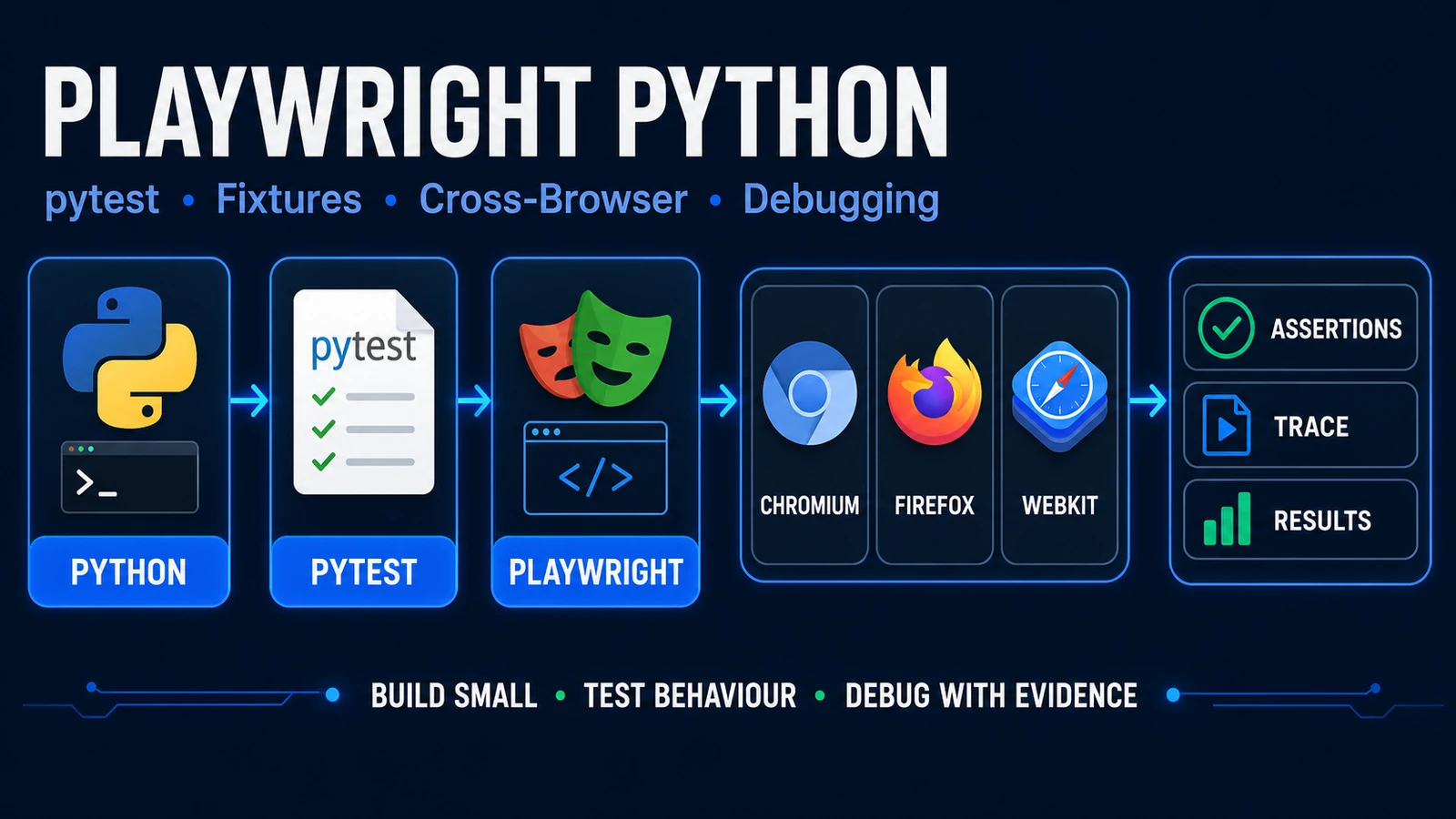
Playwright Python is Playwright’s Python API for browser automation, and for QA teams the most practical path is usually to combine it with the official pytest-playwright plugin.
That gives you a familiar Python/pytest workflow while Playwright manages browser contexts, pages, locators, assertions, cross-browser execution, debugging, and failure artifacts.
This guide goes beyond “open a browser and print the title.” You will build a deliberately small pytest-based suite, understand which fixtures matter, decide between sync and async, learn how to debug failures, and see how the mental model differs from Selenium Python.
2026 compatibility note: current package metadata for Playwright Python 1.62.0 and pytest-playwright 0.9.0 requires Python 3.10 or later. The Playwright introductory documentation still lists Python 3.8+, so for a new project use Python 3.10+ and verify current package metadata before installing.
If you are new to Playwright itself, start with the Playwright automation guide and the beginner Playwright tutorial.
If your Playwright/browser environment is not working yet, use the Playwright installation guide rather than debugging Python test code on top of a broken setup.
When Does Playwright Python Make Sense?
Playwright Python is a strong fit when the surrounding engineering ecosystem already speaks Python.
| Team context | Python fit | Why |
|---|---|---|
| Existing Python + pytest QA team | Excellent | Minimal ecosystem switching |
| Selenium Python team | Strong | Keep the language while changing browser automation model |
| Backend/data-heavy Python team | Strong | Fits existing tooling and libraries |
| Playwright-first frontend team | Situational | TypeScript may reduce language boundaries |
| Java-centric enterprise team | Situational | Existing Java tooling may outweigh Python familiarity |
There is no universal “best Playwright language.”
For a team already invested in pytest, Python can be a natural choice because the official plugin handles much of the browser lifecycle for you.
The useful question is not “Which language is globally best?” It is “Which language lets your team build, review, debug, and maintain tests consistently?”
Python Prerequisites
For a new Playwright Python project, use a maintained Python version that satisfies the current package requirements.
At this article’s August 2026 technical review point, current Playwright and pytest-playwright package metadata requires:
Python >= 3.10
Check your interpreter:
python --version
Create a virtual environment:
python -m venv .venv
Activate it on macOS/Linux:
source .venv/bin/activate
PowerShell:
.venv\Scripts\Activate.ps1
Then update pip:
python -m pip install --upgrade pip
A virtual environment is not a Playwright-specific requirement. It is a clean Python project practice because it keeps this project’s dependencies separate from other Python applications on the machine.
Install Playwright for Python
For the pytest path:
python -m pip install pytest-playwright
Then install the browsers Playwright needs:
playwright install
If your shell does not resolve the Playwright executable cleanly from the active environment, an interpreter-bound form can also be useful:
python -m playwright install
The important distinction is:
Python packages
        ≠
Playwright-managed browser binaries
Installing the Python plugin gives your environment the Python/pytest integration. Installing browsers gives Playwright the browser revisions it expects to launch.
Do not turn PW-04 into a full installation troubleshooting page. If browser downloads, OS dependencies, corporate proxy, certificate handling, or cache paths fail, use the dedicated Playwright setup guide.
Write Your First Pytest Playwright Test
Create:
tests/test_get_started.py
Then add:
from playwright.sync_api import Page, expect


def test_get_started_navigation(page: Page) -> None:
    page.goto("https://playwright.dev/")

    page.get_by_role("link", name="Get started").click()

    expect(
        page.get_by_role("heading", name="Installation")
    ).to_be_visible()
Run it:
pytest tests/test_get_started.py
By default, the official pytest integration runs browser tests headlessly and uses Chromium unless you select another browser.
Why the page fixture matters
You did not manually launch Chromium, create a context, create a page, close the page, close the context, and close the browser.
The Playwright pytest plugin provides the page fixture and manages that lifecycle.
That is why learning the plugin’s fixture model is more valuable than recreating a manual browser manager on day one.
Build a Realistic Playwright Python QA Suite
The first test proves the environment works. Now build a suite that demonstrates maintainability without pretending a 20-folder architecture is automatically “enterprise grade.”
For the main example, use Playwright’s own TodoMVC demo:
https://demo.playwright.dev/todomvc/
It requires no production credentials, supports meaningful browser interactions, and keeps browser state isolated enough for a safe tutorial.
We will cover two behaviors:
Create a todo
Complete a todo
Step 1: Add a small page object
Create:
pages/todo_page.py
from playwright.sync_api import Locator, Page


class TodoPage:
    URL = "https://demo.playwright.dev/todomvc/#/"

    def __init__(self, page: Page) -> None:
        self.page = page
        self.new_todo = page.get_by_placeholder("What needs to be done?")

    def open(self) -> None:
        self.page.goto(self.URL)

    def add_todo(self, title: str) -> None:
        self.new_todo.fill(title)
        self.new_todo.press("Enter")

    def todo_item(self, title: str) -> Locator:
        return self.page.get_by_role("listitem").filter(has_text=title)
This abstraction has a purpose: it gives the tests a small vocabulary for the Todo page.
It does not wrap every Playwright call behind generic methods such as click_element(), fill_element(), wait_for_element(), or generic_find().
If you hide the entire Playwright API behind a second generic API, your team eventually has two automation frameworks to debug.
Step 2: Create one custom fixture
Create:
conftest.py
import pytest
from playwright.sync_api import Page

from pages.todo_page import TodoPage


@pytest.fixture
def todo_page(page: Page) -> TodoPage:
    todo = TodoPage(page)
    todo.open()
    return todo
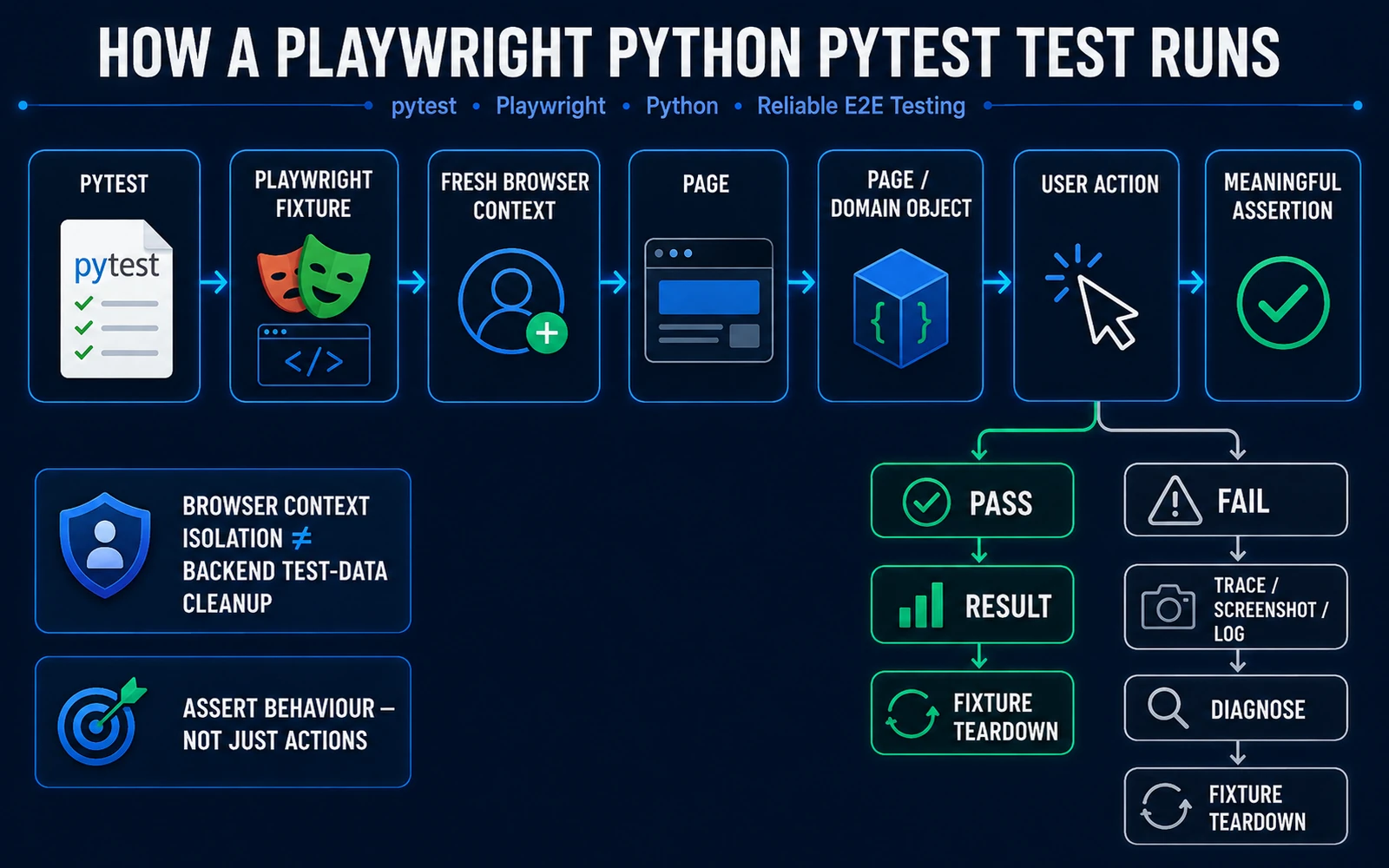
The fixture remains function-scoped by default. Every test gets a fresh Playwright page/context lifecycle through the plugin rather than sharing one mutable page across the session.
Step 3: Test creation
Create:
tests/test_todo_create.py
from playwright.sync_api import expect

from pages.todo_page import TodoPage


def test_user_can_create_todo(todo_page: TodoPage) -> None:
    title = "Review release notes"

    todo_page.add_todo(title)

    item = todo_page.todo_item(title)

    expect(item).to_contain_text(title)
This test proves a user-visible outcome. It does not simply perform actions and finish.
Step 4: Test completion
Create:
tests/test_todo_complete.py
from playwright.sync_api import expect

from pages.todo_page import TodoPage


def test_user_can_complete_todo(todo_page: TodoPage) -> None:
    title = "Review release notes"

    todo_page.add_todo(title)

    item = todo_page.todo_item(title)
    checkbox = item.get_by_role("checkbox")

    checkbox.check()

    expect(checkbox).to_be_checked()
Now the suite tests two distinct behaviors: create and complete.
From a QA Engineer’s Perspective
A maintainable suite is not defined by the number of folders.
Ask: Does each abstraction make the test intent clearer or repeated behavior easier to maintain? If not, do not add the abstraction just because a framework diagram says an “enterprise project” should have it.
A Small Playwright Python Project Structure
Use:
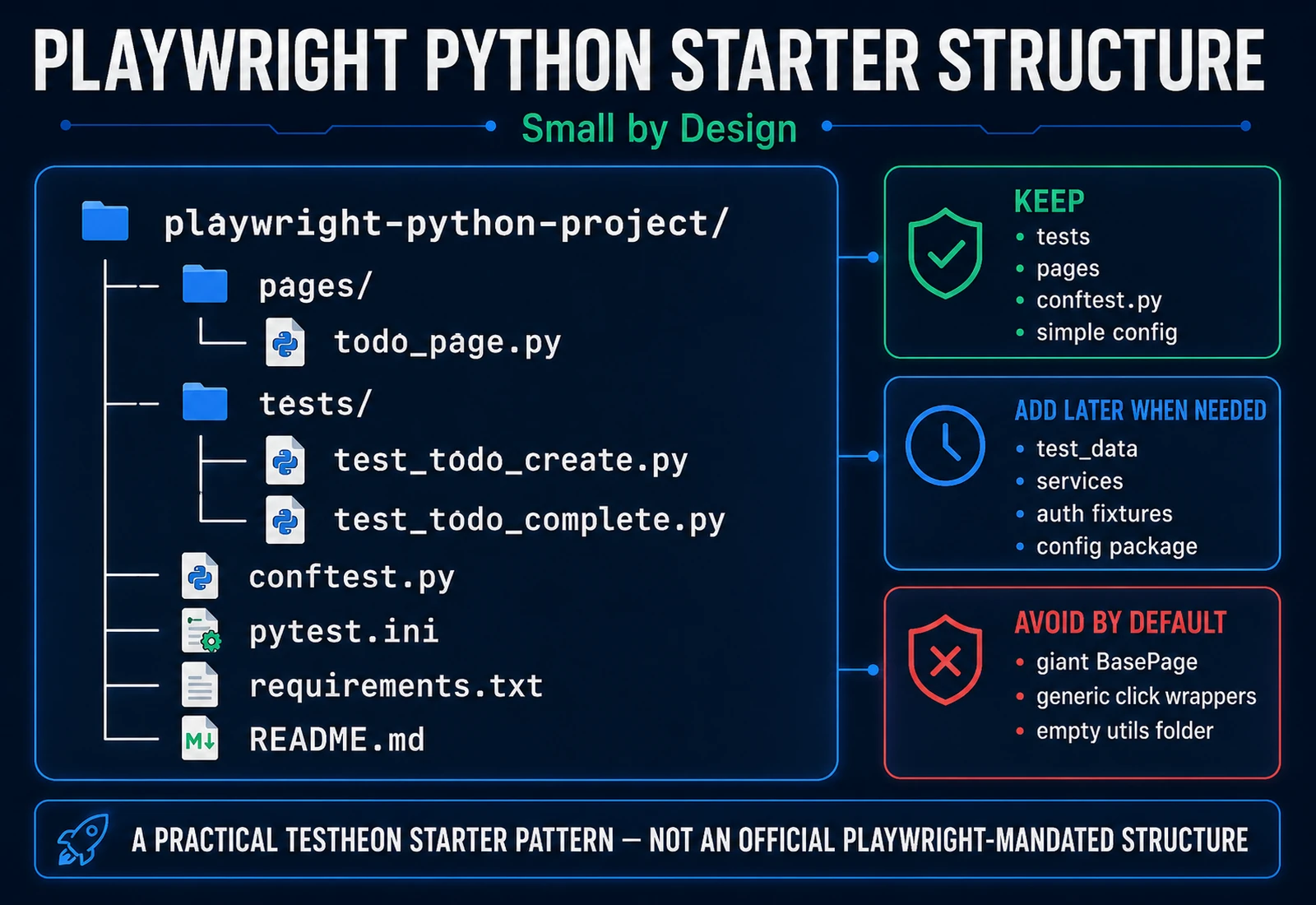
playwright-python-project/
├── pages/
│   └── todo_page.py
├── tests/
│   ├── test_todo_create.py
│   └── test_todo_complete.py
├── conftest.py
├── pytest.ini
├── requirements.txt
└── README.md
This is a practical Testheon starter pattern, not an official Playwright-mandated project structure.
| Item | Purpose |
|---|---|
tests/ |
Business/test scenarios |
pages/ |
Small page-specific interaction vocabulary |
conftest.py |
Shared pytest fixtures |
pytest.ini |
Minimal pytest configuration |
requirements.txt |
Declared project dependencies |
README.md |
Setup, run, and debug instructions |
What is missing on purpose?
fixtures/
test_data/
utils/
base_page.py
services/
factories/
config/
reports/
Add them only when your real suite demonstrates a need.
A folder named utils is not architecture. Neither is a BasePage that simply forwards every call to Playwright.
A Minimal pytest.ini
[pytest]
testpaths = tests
addopts = -ra
You do not need a large marker/configuration system for two tests.
If your organisation already standardises pytest configuration in pyproject.toml, follow the team convention rather than creating a second configuration source.
Pytest Integration: What Playwright Gives You
The most important starter fixtures are:
| Fixture | Scope | Why you care |
|---|---|---|
page |
Function | Isolated browser page for a test |
context |
Function | Browser context for that test |
new_context |
Function factory | Additional isolated context for multi-user scenarios |
browser |
Session | Browser instance reused across tests |
browser_name |
Session | Current browser engine name |
playwright |
Session | Playwright instance |
The separation is useful:
one browser process/session
        ↓
fresh context per test
        ↓
fresh page per test
That provides browser-level isolation without relaunching a separate browser process for every test.
Browser isolation is not backend-data isolation
A fresh browser context can isolate cookies, local storage, and browser session state.
It does not automatically delete a server-side order, database user, payment record, or mutation to a shared account.
Once tests create real backend entities, combine browser isolation with a proper test data management strategy.
Essential Custom Fixture Rule
For this starter suite, one custom fixture is enough:
@pytest.fixture
def todo_page(page: Page) -> TodoPage:
    todo = TodoPage(page)
    todo.open()
    return todo
Do not make it session-scoped. The underlying page is function-scoped, and the wrapper holds mutable page state.
Deep fixture factories, authenticated-role fixtures, API-backed setup, multi-user fixtures, and fixture dependency architecture belong in the dedicated Playwright Fixtures article.
Playwright Python Sync vs Async
Playwright Python supports both synchronous and asynchronous APIs.
The choice should be based on your surrounding Python architecture—not on which syntax looks more advanced.
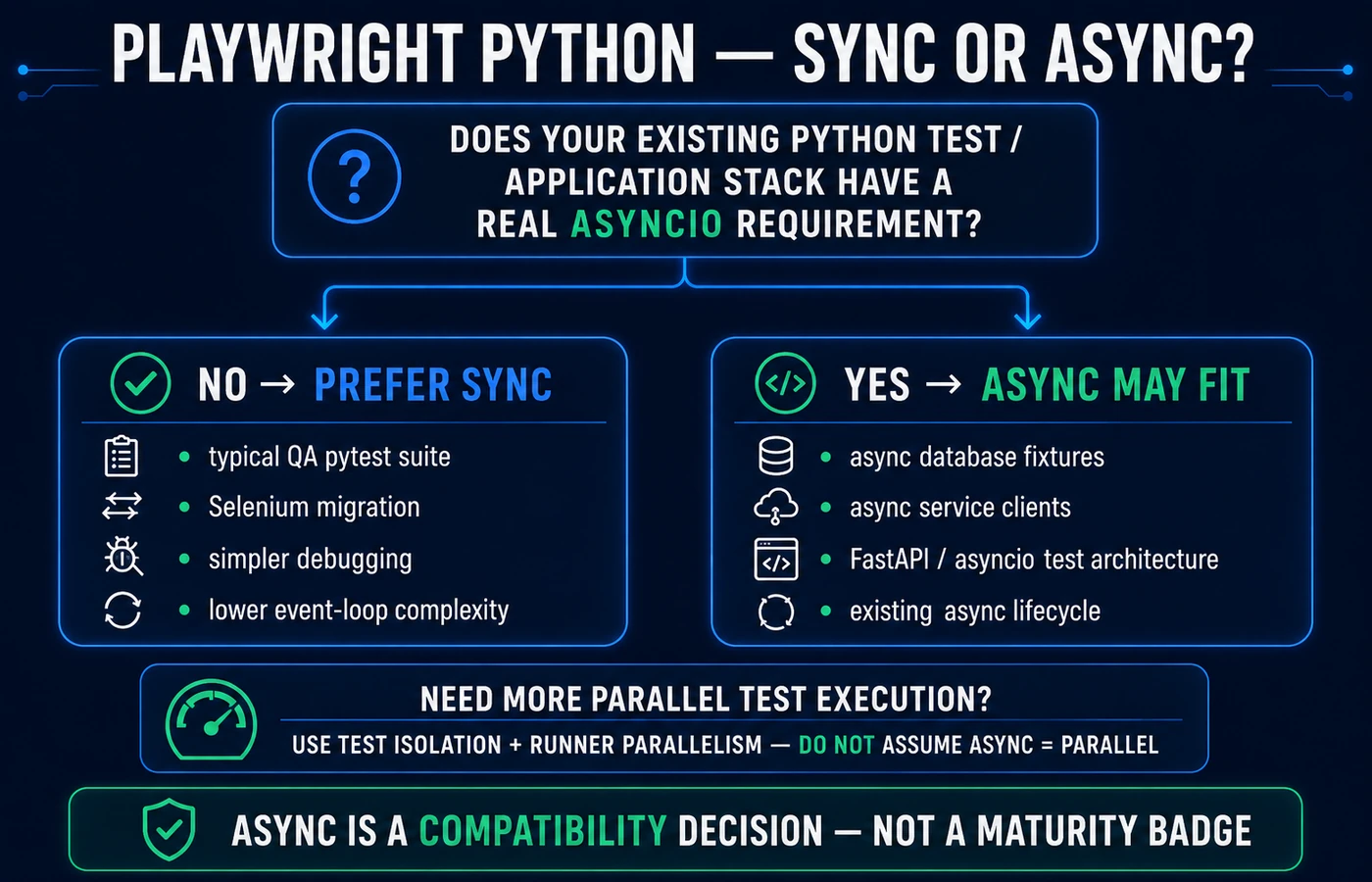
| Situation | Prefer | Why |
|---|---|---|
| Typical QA engineer + pytest suite | Sync | Less event-loop complexity |
| Selenium Python migration | Sync | Familiar sequential style |
| Ordinary E2E regression suite | Sync | No async requirement by default |
| Existing async DB/service fixtures | Async | Fits existing asyncio architecture |
| FastAPI/async application test stack | Often async | Avoid awkward sync/async boundaries |
| Need more test parallelism | Neither by itself | Use isolation + runner parallelism where appropriate |
Sync example:
from playwright.sync_api import Page


def test_example(page: Page) -> None:
    page.goto("https://playwright.dev/")
Async example:
import pytest
from playwright.async_api import Page


@pytest.mark.asyncio(loop_scope="session")
async def test_example(page: Page) -> None:
    await page.goto("https://playwright.dev/")
The current async pytest path adds an async Playwright plugin and event-loop configuration. That may be exactly right for an asyncio-heavy project. It is not automatically better for a normal browser QA suite.
From a QA Engineer’s Perspective
Async is not a maturity badge.
If your team cannot point to a concrete asyncio integration requirement, adding another concurrency model may increase debugging cost without improving business value.
Locators in Playwright Python
Playwright Python uses snake_case APIs:
page.get_by_role("button", name="Save")
page.get_by_label("Email")
page.get_by_text("Order confirmed")
page.get_by_test_id("checkout-total")
This matters when engineers or AI assistants copy JavaScript examples such as getByRole() directly into Python code.
For PW-04, keep the rule simple:
- role + accessible name;
- label/placeholder for form controls;
- visible text where appropriate;
- test ID when the product deliberately provides a stable testing contract;
- CSS/XPath when there is a real technical reason.
The dedicated Playwright Locators article should own the full strategy.
Assertions: Actions Are Not Verification
This:
checkbox.check()
performs an action.
This:
expect(checkbox).to_be_checked()
verifies the expected state.
Other useful Python assertions include:
expect(locator).to_be_visible()
expect(locator).to_have_text("Expected text")
expect(locator).to_contain_text("Expected")
expect(locator).to_have_value("example")
expect(page).to_have_url("https://example.test/dashboard")
Use the assertion that proves the behavior the test claims to cover.
A script can execute perfectly and still be a weak test if its assertions do not catch meaningful defects.
Why You Should Not Default to time.sleep()
Avoid patterns such as:
import time

time.sleep(5)
after every browser action.
Playwright performs actionability checks for locator actions and retrying assertions can wait for expected states.
That does not mean every synchronization problem disappears. Real systems still have unstable data, asynchronous backend jobs, third-party dependencies, races, environment delays, and application defects.
Ask instead: What exact state does the test need before it can continue? Then wait or assert against that state rather than guessing a number of seconds.
Run Playwright Python Tests
Run the suite:
pytest
Run one file:
pytest tests/test_todo_complete.py
Run one test by name:
pytest -k test_user_can_complete_todo
Watch the browser:
pytest --headed
Run in Firefox:
pytest --browser firefox
Run in WebKit:
pytest --browser webkit
Run multiple browser engines:
pytest --browser chromium --browser firefox --browser webkit
WebKit is not “Safari”
Playwright supports Chromium, Firefox, and WebKit.
WebKit coverage is useful for catching engine-specific behavior. Do not casually describe it as “running Safari” without qualification.
Debugging Playwright Python Tests
Use this flow:
read the pytest failure
        ↓
identify the failing locator/action/assertion
        ↓
rerun one test
        ↓
use headed mode if visual state matters
        ↓
use Inspector
        ↓
inspect trace/screenshots if needed
        ↓
change one thing
        ↓
rerun
Use Inspector
Bash/macOS/Linux:
PWDEBUG=1 pytest -s -k test_user_can_complete_todo
PowerShell:
$env:PWDEBUG=1
pytest -s -k test_user_can_complete_todo
Pause inside a test
page.pause()
Retain trace and screenshot on failure
pytest --tracing retain-on-failure --screenshot only-on-failure
A screenshot shows one moment. A trace can provide richer evidence around actions and application state.
Security warning
Traces, screenshots, videos, logs, and reports can contain usernames, customer data, tokens, internal URLs, test source, and application content.
Treat artifacts as potentially sensitive. Do not automatically upload every artifact to a public location.
Coming from Selenium Python?
Selenium is not obsolete. It remains an actively maintained browser automation ecosystem.
The useful comparison is how your mental model changes.
| Selenium Python habit | Playwright Python mental model |
|---|---|
webdriver.Chrome() |
Let pytest/Playwright fixtures own browser lifecycle |
driver.get(url) |
page.goto(url) |
find_element(...) |
User-facing Playwright locators |
Store WebElement |
Prefer reusable Locator |
| Explicit waits around many UI actions | Start with Playwright actionability + retrying assertions |
| Raw text/property assertion | Playwright expect(...) assertions |
| Driver/browser setup | Playwright-managed browser installation |
| Shared browser/session habits | Fresh test context/page by default |
| Manual screenshots only | Trace/screenshot failure artifacts |
| Wrapper around every interaction | Add abstractions only where they clarify domain behavior |
Do not migrate a Selenium suite mechanically.
A mature Selenium suite may have valuable domain abstractions, test data patterns, reporting, environment configuration, CI, and team conventions. Preserve what is good. Replace only the patterns that Playwright makes unnecessary or materially different.
From a QA Engineer’s Perspective
A poorly isolated Selenium suite does not become a good suite because you translated find_element() into get_by_role().
Migration should improve the testing model, not merely the API syntax.
How QA Teams Should Structure a Playwright Python Suite
1. Name tests by behavior
Prefer:
def test_user_can_complete_todo(...)
over:
def test_case_002(...)
A CI failure should tell the reviewer what behavior broke.
2. Keep mutable test data owned by the test
Avoid all tests editing the same shared user. Prefer per-test or per-run data where the application allows it.
3. Do not depend on execution order
If test_02 requires test_01 to pass first, the suite is carrying hidden state between tests.
4. Keep environment values outside test logic
Do not scatter staging/internal URLs across dozens of files. Introduce environment configuration once multiple environments genuinely exist.
5. Retain useful failure evidence
Keep enough trace/screenshot/reporting to diagnose failures efficiently, but do not produce unlimited artifacts without retention/security rules.
6. Review the assertion, not only the syntax
During code review ask:
What defect would make this assertion fail?
7. Do not make UI automation own every testing problem
Playwright browser tests should not replace unit, API, security, performance, or exploratory testing.
Common Playwright Python Mistakes
| Mistake | Why it hurts | Better approach |
|---|---|---|
time.sleep() everywhere |
Slow and timing-dependent | Wait/assert against meaningful state |
| Copying JS API names into Python | Invalid binding calls | Use snake_case Python APIs |
| Manually launching a browser inside every pytest test | Duplicates plugin lifecycle | Use page/context fixtures |
| Session-scoped mutable pages | State leaks between tests | Keep page/context function-scoped |
Huge BasePage wrappers |
Hides Playwright behind another framework | Wrap real domain behavior only |
| Hard-coded credentials | Security risk | Use approved secret/config mechanisms |
| Async because it “looks advanced” | Extra event-loop complexity | Use async only for a real ecosystem need |
| Treating async as parallel execution | Wrong mental model | Use isolated tests + runner parallelism |
| Brittle CSS/XPath copied from DevTools | High DOM coupling | Prefer user-facing locators where possible |
| Assuming browser context cleans backend records | Data leakage remains | Use proper test-data cleanup/isolation |
| Uploading traces publicly | Can leak sensitive data | Use trusted artifact storage |
| Calling WebKit “Safari” | Overstates coverage | Say WebKit unless qualified |
⚡ AI Shortcut: Review a Playwright Python Test Before You Refactor It
AI can help identify brittle locators, missing assertions, repeated logic, unnecessary waits, fixture misuse, shared mutable state, hard-coded secrets, and overengineering.
The safest workflow is:
existing Python test
→ AI reviews
→ QA engineer verifies intent
→ minimal patch
→ pytest rerun
→ inspect failure evidence
→ merge only understood changes
Use ChatGPT or Claude for a self-contained snippet. Use Cursor, Windsurf, or Codex when repository context matters.
📋 Copy this Playwright Python AI review prompt
You are reviewing an existing Playwright Python + pytest automated test.

Your job is to improve correctness, maintainability, isolation,
and debuggability without changing the application's intended behaviour.

Context:
- Language: Python
- Runner: pytest
- Browser automation: Playwright Python
- Project style: small, maintainable QA suite
- Prefer the official pytest-playwright fixture model unless the
  supplied code has a documented reason not to use it.

Review rules:

1. Do NOT invent application behaviour, page content, routes,
   API responses, credentials, test IDs, selectors, or expected outcomes.

2. If required application context is missing, list the missing
   information instead of guessing.

3. Do NOT weaken an assertion merely to make a failing test pass.

4. Do NOT delete an assertion unless you explain why it is invalid,
   duplicated, or testing the wrong behaviour.

5. Check locator quality:
   - prefer meaningful role/label/text/test-id locators where appropriate;
   - flag brittle DOM coupling;
   - do not fabricate data-testid attributes.

6. Check waiting:
   - flag unnecessary time.sleep() calls;
   - do not add fixed sleeps as the default solution;
   - identify the actual state the test must wait/assert against.

7. Check pytest/Playwright fixtures:
   - identify manual browser/context/page lifecycle that duplicates
     pytest-playwright;
   - identify suspicious fixture scopes or shared state;
   - do not change fixture scope without explaining the isolation impact.

8. Check test isolation and data:
   - identify dependencies on execution order;
   - identify reused mutable users/orders/accounts;
   - identify state that may leak across tests or workers;
   - do not invent cleanup APIs.

9. Check assertions:
   - identify missing assertions after important actions;
   - distinguish action/navigation from verification;
   - ensure each test proves its stated behaviour.

10. Check architecture:
    - flag duplicate behaviour worth extracting;
    - do NOT introduce BasePage, generic wrappers, factories,
      service layers, dependency injection, or new directories
      unless the current code demonstrates a real need.

11. Do NOT convert synchronous Playwright code to async unless there
    is a concrete existing asyncio requirement. Explain it first.

12. Security:
    - flag hard-coded passwords, tokens, API keys, customer data,
      internal URLs, or sensitive test artifacts;
    - do not reproduce secrets in your output.

13. Explain every proposed change.

Return:

A. What the test is trying to verify
B. Correctness risks
C. Locator issues
D. Fixture/isolation issues
E. Assertion issues
F. Waiting/debugging issues
G. Security/privacy issues
H. Recommended changes ranked:
   - Critical
   - Important
   - Optional
I. Revised code
J. Assumptions and missing context
K. Changes you deliberately did NOT make and why

Here is the test:

[PASTE TEST HERE]

Relevant page object / fixture code:

[PASTE ONLY THE NECESSARY AUTHORIZED CODE HERE]

Known application behaviour:

[DESCRIBE EXPECTED BEHAVIOUR]
Human verification checklist
Before accepting the AI’s change:
- Did the product requirement stay the same?
- Did any assertion become weaker?
- Did AI invent a locator or
data-testid? - Did it add a sleep or hidden retry?
- Did it change fixture scope?
- Did it introduce shared state?
- Did it convert sync to async without a concrete reason?
- Did it add architecture for one call site?
- Can you explain every changed line?
- Does the test still fail when the product behavior is deliberately broken?
Privacy checklist
Do not paste production credentials, tokens, customer data, authentication storage-state files, proprietary code you are not authorised to share, confidential traces/screenshots, or internal URLs where company policy forbids disclosure.
AI produces the first review. The QA engineer owns correctness.
What About Playwright CLI, MCP, and Test Agents?
Playwright’s agent ecosystem is evolving quickly.
For a Python article, keep the distinction clear:
- repository-aware AI can review/refactor Python tests;
- Playwright CLI/MCP can help an authorised agent inspect browser behavior;
- current Playwright Test Agents should not be marketed as a drop-in pytest-Python test generator.
PW-04 should not become the Playwright MCP/AI/Test Agents article.
What Should You Learn Next?
Once you are comfortable with the Python pytest suite, deepen the area your project actually needs:
- Locators.
- Fixtures.
- Framework design.
- Authentication.
- API testing.
- Trace Viewer.
- CI/CD.
- Selenium comparison/migration if you have an existing Selenium estate.
For the wider QA progression, use the QA roadmap once its live canonical is verified.
Playwright Python FAQ
What is Playwright Python?
Playwright Python is Playwright’s Python browser-automation API. It supports sync and async Python code and can be used with the official pytest plugin for browser tests across Chromium, Firefox, and WebKit.
How do I install Playwright for Python?
For the pytest path, create a Python environment, install pytest-playwright, then install Playwright’s browser binaries. Verify current package requirements before choosing the Python version.
Does Playwright work with pytest?
Yes. Playwright provides an official pytest plugin with fixtures such as page, context, and browser, plus browser/debugging options.
Should I use Playwright Python sync or async?
For a typical QA pytest suite, sync is the simpler default. Choose async when your existing Python application/test stack already depends meaningfully on asyncio.
Is Playwright Python better than Selenium?
Not universally. Playwright and Selenium use different browser/testing models, and Selenium remains actively maintained. Choose based on your application, team, existing suite, infrastructure, and migration cost.
Which Python version should I use?
At this article’s August 2026 review point, current Playwright Python and pytest-playwright package metadata requires Python 3.10 or later. Recheck current package metadata because compatibility can change.
How do I run Playwright Python tests?
With the pytest plugin:
pytest
Use --headed to show the browser and --browser firefox or --browser webkit to select another engine.
What fixtures does pytest-playwright provide?
Important fixtures include page, context, new_context, browser, browser_name, and the Playwright instance. PW-04 uses only the fixtures necessary for a small maintainable suite.
Should I use Page Objects?
Use a page/domain abstraction when it makes repeated behavior clearer. Do not create a giant BasePage or generic wrapper hierarchy only because a framework diagram suggests it.
How do I debug Playwright Python tests?
Rerun the failing test, inspect the pytest/Playwright error, try headed execution, use Playwright Inspector with PWDEBUG, and retain traces/screenshots when you need richer failure evidence.
Final Takeaway
The goal of Playwright Python is not to build the largest automation framework possible.
A strong first production-style suite is small enough to understand:
pytest
→ Playwright fixtures
→ fresh browser context
→ readable page/domain interaction
→ meaningful assertion
→ useful failure evidence
Start with the sync API unless your existing Python architecture gives you a concrete async requirement.
Use Playwright’s fixtures rather than recreating browser lifecycle code.
Add abstractions only when they make real test behavior easier to express.
And whether code comes from a human or an AI assistant, the final question stays the same:
Does this test prove the behavior we actually care about?