
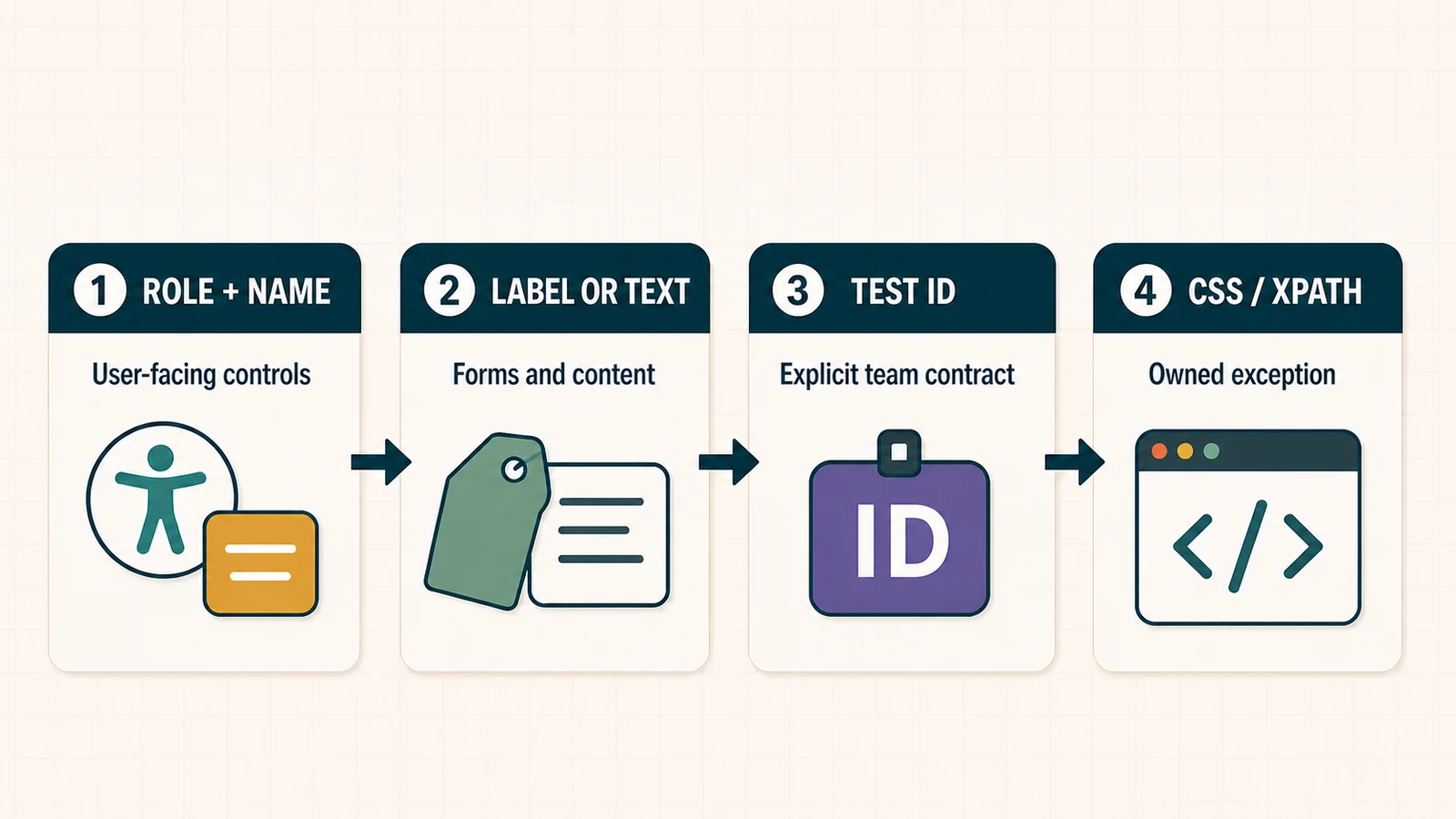
Playwright locators are reusable queries that find elements when an action or assertion runs. The most maintainable strategy is to identify controls the way a user or assistive technology does—usually by role and accessible name—then use labels, visible text, or an explicit test-id contract when those better express the behavior.
The hard part is not memorising getByRole(), getByText(), getByLabel(), and getByTestId(). It is knowing which contract should survive a redesign, how to narrow repeated components without relying on position, and what to do when Playwright reports a strict-mode violation.
This guide builds that decision system. The examples use Playwright Test with TypeScript, but the locator model also applies to the Playwright Python and Playwright Java APIs. If you need runner installation and project configuration first, follow the Playwright TypeScript guide or the slower beginner Playwright tutorial.
Playwright Locator Priority: The Practical Answer
| Start with | Best fit | What it validates | Main risk |
|---|---|---|---|
getByRole() |
Buttons, links, headings, checkboxes, dialogs, tables | User-facing role and accessible name | Poor or misunderstood accessibility semantics |
getByLabel() |
Form controls | The control-label relationship | Missing, duplicated, or unstable labels |
getByText() |
Non-interactive copy, messages, content | Visible text content | Broad matches, copy changes, localisation |
getByTestId() |
Explicit automation contracts | A stable identifier agreed with the product team | It can pass while user-facing semantics are wrong |
getByPlaceholder(), getByAltText(), getByTitle() |
Narrow attribute-specific cases | The named attribute or text alternative | The attribute may not be the product contract |
locator('css') or XPath |
Genuine implementation-level or legacy cases | DOM structure/attributes | Refactoring breaks tests without changing behavior |
This is a decision ladder, not a moral ranking. A well-governed test ID can be a stronger contract than translated text or a third-party widget’s inconsistent semantics. Conversely, a test ID should not replace a role assertion when the accessible role and name are part of the requirement.
How Playwright Locators Work
A locator is a query recipe, not a stored DOM node. Playwright resolves the element again whenever the locator is used for an action. If a framework re-renders the button between hover() and click(), both operations can still use the current element that matches the same contract.
const submit = page.getByRole('button', { name: 'Submit order' });

await submit.hover(); // resolves the current matching element
await submit.click(); // resolves it again before the action
Before an action such as click(), Playwright performs relevant actionability checks—for example, that one element resolves, is visible, stable, able to receive events, and enabled. A locator assertion such as await expect(status).toHaveText('Saved') repeatedly re-fetches and checks the element until it passes or times out.
That behavior removes many hand-written waits, but it does not rescue an ambiguous selector. A locator that matches the wrong “Save” button reliably is still wrong. Microsoft’s locator guide and actionability reference document the current behavior.
Locator versus element handle
Store Locator objects in tests and page/component objects. Avoid caching an ElementHandle across re-renders: a handle points to one particular DOM node, while a locator describes how to find the current one.
Use getByRole for Interactive Elements
getByRole() is normally the first choice for interactive UI. It reflects how the page is exposed to users and assistive technology. Native elements already carry implicit roles, so a semantic <button> is usually better for both the product and its tests than a clickable <div>.
await page.getByRole('button', { name: 'Create account' }).click();
await page.getByRole('checkbox', { name: 'Email updates' }).check();
await page.getByRole('link', { name: 'Billing history' }).click();

await expect(
  page.getByRole('heading', { name: 'Account settings', level: 1 })
).toBeVisible();
Usually pass both a role and an accessible name. page.getByRole('button') is valid when you intentionally need a collection, but it is too broad for a single click on a page with several buttons.
The accessible name is not always the visible text
The name option uses the computed accessible name. Depending on the markup, that name can come from text content, an associated label, aria-label, aria-labelledby, or an image alternative. For this control:
<button aria-label="Close cart">
  <svg aria-hidden="true">...</svg>
</button>
the locator is page.getByRole('button', { name: 'Close cart' }). If visible copy and the accessible name disagree, inspect the markup and accessibility tree before reaching for CSS. A role failure can reveal a real product defect, although Playwright correctly notes that role locators do not replace a full accessibility audit.
Use state options when state is the requirement
Role locators can also narrow by semantic state:
const selectedTab = page.getByRole('tab', {
  name: 'Invoices',
  selected: true,
});

await expect(selectedTab).toBeVisible();
Use checked, selected, expanded, pressed, or level only when that state distinguishes the intended target or is part of the assertion. Do not add options merely to make a locator look more specific.
Use getByLabel for Form Controls
getByLabel() finds a form control through an associated <label>, aria-labelledby, or aria-label. It states both what the user sees and which control receives the action.
await page.getByLabel('Work email').fill('qa@example.com');
await page.getByLabel('Password').fill(process.env.E2E_PASSWORD!);
await page.getByLabel('Remember this device').check();
Prefer the label over the placeholder. A placeholder can disappear after typing, is often reused as hint text, and is not a substitute for an accessible label. Use getByPlaceholder() when the product genuinely has no label and the placeholder is the only intended contract; also treat that design as an accessibility review signal.
Use getByText for Non-Interactive Content
getByText() is a good fit for messages, labels, paragraphs, and other non-interactive content. For a button or link, prefer role plus name because it asserts the interaction semantics as well as the words.
await expect(page.getByText('Payment received', { exact: true }))
  .toBeVisible();

await expect(page.getByText(/order #[A-Z0-9-]+ is ready/i))
  .toBeVisible();
String matching is partial by default. Add exact: true when the entire normalised text is the contract. “Exact” still normalises whitespace: repeated spaces collapse, line breaks become spaces, and leading/trailing whitespace is ignored.
Regular expressions are useful for controlled dynamic fragments, but do not turn them into vague catch-alls. A pattern such as /save/i may match “Save”, “Save draft”, and “Saved search”. Prefer an anchored pattern or an exact accessible name when copy is stable.
Use getByTestId as an Explicit Contract
A test ID is an intentional interface between product code and automation. It can remain stable through copy changes, localisation, markup refactors, and visual redesigns. That makes it especially useful for icon controls, canvas-backed widgets, repeated virtualised content, and behaviour whose semantics do not uniquely identify one DOM node.
<button data-testid="checkout-submit">Place order</button>
await page.getByTestId('checkout-submit').click();
Playwright uses data-testid by default. Teams can standardise another attribute in configuration:
import { defineConfig } from '@playwright/test';

export default defineConfig({
  use: {
    testIdAttribute: 'data-pw',
  },
});

// Matches <button data-pw="checkout-submit">...</button>
await page.getByTestId('checkout-submit').click();
Choose identifiers for durable domain intent: checkout-submit, invoice-row-42, or account-menu. Avoid layout and styling names such as right-blue-button. Do not generate IDs from array positions if rows can reorder.
A test ID proves the explicit contract, not the user experience. If the button must be accessible as “Place order”, pair the stable action with a relevant role/name assertion:
const submit = page.getByTestId('checkout-submit');

await expect(submit).toHaveRole('button');
await expect(submit).toHaveAccessibleName('Place order');
await submit.click();
Chain and Filter Locators for Repeated Components
Real pages contain repeated cards, table rows, dialogs, and toolbar buttons. The maintainable answer is usually: identify the stable container, identify which instance it is, then find the control inside it.
const enterprisePlan = page
  .getByRole('listitem')
  .filter({
    has: page.getByRole('heading', { name: 'Enterprise' }),
  });

await expect(enterprisePlan).toHaveCount(1);
await enterprisePlan
  .getByRole('button', { name: 'Choose plan' })
  .click();
This reads like the product: choose the plan card whose heading is “Enterprise”, then click that card’s “Choose plan” button. It survives added cards and reordered plans because position is not the identity.
Filter by contained text
const enterprisePlan = page
  .getByRole('listitem')
  .filter({ hasText: 'Enterprise' });

const activePlans = page
  .getByRole('listitem')
  .filter({ hasNotText: 'Archived' });

await expect(activePlans).toHaveCount(2);
hasText searches the candidate element and its descendants. It is convenient, but a role-based descendant often states intent more precisely. A card can contain “Enterprise” in a badge, description, or hidden announcement as well as its heading.
Understand relative filter scope
The inner locator in has or hasNot is evaluated from each outer candidate. It must describe something inside that candidate, not navigate outward and back in from the page root.
// Good: the heading is inside each candidate list item.
const card = page.getByRole('listitem').filter({
  has: page.getByRole('heading', { name: 'Enterprise' }),
});

// Wrong model: this starts from a list outside the candidate item.
const broken = page.getByRole('listitem').filter({
  has: page.getByRole('list').getByText('Enterprise'),
});
Inner and outer locators must also belong to the same frame. Use a frame locator first, then compose within that frame.
Use and() and or() deliberately
and() intersects conditions:
const subscribe = page
  .getByRole('button')
  .and(page.getByTitle('Subscribe'));
or() is useful when either of two states may legitimately appear—for example, a “New message” button or a security dialog. If both appear, the combined locator matches both and can trigger strictness. Treat the alternatives explicitly after waiting; do not use or().first() everywhere as an ambiguity eraser.
Playwright Strictness: Diagnose, Do Not Hide
Locators are strict for operations that require one target. This click throws when two buttons have the accessible name “Save”:
await page.getByRole('button', { name: 'Save' }).click();
// Error: strict mode violation — more than one element matched.
A collection operation is different. Playwright knows that count() can operate on multiple matches:
const saveButtons = page.getByRole('button', { name: 'Save' });
await expect(saveButtons).toHaveCount(2);
Fix the ambiguity by expressing which product region owns the action:
const notificationDialog = page.getByRole('dialog', {
  name: 'Notification settings',
});

await notificationDialog
  .getByRole('button', { name: 'Save' })
  .click();
A deterministic strictness triage sequence
- Inspect the matches. Check the count and examine roles, accessible names, and surrounding regions.
- Verify the intended contract. Is the accessible name different from the text you assumed?
- Add exactness only when exactness is real. Distinguish “Save” from “Save draft” with
exact: true, not when two genuine “Save” buttons remain. - Scope to a stable region. Dialog, form, navigation, row, list item, or named section.
- Filter by a stable descendant. A row heading, cell value, label, or domain identifier.
- Add an explicit test ID. Use one when semantics cannot distinguish the product target.
- Use position only if order is the requirement. Assert the collection and its ordering before calling
nth().
first(), last(), and nth() opt out of ambiguity by selecting a position. They are not default fixes. If a banner or hidden template is inserted earlier in the DOM, first() can click a different element while the test remains green.
Work Safely With Lists and Dynamic UIs
Assert a collection as a collection. This produces better diagnostics and avoids manually sampling a list before it settles:
const rows = page.getByRole('row').filter({ hasNotText: 'Loading' });

await expect(rows).toHaveCount(3);
await expect(rows.getByRole('cell').filter({ hasText: /Paid|Pending/ }))
  .toHaveCount(3);
For an ordered list, toHaveText([...]) can assert all items and their sequence. If ordering is not a requirement, identify the row by a durable key rather than index.
Be careful with locator.all(): it returns the currently matched locators immediately and does not wait for a dynamic list to finish loading. First wait on a product condition or a web-first collection assertion, then iterate if iteration is truly needed.
Frames and Shadow DOM
For an iframe, enter the frame contract and continue with normal locators:
const paymentFrame = page.frameLocator('iframe[title="Secure payment"]');

await paymentFrame.getByLabel('Card number').fill('4242 4242 4242 4242');
await paymentFrame.getByRole('button', { name: 'Pay now' }).click();
Most Playwright locators pierce open Shadow DOM automatically. XPath does not pierce shadow roots, and closed-mode shadow roots are not supported. If a web component exposes good text, roles, labels, or test IDs, use them as if the open shadow boundary were not there.
CSS and XPath: Last Resort, Not Forbidden Syntax
page.locator() accepts CSS and XPath, and Playwright can auto-detect XPath that begins with // or ... The issue is coupling, not syntax support.
// Brittle: layout and generated classes define identity.
page.locator('#checkout > div:nth-child(3) .btn-primary');

// Brittle: the complete ancestor path defines identity.
page.locator('//main/div[2]/form/div[4]/button');

// Stable product meaning.
page.getByRole('button', { name: 'Place order' });
A short CSS selector can be acceptable for an implementation-level target—for example, a canvas layer, syntax token, or internal state hook that has no user-facing representation. Make that exception visible in code review and keep the selector short. If many tests need the same exception, add a durable product contract.
Locator Anti-Patterns and Better Replacements
| Anti-pattern | Why it becomes fragile | Better replacement |
|---|---|---|
| Long CSS or absolute XPath | Couples tests to DOM depth, classes, and layout | Role/name, label, stable container, or test-id contract |
.first() after a strictness error |
Hides which matching element was intended | Scope or filter until the target is uniquely meaningful |
.nth(2) for a business row |
Sorting and inserted rows redirect the action | Filter by heading, cell value, or domain key |
| Text locator for every button | Does not assert that the element is interactive | getByRole('button', { name }) |
| Placeholder as the default form locator | Hint copy changes and may disappear | Associated label; fix the product markup if needed |
| One global selector file | Ownership and component context disappear | Keep locators with the behavior/component they support |
| Cached element handles | Re-renders detach the stored node | Store Locator recipes and resolve at action time |
isVisible() followed by a generic assertion |
Samples immediately rather than retrying | await expect(locator).toBeVisible() |
| Fixed sleeps before locator actions | Slow locally and flaky under load | Wait on an observable UI or network contract |
| Test IDs named after colour/position | Visual redesign invalidates domain identity | Names based on durable user or business intent |
Build Maintainable Locator Standards for a Team
Locator quality is partly a test-code concern and partly a product-interface concern. Automation engineers should agree with front-end and accessibility owners on the contracts the application will expose.
Define a small selector policy
- Use semantic HTML and stable accessible names for interactive controls.
- Use associated labels for form fields.
- Reserve visible-text locators primarily for meaningful content and copy requirements.
- Choose one test-id attribute and a domain-oriented naming convention.
- Require a comment or review explanation for positional selectors and long CSS/XPath.
- Assert uniqueness when a reusable component locator is introduced.
- Treat role, accessible-name, label, and test-id changes as interface changes.
Keep locators near behavior
A page or component object can store Locator fields safely because the locators are query recipes. The object should expose product intent, not create a second low-level language of one-line wrappers.
import type { Locator, Page } from '@playwright/test';

export class PlansPanel {
  readonly page: Page;
  readonly root: Locator;

  constructor(page: Page) {
    this.page = page;
    this.root = page.getByRole('region', { name: 'Plans' });
  }

  plan(name: string): Locator {
    return this.root.getByRole('listitem').filter({
      has: this.page.getByRole('heading', { name, exact: true }),
    });
  }

  async choose(name: string): Promise<void> {
    await this.plan(name)
      .getByRole('button', { name: 'Choose plan' })
      .click();
  }
}
Be cautious when composing inner locators from a scoped root: the inner filter still must be relative to each candidate. The example deliberately builds the inner heading locator from page; Playwright evaluates it relative to each candidate list item. Starting the inner locator from this.root would incorrectly look for the outer region inside each item.
Do not centralise every locator
A global selector registry looks reusable but makes ordinary changes risky: nobody can see which behavior owns a locator or whether two identical strings represent the same component. Centralise repeated component behavior, not strings that merely look alike.
Keep assertions in behavior-focused tests unless a component owns a reusable invariant. For example, a checkout object can expose submitOrder(); the test should still state whether the expected outcome is a confirmation, rejected payment, or retained basket.
Migrate Brittle Selectors Without a Rewrite
- Inventory selectors by failure rate and change frequency.
- Start with the highest-cost paths, not the easiest mass replacement.
- Identify the intended user or product contract for each target.
- Improve semantic HTML or add a governed test ID where no stable contract exists.
- Add the new locator and assert that it resolves uniquely.
- Run the focused test across the required browsers and responsive states.
- Remove the old selector after the replacement has proven stable.
- Track remaining positional/CSS/XPath exceptions as owned selector debt.
Do not transform hundreds of XPath strings into hundreds of unreviewed test IDs. That changes syntax without improving ownership. The goal is a smaller set of meaningful contracts.
Debug and Generate Locators Efficiently
Use Playwright Codegen or the VS Code extension to inspect candidates. The generator prioritises role, text, and test-id locators and refines a candidate when multiple elements match.
npx playwright codegen https://example.test
Generated code is a starting point. Review whether the locator expresses business identity, survives localisation and responsive variants, and stays within the intended frame or component. The official Codegen guide explains locator picking and editing.
When a locator fails:
- run the smallest failing test in UI or debug mode;
- inspect the accessibility tree and computed name;
- check whether a loading skeleton, duplicate dialog, or hidden variant also matches;
- use the trace to see the DOM and action at failure time;
- replace fixed waits with the actual readiness assertion;
- fix the product contract when the UI exposes no stable target.
Cross-Language Locator Mapping
The concepts are the same across Playwright languages, while syntax follows each client:
| Intent | TypeScript | Python | Java |
|---|---|---|---|
| Button by role/name | getByRole('button', { name: 'Save' }) |
get_by_role('button', name='Save') |
getByRole(AriaRole.BUTTON, options) |
| Field by label | getByLabel('Email') |
get_by_label('Email') |
getByLabel("Email") |
| Explicit test ID | getByTestId('submit') |
get_by_test_id('submit') |
getByTestId("submit") |
Use the language-specific guides for runner lifecycle and configuration. Do not make this locator owner repeat setup that belongs to the Playwright automation pillar or browser-download troubleshooting that belongs to the installation guide.
⚡ AI Shortcut: Review a Locator Set
AI can flag broad matches, positional shortcuts, and inconsistent test-id names. It cannot see the intended business behavior unless you provide it, and it must not invent selectors from incomplete markup.
Review these Playwright locators as a senior automation engineer.

For each locator, I will provide:
- the relevant HTML or accessibility snapshot;
- the user behavior the test must prove;
- whether copy is localised or intentionally changeable;
- repeated cards, rows, dialogs, frames, and responsive variants;
- the team's approved test-id attribute and naming policy.

Check for:
1. incorrect or missing role/accessibility-name assumptions;
2. broad text matches and missing exactness;
3. filters whose inner locator is outside the candidate scope;
4. strictness hidden by first(), last(), or nth();
5. CSS/XPath coupled to styling or DOM depth;
6. test IDs based on position, colour, or generated indexes;
7. locators duplicated across unclear owners;
8. immediate checks where web-first assertions are required.

Return BLOCKER, MAJOR, MINOR, and SUGGESTION findings.
For each replacement, explain the product contract it depends on.
If the markup exposes no stable contract, recommend a product change
instead of inventing a selector.
Human verification checklist
- Does the locator identify the behavior the test claims to protect?
- Would it survive a styling or DOM-layout refactor?
- Does a role locator use the real computed accessible name?
- Is a text match intentionally exact, partial, or regular-expression based?
- Are filters relative to the repeated component they narrow?
- Does a single-target action resolve to exactly one intended element?
- If position is used, is order an asserted product requirement?
- Are test IDs durable, governed, and free of sensitive data?
- Did a person verify every AI-suggested locator in the actual application?
Privacy checklist
Before sharing HTML, accessibility snapshots, traces, screenshots, or test code with an AI system, remove credentials, tokens, cookies, customer identifiers, personal data, private URLs, proprietary copy, and sensitive business rules. Follow the organisation’s approved AI and data-handling policy.
Playwright Locators FAQ
What is a locator in Playwright?
A locator is a reusable query that Playwright resolves when an action or assertion runs. It works with auto-waiting, actionability checks, and web-first assertions, and it can re-find the current element after a re-render.
Which Playwright locator is best?
For interactive elements, start with role plus accessible name. Use labels for form fields and text for non-interactive content. Use a test ID when the team needs an explicit stable contract. The best locator is the one that uniquely expresses the behavior that should survive change.
Is getByTestId a bad practice?
No. A governed test ID is a durable automation contract and can be the right choice for localised, virtualised, icon-only, or semantics-poor UI. It is not user-facing, so add role, name, or content assertions when those qualities are part of the requirement.
Why does Playwright show a strict mode violation?
A single-target operation matched more than one element. Inspect the matches, verify the accessible name, then add exactness, scope, a relative filter, or an explicit test ID. Do not automatically hide the ambiguity with first().
When should I use first(), last(), or nth()?
Use position only when order itself is part of the behavior—for example, asserting the first result after a known sort. Assert the collection and ordering first. Avoid positional selection for rows or cards that have a stable name or domain key.
Should I use CSS or XPath with Playwright?
Playwright supports both, but long structural selectors are fragile because they couple tests to implementation. Prefer user-facing semantics or a test-id contract. Keep CSS/XPath for bounded legacy or implementation-level cases with explicit ownership.
How do I locate a button inside a specific card?
Locate all card containers, filter to the card that has a stable heading or identifier, then chain getByRole('button', { name }) from that card. This is more maintainable than selecting a global button by index.
Do Playwright locators work in Shadow DOM?
Most locators work through open Shadow DOM automatically. XPath does not pierce shadow roots, and closed-mode shadow roots are unsupported.
Should locators live in page objects?
Repeated component locators and interactions can live in small page or component objects. Keep them close to behavior and expose intent rather than wrapping every click. Avoid one global selector file that obscures ownership.
Does a locator wait automatically?
The locator is a query. Actions wait for their actionability requirements, and Playwright locator assertions retry until they pass or time out. Collection snapshots such as locator.all() do not automatically wait for a dynamic list to finish loading.
Final Takeaway
Reliable Playwright locators are contracts. Role and accessible name protect user-facing semantics. Labels protect form relationships. Text protects meaningful content. Test IDs protect deliberate automation interfaces. Chaining and relative filters express component structure without hard-coding DOM position.
Let strictness reveal ambiguity. Scope the target until it is unique, use positional methods only when order is the requirement, and treat CSS/XPath as owned exceptions. With those rules, locator failures become useful signals about the UI contract instead of recurring maintenance noise.