
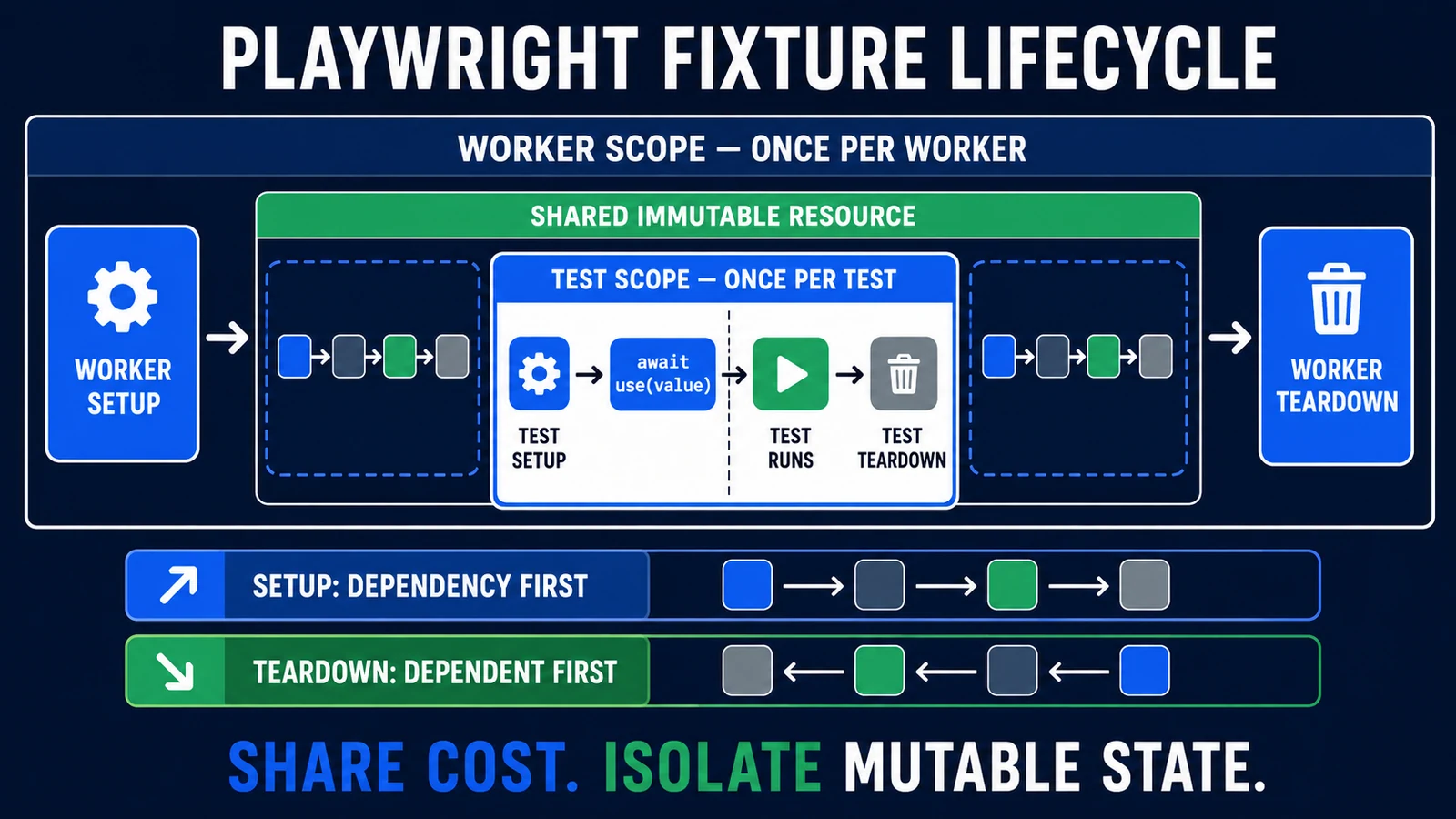
Playwright fixtures are dependency-managed setup and teardown units in Playwright Test. A fixture prepares a value or resource, gives it to a test or another fixture through await use(value), and cleans it up afterward. Test-scoped fixtures prioritize isolation; worker-scoped fixtures can share expensive resources within one worker.
The important idea is not “put every helper in a fixture.” It is to model resource ownership explicitly. When the scope, dependency graph, and cleanup boundary are correct, tests stay readable and parallel-safe. When they are wrong, a reusable fixture becomes a shared-state machine that spreads failures across the suite.
What are Playwright fixtures?
Playwright Test inspects the fixture names requested by a test, hook, or another fixture, then prepares only the required graph. The built-in page fixture is the familiar example:
import { test, expect } from '@playwright/test';

test('shows the account heading', async ({ page }) => {
  await page.goto('/account');
  await expect(page.getByRole('heading', { name: 'Account' })).toBeVisible();
});
Naming page in the parameter list tells the runner to create it before the test and tear it down afterward. The official fixtures guide describes five benefits over repeating setup in hooks: fixtures colocate setup and teardown, are reusable across files, run on demand, compose through dependencies, and let each test request the exact environment it needs.
| Built-in fixture | What it provides | Default lifecycle |
|---|---|---|
page |
An isolated Page | One test |
context |
The isolated BrowserContext that owns the test page | One test |
browser |
A Browser shared to reduce launch cost | One worker |
browserName |
The active engine: Chromium, Firefox, or WebKit | Available from the worker environment |
request |
An isolated APIRequestContext | One test |
The fresh BrowserContext behind each test is a core isolation boundary. Do not replace it with a shared Page merely to reduce setup time unless the scenario explicitly requires serial, shared state and the resulting risk is accepted.
The setup, use, and teardown lifecycle
A custom fixture function has three phases:
resource: async ({ dependency }, use) => {
  // 1. Setup
  const resource = await createResource(dependency);

  // 2. Yield: the test or dependent fixture runs while this awaits
  await use(resource);

  // 3. Teardown
  await resource.dispose();
}
Code before await use() prepares the value. Playwright pauses the fixture at that call and runs the consumer. When the consumer is finished, the fixture resumes and performs teardown. In production code, make material cleanup explicit with try/finally:
resource: async ({}, use) => {
  const resource = await createResource();
  try {
    await use(resource);
  } finally {
    await resource.dispose();
  }
}
This keeps creation and destruction together. It does not make cleanup magical: if setup fails before use, perform compensating cleanup inside setup; if the process is forcibly terminated or the backend is unavailable, use resource expirations or a separate bounded janitor.
Create a type-safe custom fixture with test.extend()
Use test.extend() to add project-specific fixtures to the base Playwright test. A production-shaped module can combine API-backed data setup with a page object:
// tests/fixtures/test.ts
import { test as base, expect } from '@playwright/test';
import { CheckoutPage } from '../../pages/checkout-page';
import { createOrder, deleteOrder } from '../../support/orders';

type TestFixtures = {
  orderId: string;
  checkoutPage: CheckoutPage;
};

export const test = base.extend<TestFixtures>({
  orderId: async ({ request }, use) => {
    const order = await createOrder(request);
    try {
      await use(order.id);
    } finally {
      await deleteOrder(request, order.id);
    }
  },

  checkoutPage: async ({ page, orderId }, use) => {
    const checkoutPage = new CheckoutPage(page);
    await checkoutPage.goto(orderId);
    await use(checkoutPage);
  },
});

export { expect };
createOrder and deleteOrder are application helpers, not Playwright APIs. The fixture owns the order. The page-object fixture depends on both page and orderId, so Playwright resolves the order before navigating to it. A test imports the extended test instead of the package default:
// tests/checkout.spec.ts
import { test, expect } from './fixtures/test';

test('submits an existing order', async ({ checkoutPage }) => {
  await checkoutPage.submit();
  await expect(checkoutPage.confirmation).toBeVisible();
});
Centralize that import path so tests do not accidentally bypass the project fixture contract. For a fuller repository layout, configuration, utilities, environments, and reporting design, use the Playwright framework guide.
Test scope vs worker scope
Custom fixtures are test-scoped by default. Add the tuple option { scope: 'worker' } when one value should live for a worker process.
| Question | Test scope | Worker scope |
|---|---|---|
| Created how often? | For each test that needs it | Once for each worker process that needs it |
| Best for | Pages, contexts, mutable records, isolated API clients, per-test artifacts | Expensive services, immutable reference data, one unique account per worker |
| Isolation | Strong default | Consumers can observe shared mutations unless controlled |
| Parallel behavior | Independent by design | One value is reused by tests assigned to the same worker |
| Failure behavior | Torn down after the test | May be created again when Playwright restarts a failed worker |
| Default decision | Use unless sharing is justified | Use only when cost and state semantics are understood |
A worker fixture is not guaranteed to run once for the entire command. Playwright may run several workers, and the retry model can discard a worker process after a failure and create another. Worker resources therefore need unique identities and retry-safe creation.
A worker-scoped account fixture
import { test as base } from '@playwright/test';
import { createTestAccount, deleteTestAccount } from '../support/accounts';

type Account = {
  id: string;
  email: string;
};

type WorkerFixtures = {
  workerAccount: Account;
};

export const test = base.extend<{}, WorkerFixtures>({
  workerAccount: [
    async ({}, use, workerInfo) => {
      const account = await createTestAccount({
        alias: `e2e-${workerInfo.workerIndex}`,
      });

      try {
        await use(account);
      } finally {
        await deleteTestAccount(account.id);
      }
    },
    { scope: 'worker', timeout: 60_000 },
  ],
});
In a shared CI backend, add a run-unique value to the alias; workerIndex alone can collide with another run. Tests should not mutate this account in ways that change another test’s assumptions. Prefer a worker-owned identity plus per-test records or a fresh per-test context.
How fixture dependencies control execution order
Fixtures form a directed dependency graph. If fixture A requests fixture B, Playwright follows two rules documented in the execution-order section:
- B is set up before A.
- B is torn down after A.
Teardown is the reverse of setup because a dependent must release its work before its provider disappears. In the checkout example, request exists before orderId; orderId exists before checkoutPage. After the test, the page fixture finishes before the order is deleted, and the API request context remains available for deletion.
Non-automatic fixtures are lazy. Defining checkoutPage does not navigate every test. It runs only for a test or hook whose requested graph reaches it. Preserve that advantage by avoiding a giant app or world fixture that pulls in every service.
Respect scope direction
A long-lived worker fixture must not be built on a short-lived test fixture. The worker value would outlive its dependency. Use this design rule:
- A test-scoped fixture may depend on worker-scoped infrastructure.
- A worker-scoped fixture should depend only on worker-lifetime inputs.
- Keep mutable records test-scoped even if an immutable service client is worker-scoped.
If the graph becomes difficult to explain on one screen, split it by capability or move suite-wide scheduling into a project dependency.
Fixtures vs hooks vs project dependencies
These tools are related but not interchangeable:
| Mechanism | Use it when | Key limitation |
|---|---|---|
| Test fixture | A test needs an isolated value/resource with owned cleanup | Setup cost repeats per consuming test |
| Worker fixture | Tests in one worker can safely share an expensive resource | Mutable state can leak; setup may repeat after worker restart |
beforeEach/afterEach |
Simple behavior is local to one file or describe group and exposes no reusable value | Cross-file reuse and dependency composition are weaker |
beforeAll/afterAll |
A file or group needs per-worker preparation | It is not a once-per-command global lifecycle |
| Setup project dependency | A whole project matrix needs observable setup before dependent projects | It controls project scheduling, not per-test resource injection |
Raw globalSetup |
A legacy or unusual suite-wide operation cannot fit a setup project | Manual browser/report/trace integration |
Playwright’s global setup guide recommends project dependencies because setup appears in the HTML report, can record traces, can use fixtures, and participates in normal browser and runner behavior. A project dependency means “run this setup project first.” A fixture dependency means “this resource needs that resource.” Keep those two graphs separate.
Use option fixtures for typed environments
An option fixture is a typed value that projects or configuration can override through use. It is useful for tenants, personas, regional variants, or feature modes:
// tests/fixtures/test.ts
import { test as base } from '@playwright/test';

export type TestOptions = {
  tenant: 'standard' | 'enterprise';
};

export const test = base.extend<TestOptions>({
  tenant: ['standard', { option: true }],
});
// playwright.config.ts
import { defineConfig } from '@playwright/test';
import type { TestOptions } from './tests/fixtures/test';
export default defineConfig<TestOptions>({
projects: [
{ name: 'standard', use: { tenant: 'standard' } },
{ name: 'enterprise', use: { tenant: 'enterprise' } },
],
});Pass the option into another fixture that actually configures the environment. Avoid reading scattered environment variables inside page objects and tests. The option becomes a visible, typed part of the test contract. For an array-valued option, follow the official nested-array syntax; otherwise Playwright can interpret the array as fixture configuration.
Automatic fixtures, overrides, merging, and boxing
Automatic fixtures
Add { auto: true } when a fixture must run even if a test does not list it. A good use is attaching diagnostic logs only when a test fails. A poor use is silently creating large datasets, navigating, or logging in every test. Automatic fixtures trade visible dependencies for convenience, so keep them small and cross-cutting.
Overriding a fixture
Playwright allows built-in and custom fixtures to be overridden. Overriding page to navigate to baseURL can be reasonable in a tightly scoped suite. If the override adds a role, creates data, or exposes a page-object contract, a name such as adminPage or checkoutPage is clearer than changing what every reader expects page to mean.
Authentication state can be loaded into a context fixture, but storage-state creation, multi-role separation, session expiry, and secret handling belong in the Playwright authentication guide.
Merging fixture modules
mergeTests can combine extended test objects from independently maintained modules. Use it when capabilities have real ownership boundaries, such as database fixtures and accessibility fixtures. Avoid creating multiple competing “base” modules that override the same names or make import behavior unpredictable.
Boxing and titles
Fixture boxing can hide fixture steps from a report, and custom titles can replace implementation-oriented names. Use those presentation options to reduce noise—not to conceal the step that failed. Setup and cleanup evidence for a critical resource should remain diagnosable.
Timeouts and failure-safe cleanup
Fixture setup time contributes to the test timeout, while Playwright provides a separate budget for teardown after the test function. The timeout documentation also supports a fixture-specific timeout. Give a known slow fixture its own bounded timeout instead of raising every test’s timeout.
For external resources, use a cleanup policy that survives the normal failure modes:
- Create the smallest resource the test needs.
- Record its unique ID immediately.
- If setup has several steps, compensate for completed steps when a later step fails.
- Wrap
await use(value)intry/finally. - Make deletion safe when the record is already absent.
- Preserve the original test failure when reporting an additional cleanup failure.
- Give orphanable test data a recognizable prefix and expiry.
Use API-backed setup and deletion when the test is about UI behavior; it is usually faster and more deterministic than cleaning up through the UI. Keep the assertion in the channel that proves the requirement. The Playwright API testing guide covers APIRequestContext, authentication, assertions, and combined UI/API workflows.
A maintainable fixture architecture
There is no universal perfect directory, but ownership should be visible:
tests/
  fixtures/
    test.ts              # exported project test and expect
    accounts.fixture.ts  # worker identity allocation
    data.fixture.ts      # per-test domain data
    diagnostics.ts       # small automatic evidence fixture
  e2e/
    checkout.spec.ts
pages/
  checkout-page.ts
components/
  cart-panel.ts
support/
  accounts.ts
  orders.ts
playwright.config.ts
Fixtures own lifecycle and dependency wiring. Page and component objects own UI interaction vocabulary. Support modules own direct application APIs. Tests own the scenario and assertions. That separation prevents a fixture from becoming a second test body.
Use capability-oriented names such as order, adminPage, or auditLog. Avoid names such as setup, data, or helper that hide what a consumer receives. Keep locator choices inside page/component objects aligned with the Playwright locators guide.
Common Playwright fixture anti-patterns
| Anti-pattern | Why it fails | Better design |
|---|---|---|
One giant world fixture |
Every test pays the cost; failures have high fan-out | Small capability fixtures composed on demand |
| Worker-scoped mutable business data | Tests affect one another and fail by order | Share immutable infrastructure; create records per test |
| Automatic setup everywhere | Hidden work makes cost and causes difficult to see | Reserve auto fixtures for diagnostics or true cross-cutting policy |
| Assertions inside fixture setup | Resource wiring and scenario intent become coupled | Validate setup contracts narrowly; keep business assertions in tests |
Overriding page with many side effects |
The familiar name no longer has familiar behavior | Use explicit adminPage or feature-page fixtures |
Cleanup only in afterEach |
Ownership is separated from creation and hard to reuse | Colocate teardown with the fixture that creates the resource |
| Increasing retries or timeouts | It can mask readiness, state, or dependency defects | Diagnose the trace and wait on a deterministic signal |
| One worker alias across CI runs | Concurrent runs collide | Combine run identity, worker identity, and expiry |
Importing both base and extended test |
Some specs silently bypass the framework contract | Expose one project import path and enforce it in review/linting |
Debug fixture failures systematically
When a fixture fails, debug the lifecycle before editing a locator or adding a delay:
- Identify whether failure occurred in setup, the test, or teardown.
- Read the requested fixture graph and find the first failing dependency.
- Confirm scope: did the test receive fresh state, or a worker value mutated earlier?
- Check whether a retry created a new worker and repeated external setup.
- Inspect trace, network, console, and attachment evidence.
- Run the test alone, then with parallel neighbors, to expose order or collision problems.
- Verify cleanup directly in the backend and test the partial-setup path.
A green rerun after adding a wait does not prove the fixture is correct. The fix should explain which lifecycle assumption was wrong and why the new readiness or ownership boundary is deterministic.
AI-assisted fixture review with human validation
An AI coding tool can map a fixture graph and flag design risks, but it cannot infer every backend cost, data-retention rule, or team contract. Give it the relevant files and request analysis before edits:
Review this Playwright fixture architecture without editing files yet.

Inputs:
- playwright.config.ts and project definitions
- the exported custom test/expect modules
- fixture, page/component, and data-helper files
- two representative specs
- one report or trace from a setup/teardown failure, if available

Return:
1. A fixture dependency graph with test/worker scope for every node.
2. Setup and reverse-teardown order for each representative spec.
3. Scope mismatches, mutable worker state, hidden automatic work,
   duplicate base-test imports, and retry/collision risks.
4. Cleanup gaps for test failure, partial setup, worker restart,
   concurrent CI runs, and unavailable external services.
5. Fixtures with excessive fan-out or more responsibilities than one name.
6. Proposed changes ranked BLOCKER, MAJOR, or MINOR, with evidence.

Do not print secrets or storage-state contents. Do not change scope merely
for speed. Mark application-specific assumptions that require a human owner.
Validate the returned graph against the code, run affected tests alone and in parallel, and inspect real backend cleanup. AI can accelerate inventory and review; the team still owns state semantics and risk.
Playwright fixture design checklist
- Does each fixture name describe the value or capability it provides?
- Is test scope the default for mutable state?
- Is every worker-scoped value safe to share and recreate?
- Are dependencies acyclic, small, and valid for their lifetimes?
- Will unused fixtures remain unused, or does an automatic fixture activate them?
- Are setup and cleanup colocated, with partial-setup compensation?
- Are external IDs unique across workers, retries, and concurrent runs?
- Does a fixture-specific timeout represent a known cost instead of hiding slowness?
- Are business assertions in tests and lifecycle wiring in fixtures?
- Can a reader tell when to use a hook, fixture, or project dependency?
- Do reports expose enough fixture detail to diagnose failures?
- Do all specs import the intended extended
test?
Frequently asked questions
What is a fixture in Playwright?
A fixture is a runner-managed value or resource with setup and teardown. Tests request fixtures by name, and Playwright resolves the required dependencies before running the test.
Are Playwright fixtures better than beforeEach?
They are better when setup must expose a reusable value, own cleanup, compose with dependencies, or be shared across files. beforeEach remains useful for simple behavior local to a file or describe group.
What is the default Playwright fixture scope?
Custom fixtures are test-scoped by default. They are set up for each consuming test and torn down afterward. Worker scope must be selected explicitly with { scope: 'worker' }.
Does a worker fixture run once for the whole test suite?
No. It runs once per worker process that needs it. Several workers may exist, and a failed worker can be replaced during retries, causing setup to run again.
Can one fixture depend on another?
Yes. Request the dependency in the fixture function’s first parameter. Playwright sets dependencies up first and tears them down last. Keep longer-lived worker fixtures independent of shorter-lived test fixtures.
Should page objects be fixtures?
A page or component object is a good fixture when it needs consistent dependency injection or setup and is used by many tests. A small object constructed directly inside one test does not need a fixture. Do not make page objects global singletons.
Can Playwright fixtures guarantee cleanup?
They reliably express normal teardown, including after test failures, but no in-process mechanism can guarantee cleanup after forced termination, machine loss, or an unreachable backend. Add idempotent deletion, expirations, and orphan cleanup where the risk requires them.
Build fixtures around ownership, not convenience
A strong fixture layer makes the test’s needs obvious: isolated state by default, shared cost only where safe, dependencies that explain creation order, and teardown beside the resource owner. Start with a small extended test, add capabilities only when multiple scenarios need them, and review worker scope as a correctness decision—not a performance switch.
Once that foundation is stable, apply it to realistic setup, UI actions, backend validation, cleanup, and reporting in the Playwright E2E workflow guide, or step back to the broader Playwright automation strategy. If your team is still building its TypeScript baseline, use the Playwright TypeScript guide first.